Playback starts YouTube’s embedded player (privacy-enhanced mode).
How to use the SEAT Digital Cockpit | Tutorial
ChannelSnows Motor GroupDescription from the creator
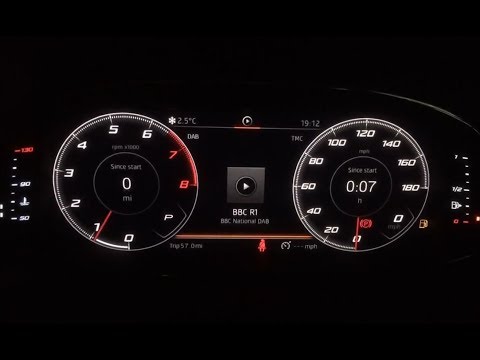
A few months ago SEAT announced that its new Digital Cockpit technology will be available as standard on all FR, Sport, Xcellence Lux trim levels and various special edition models. This technology has recently become available of Ibiza and Arona models, despite it having already been rolled out on higher-specification Ateca and Leon models since early last year.
Take a look at the features this handy virtual colour display has to offer as Senior Sales Executive, Peter, gives us an in-depth, step-by-step tutorial into how to use the new Digital Cockpit to its full potential. Learn how to change the fully customisable LCD screen from a traditional analogue dial view to fully digital or a combination of the two, plus much more! To do this simply use the VIEW button and the scroll bar to the right of the steering wheel to control/zoom in and out of various display options.
To experience the Digital Cockpit for yourself, find your nearest Snows SEAT dealership: goo.gl/pxBkHN
Alternatively, send us an enquiry and we'll get back to you: goo.gl/8memx2.
Take a look at the features this handy virtual colour display has to offer as Senior Sales Executive, Peter, gives us an in-depth, step-by-step tutorial into how to use the new Digital Cockpit to its full potential. Learn how to change the fully customisable LCD screen from a traditional analogue dial view to fully digital or a combination of the two, plus much more! To do this simply use the VIEW button and the scroll bar to the right of the steering wheel to control/zoom in and out of various display options.
To experience the Digital Cockpit for yourself, find your nearest Snows SEAT dealership: goo.gl/pxBkHN
Alternatively, send us an enquiry and we'll get back to you: goo.gl/8memx2.
About this tutorial
Snows Motor Group published this 6:33 video tutorial on November 11, 2019. It has been watched 281,601 times on YouTube.
- Channel
- Snows Motor Group
- Category
- Autos & Vehicles
- Duration
- 6:33
- Published
- November 11, 2019
- Views
- 281,601
- Likes
- 805
Share
This tutorial in other languages
- FRComment utiliser la SEAT numérique Cockpit | Didacticiel
- ESCómo usar el asiento de vuelo electrónicos | Tutorial
- PTComo usar o SEAT Cockpit Digital | Tutorial
- ITCome utilizzare il sedile del pozzetto Digital | lezione
- DEWie die SEAT Digital-Cockpit verwenden | Lernprogramm
- NLHoe de SEAT Digital Cockpit gebruiken | Tutorial
- RUКак использовать автокресло Digital кокпита | Руководство
- PLJak używać fotelika Cyfrowy kokpicie | Instruktaż
- JASEATデジタルコックピットを使用する方法|チュートリアル
- ARكيفية استخدام SEAT قمرة القيادة الرقمية | الدورة التعليمية
- HIकैसे सीट डिजिटल कॉकपिट उपयोग करने के लिए | ट्यूटोरियल
- IDCara menggunakan SEAT Digital Cockpit | tutorial