Playback starts YouTube’s embedded player (privacy-enhanced mode).
ASPEN PLUS TUTORIALS: INTRODUCTION COURSE - DESIGN SPECIFICATION #5
ChannelScuolaTechDescription from the creator
Help for ASPEN: marinomiccio.wix.com/home
Subscribe to the Channel: youtube.com/ScuolaTech
ASPEN TUTORIALS: youtube.com/playlist?list=PL53F1CF4F78B5E953
Aspen Tutorial 5: Design Specification
Outline:
• Updating the Simulation
• Sensitivity Analysis
Up to this point we have not maximized our use of Aspen's computational abilities. Often times in chemical engineering we are faced with problems that have iterative solutions or iterative steps on the way to a desired result. we will be using Aspen to calculate the flow rate of a second feed stream of MIBK, in order to get the desired 90% purity of our water stream through the use of a design specification. During a design specification Aspen iterates its calculation sequence through a range of values provided for an independent variable, in order to obtain a specified result for a dependent variable (within a certain tolerance).
The most realistic separation results that we obtained last week were based on using the NRTL thermodynamic method.
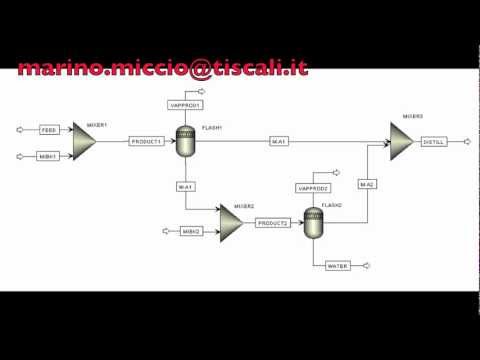
Add a second mixer and a second flash separation unit to your process flowsheet and name them as you like. Connect the stream that is primarily water and acetone (the stream off of the bottom of the first flash separator) to the new mixer and add in a new feed stream of MIBK that also feeds into this new mixer...
...You will notice that the Convergence option under the Results Summary Tab in the Data Browser window now has results. The Error column indicates how far off the final dependent variable was from the specified value and the Error / Tolerance column indicates how closely the design specification converged. A value of 1 in this column means that the simulation barely converged while a value near 0 indicates excellent convergence.
Thanks to the Prof. Rene Overney for the material for these tutorials.
courses.washington.edu/overney
Subscribe to the Channel: youtube.com/ScuolaTech
ASPEN TUTORIALS: youtube.com/playlist?list=PL53F1CF4F78B5E953
Aspen Tutorial 5: Design Specification
Outline:
• Updating the Simulation
• Sensitivity Analysis
Up to this point we have not maximized our use of Aspen's computational abilities. Often times in chemical engineering we are faced with problems that have iterative solutions or iterative steps on the way to a desired result. we will be using Aspen to calculate the flow rate of a second feed stream of MIBK, in order to get the desired 90% purity of our water stream through the use of a design specification. During a design specification Aspen iterates its calculation sequence through a range of values provided for an independent variable, in order to obtain a specified result for a dependent variable (within a certain tolerance).
The most realistic separation results that we obtained last week were based on using the NRTL thermodynamic method.
Add a second mixer and a second flash separation unit to your process flowsheet and name them as you like. Connect the stream that is primarily water and acetone (the stream off of the bottom of the first flash separator) to the new mixer and add in a new feed stream of MIBK that also feeds into this new mixer...
...You will notice that the Convergence option under the Results Summary Tab in the Data Browser window now has results. The Error column indicates how far off the final dependent variable was from the specified value and the Error / Tolerance column indicates how closely the design specification converged. A value of 1 in this column means that the simulation barely converged while a value near 0 indicates excellent convergence.
Thanks to the Prof. Rene Overney for the material for these tutorials.
courses.washington.edu/overney
About this tutorial
ScuolaTech published this 10:15 video tutorial on November 1, 2013. It has been watched 33,923 times on YouTube.
- Channel
- ScuolaTech
- Category
- Education
- Duration
- 10:15
- Published
- November 1, 2013
- Views
- 33,923
- Likes
- 88
Tags
Share
This tutorial in other languages
- FRASPEN PLUS TUTORIELS: COURS D'INTRODUCTION - CONCEPTION CAHIER # 5
- ESASPEN PLUS TUTORIALES: CURSO DE INTRODUCCIÓN - especificación de diseño # 5
- PTASPEN PLUS TUTORIAL: Curso de Introdução - Especificação de design # 5
- ITASPEN PLUS TUTORIAL: Introduzione al corso - specifiche di progettazione # 5
- DEASPEN PLUS TUTORIALS: Schnupperkurs - BAUBESCHREIBUNG # 5
- NLASPEN PLUS TUTORIALS: Introductiecursus - DESIGN SPECIFICATION # 5
- RUASPEN PLUS Обучение: ВВЕДЕНИЕ КУРСА - ДИЗАЙН СПЕЦИФИКАЦИЯ # 5
- PLASPEN PLUS ĆWICZENIA: WPROWADZENIE przedmiotów - Specyfikacja produktu # 5
- JAASPEN PLUSチュートリアル:はじめにコース - 設計仕様#5
- ARASPEN PLUS الدروس: مقدمة COURSE - DESIGN المواصفات رقم 5
- HIASPEN प्लस ट्यूटोरियल: परिचय कोर्स - डिजाइन विनिर्देशन # 5
- IDASPEN PLUS Tutorial: PENDAHULUAN KURSUS - DESIGN SPESIFIKASI # 5