Playback starts YouTube’s embedded player (privacy-enhanced mode).
Dispersion Effect: Photoshop Tutorial
ChannelPhotoshop TutorialsIn brief
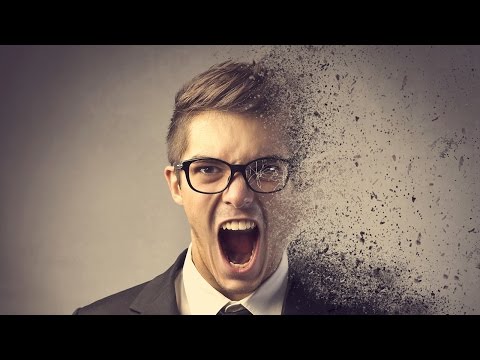
You’ll create a striking dispersion effect in Photoshop using brushes, masks, and a broken glass texture, then enhance it with a gradient and sharpening. This technique suits anyone looking to add a modern, dynamic look to photos or designs.
Questions & answers
What brush set is recommended for this effect?
The creator provides a free brush set in the tutorial description.
Description from the creator
In this Photoshop Tutorial, I will teach you how to create a dispersion effect. This effect has become very popular. It looks fairly complicated, but it's actually quite simple. I believe the hardest part was finding the perfect free brush set for the effect. Which I have provided below. A few things we'll be doing is creating the effect using brushes and masks. We'll also be using a broken glass texture. I will then add a nice gradient for the image, then for the final step, I will sharpen the image and effect to make it stand out much more. I hope you like this tutorial.
►Unlimited Downloads on Envato Elements, Photoshop Actions, Brushes, Stocks and much more! bit.ly/2RUXGcR
Audio Provided By:
youtube.com/audiolibrary
►Unlimited Downloads on Envato Elements, Photoshop Actions, Brushes, Stocks and much more! bit.ly/2RUXGcR
Audio Provided By:
youtube.com/audiolibrary
About this tutorial
Photoshop Tutorials published this 10:24 video tutorial on November 3, 2016. It has been watched 6,292,142 times on YouTube.
- Channel
- Photoshop Tutorials
- Category
- Education
- Duration
- 10:24
- Published
- November 3, 2016
- Views
- 6,292,142
- Likes
- 86,278
Tags
Share
This tutorial in other languages
- FRDispersion Effet: Tutorial Photoshop
- ESEfecto de dispersión: Tutorial de Photoshop
- PTDispersão Efeito: Photoshop Tutorial
- ITDispersione Effetto: Photoshop Tutorial
- DEDispersionseffekt: Photoshop Tutorial
- NLDispersion Effect: Photoshop Tutorial
- RUDispersion Effect: Photoshop Tutorial
- PLDyspersja Efekt: Photoshop Tutorial
- JA分散効果:Photoshopのチュートリアル
- ARتشتت تأثير: دروس فوتوشوب
- HIफैलाव प्रभाव: फ़ोटोशॉप ट्यूटोरियल
- IDDispersi Efek: Photoshop Tutorial