Playback starts YouTube’s embedded player (privacy-enhanced mode).
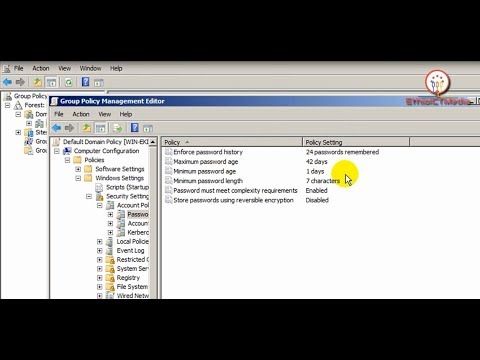
How to Change Password Complexity in Windows Server 2008
ChannelEthio ICTMediaDescription from the creator
1. Run gpmc.msc or click Start - Administrative Tools - Group Policy Management
2. Expand Group Policy Management - Forest: domain
3. Right click Default Domain Policy and click edit.
4. Expand Computer Configuration - Policies - Windows Settings - Security Settings - Account Policies - Password Policy
5. Edit your password complexity.
Telegram Channel:
t.me/ethioict_media
youtube.com/@ethioictmedia?sub_confirmation=1
Like, Share & Subscribe if you like the video
Facebook Page link:
facebook.com/Ethioictmedia-1285514301600484/?mo…
This Video Link:
youtu.be/CfOUWao4UIg
2. Expand Group Policy Management - Forest: domain
3. Right click Default Domain Policy and click edit.
4. Expand Computer Configuration - Policies - Windows Settings - Security Settings - Account Policies - Password Policy
5. Edit your password complexity.
Telegram Channel:
t.me/ethioict_media
youtube.com/@ethioictmedia?sub_confirmation=1
Like, Share & Subscribe if you like the video
Facebook Page link:
facebook.com/Ethioictmedia-1285514301600484/?mo…
This Video Link:
youtu.be/CfOUWao4UIg
About this tutorial
Ethio ICTMedia published this 8:21 video tutorial on November 2, 2019. It has been watched 1,872 times on YouTube.
- Channel
- Ethio ICTMedia
- Category
- Education
- Duration
- 8:21
- Published
- November 2, 2019
- Views
- 1,872
- Likes
- 26
Tags
Share
This tutorial in other languages
- FRComment faire pour modifier la complexité du mot de passe dans Windows Server 2008
- ESCómo Cambiar contraseña Complejidad en Windows Server 2008
- PTComo Change Password Complexidade em Windows Server 2008
- ITCome cambiare la password Complessità in Windows Server 2008
- DEWie Ändern von Kennwortkomplexität in Windows Server 2008
- NLHoe kan Change Password Complexity in Windows Server 2008
- RUКак изменить пароль Сложность в Windows Server 2008
- PLJak zmienić Złożoność haseł w systemie Windows Server 2008
- JAどのようにWindows Server 2008のの変更、パスワードの複雑性を
- ARكيفية تغيير كلمة المرور تعقد في Windows Server 2008
- HIकैसे Windows सर्वर 2008 में पासवर्ड बदलें जटिलता को
- IDCara Ganti Password Kompleksitas pada Windows Server 2008