Playback starts YouTube’s embedded player (privacy-enhanced mode).
How To Delete virus Folder *.exe From Computer Without Using Antivirus
ChannelSkills | dG Guo |Description from the creator
►Download Fixauto Link :
taimienphi.vn/download-fixauto-19128
How To Fix and Remove Virus change folder *.exe and Delete it without losing data
Hi guys, welcome watching my Skills DG Guo channel, today i wanna show you how to recognize will your folder infect virus *.exe and how does it work, then we remove and fix your computer folder if it is infected by virus .exe makes your all folder become folder.exe
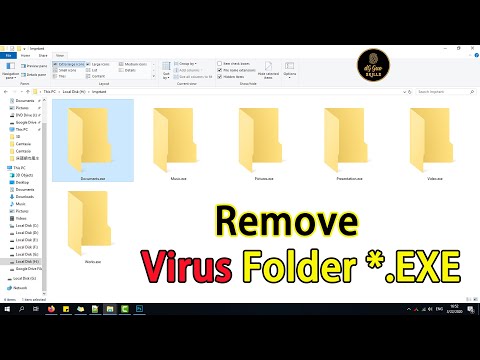
Let's start, this is all file has infected by virus makes all your folders and change them to .exe , the original file will be hide, event you show hidden file on your computer, you still can not show all of it, and it will make the same name of your original folder files, that make you misrecognize and double click on it, then your all folder will be change by .exe type. This kind of virus are always infected by inserting USB Device.But, don’t worry, just follow my video, I will show you how to figure out this, by the way remove all the virus *.exe
How To Delete virus Folder *.exe
Step 1 : Get online and search Fix auto program, download it then install in your computer, but don’t launch it when finish
►Download Link : taimienphi.vn/download-fixauto-19128
Step 2 : " Turn on the file and uncheck Show hidden files, folders, and drives "
Uncheck " Hide extensions for known file types "
Step 3 : Verify your computer's virus infected Folder. Now, You can open your computer icon to get in C or D Disk Partition by right click, then choose open. remember do not double click, virus will run more, it may make your computer infect more and more virus.
Step 4 : Launch Fix Auto Program, and follow me.
Step 5 : When it has run done, get into your Scan fix Disk Partition, verify all your folder whether enough as your original folder by counting how much items do you have and compare it together. Now you can recognize the virus folders are another Yellow folder colour, and it just 289 KB. when you make sure all the data are recovered by Fix Auto Program, you can Shift delete or remove all the infected folder .exe now.
Thank you for your following
#computer #Setup #fix folder
Made by | dG Guo | | Quach Cam Hung |
►Youtube : youtube.com/c/SkillsdGGuo
►Facebook Fanpage : facebook.com/skillsdarrenguo
►Website : lifeskilllearning.blogspot.com
►Twitter : twitter.com/skillsdarrenguo
►Donate : paypal.me/skillsdarrenguo
taimienphi.vn/download-fixauto-19128
How To Fix and Remove Virus change folder *.exe and Delete it without losing data
Hi guys, welcome watching my Skills DG Guo channel, today i wanna show you how to recognize will your folder infect virus *.exe and how does it work, then we remove and fix your computer folder if it is infected by virus .exe makes your all folder become folder.exe
Let's start, this is all file has infected by virus makes all your folders and change them to .exe , the original file will be hide, event you show hidden file on your computer, you still can not show all of it, and it will make the same name of your original folder files, that make you misrecognize and double click on it, then your all folder will be change by .exe type. This kind of virus are always infected by inserting USB Device.But, don’t worry, just follow my video, I will show you how to figure out this, by the way remove all the virus *.exe
How To Delete virus Folder *.exe
Step 1 : Get online and search Fix auto program, download it then install in your computer, but don’t launch it when finish
►Download Link : taimienphi.vn/download-fixauto-19128
Step 2 : " Turn on the file and uncheck Show hidden files, folders, and drives "
Uncheck " Hide extensions for known file types "
Step 3 : Verify your computer's virus infected Folder. Now, You can open your computer icon to get in C or D Disk Partition by right click, then choose open. remember do not double click, virus will run more, it may make your computer infect more and more virus.
Step 4 : Launch Fix Auto Program, and follow me.
Step 5 : When it has run done, get into your Scan fix Disk Partition, verify all your folder whether enough as your original folder by counting how much items do you have and compare it together. Now you can recognize the virus folders are another Yellow folder colour, and it just 289 KB. when you make sure all the data are recovered by Fix Auto Program, you can Shift delete or remove all the infected folder .exe now.
Thank you for your following
#computer #Setup #fix folder
Made by | dG Guo | | Quach Cam Hung |
►Youtube : youtube.com/c/SkillsdGGuo
►Facebook Fanpage : facebook.com/skillsdarrenguo
►Website : lifeskilllearning.blogspot.com
►Twitter : twitter.com/skillsdarrenguo
►Donate : paypal.me/skillsdarrenguo
About this tutorial
Skills | dG Guo | published this 10:59 video tutorial on April 2, 2020. It has been watched 137,598 times on YouTube.
- Channel
- Skills | dG Guo |
- Category
- Education
- Duration
- 10:59
- Published
- April 2, 2020
- Views
- 137,598
- Likes
- 790
Tags
Share
This tutorial in other languages
- FRComment faire pour supprimer le virus dossier * .EXE ordinateur sans utiliser Antivirus
- ESCómo eliminar el virus de la carpeta * .exe desde el ordenador sin utilizar Antivirus
- PTComo eliminar o vírus de pasta * .exe a partir do computador sem usar antivírus
- ITCome eliminare la cartella virus * .exe da computer senza utilizzare Antivirus
- DEWie Virus-Ordner löschen * .exe Von Computern ohne Antivirus zu verwenden
- NLHoe te verwijderen virus Folder * .exe van de computer zonder gebruik Antivirus
- RUКак удалить вирус папку * .exe с компьютера без использования антивируса
- PLJak usunąć wirusa Folder * .exe Od komputera bez użycia Antywirus
- JAウイルスのフォルダを削除する方法*アンチウイルスを使用せずに、コンピューターから.EXE
- ARكيفية حذف مجلد فيروس * إكس من جهاز الكمبيوتر دون استخدام برامج مكافحة الفيروسات
- HIकैसे हटाएं वायरस फ़ोल्डर * कंप्यूटर से .exe एंटीवायरस का उपयोग करते हुए बिना
- IDCara Hapus Virus Folder * .exe Dari Komputer Tanpa Menggunakan Antivirus