Playback starts YouTube’s embedded player (privacy-enhanced mode).
How To Make Ecommerce Website Using HTML And CSS Step By Step | Create e-Commerce Website
ChannelEasy TutorialsIn brief
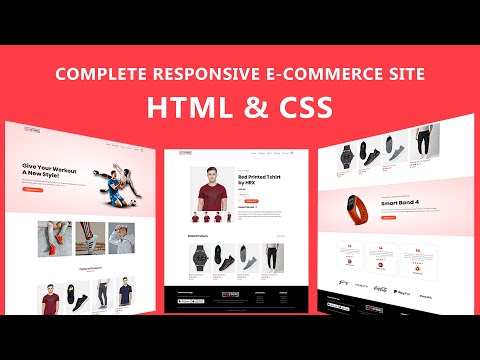
Build a fully responsive e-commerce website using only HTML and CSS, perfect for beginners. You’ll create a homepage with banners, product listings, testimonials, and a mobile-friendly navigation—no JavaScript or backend needed. Ideal for those starting web design or expanding their portfolio.
Key steps
- Add Google Fonts for typography consistency
- Build a featured categories section with images
- Create a product grid with prices, images, and ratings
- Add a recent products section and an offer banner
- Include testimonials and a top brands showcase
- Build a 4-column footer and make the site responsive for mobile
Chapters
Description from the creator
LEARN HOW TO MAKE COMPLETE RESPONSIVE ECOMMERCE WEBSITE USING HTML AND CSS STEP BY STEP TUTORIAL, E-COMMERCE WEB DESIGN IN HTML AND CSS
❤️ Source Code: greatstack.dev/go/redstore
Part 2: youtu.be/ZbnvP_hmxfE
Here in this video you will learn to build an eCommerce website step by step using HTML and CSS. In this e-commerce website design we will create Home page of eCommerce website with banner section, some featured categories images, then some featured products with product price, image and rating.
Then there will be more latest products, and one offer section with exclusive product. After that there will be testimonials and top brands section. At the bottom of website we will make footer with 4 columns.
After that we will make the drop down menu for mobile scree and we will make this complete website design responsive from mobile devices.
In next part we will make all products page, single product page, shopping cart page, login and registration page for this Ecommerce Website
Download All Images: greatstack.dev/assets/e-commerce-html-css
#HTMLAndCSS
-------------------------------------
Recommended Videos:
HTML and CSS Full Course For Beginners
► youtube.com/watch?v=GAZVvpjxYQY
Brackets editor shortcut key for fast coding
► youtube.com/watch?v=88Xb1fhst2I
Top 5 Full Website Design Tutorial using HTML & CSS
► youtube.com/watch?v=d5zBkC7peTY
---------------------------------
❤️ Complete website Using HTML and CSS
✔️ 8 Complete website step by step
✔️ Source Code Download
✔️ 76 Lectures, 12 Hours Video
✔️ Course Completion certificate
👉 easytutorialspro.com/go/course/
-------------------------------------
My recommended tools and tutorials
👉 easytutorialspro.com/
-------------------------------------
◼️ Source code link is shared in community post for all my coding videos exclusively for channel members (only channel members can see)
Join Channel Membership:
► youtube.com/channel/UCkjoHfkLEy7ZT4bA2myJ8xA/jo…
-------------------------------------
Time Stamp:
00:00 Website overview
06:40 HTML and CSS File Setup
09:14 Create Header of Website
23:20 Add google fonts on website
27:42 Make Features categories section
31:37 Add Featured products on website
42:35 Design Recent products on site
44:07 Add offer section on web design
49:18 Design testimonial section for website
57:14 Create brands widget for online store
01:00:38 Create footer of eCommerce site
01:11:15 Make the website responsive
-------------------------------------
Image credit:
Banner image created by freepik
freepik.com/
Products image is used from Myntra.com
-------------------------------------
Like - Follow & Subscribe us:
◼️ YouTube: goo.gl/tTFmPb
◼️ Facebook: goo.gl/qv7tEQ
◼️ Twitter: twitter.com/ItsAvinashKr
❤️ Source Code: greatstack.dev/go/redstore
Part 2: youtu.be/ZbnvP_hmxfE
Here in this video you will learn to build an eCommerce website step by step using HTML and CSS. In this e-commerce website design we will create Home page of eCommerce website with banner section, some featured categories images, then some featured products with product price, image and rating.
Then there will be more latest products, and one offer section with exclusive product. After that there will be testimonials and top brands section. At the bottom of website we will make footer with 4 columns.
After that we will make the drop down menu for mobile scree and we will make this complete website design responsive from mobile devices.
In next part we will make all products page, single product page, shopping cart page, login and registration page for this Ecommerce Website
Download All Images: greatstack.dev/assets/e-commerce-html-css
#HTMLAndCSS
-------------------------------------
Recommended Videos:
HTML and CSS Full Course For Beginners
► youtube.com/watch?v=GAZVvpjxYQY
Brackets editor shortcut key for fast coding
► youtube.com/watch?v=88Xb1fhst2I
Top 5 Full Website Design Tutorial using HTML & CSS
► youtube.com/watch?v=d5zBkC7peTY
---------------------------------
❤️ Complete website Using HTML and CSS
✔️ 8 Complete website step by step
✔️ Source Code Download
✔️ 76 Lectures, 12 Hours Video
✔️ Course Completion certificate
👉 easytutorialspro.com/go/course/
-------------------------------------
My recommended tools and tutorials
👉 easytutorialspro.com/
-------------------------------------
◼️ Source code link is shared in community post for all my coding videos exclusively for channel members (only channel members can see)
Join Channel Membership:
► youtube.com/channel/UCkjoHfkLEy7ZT4bA2myJ8xA/jo…
-------------------------------------
Time Stamp:
00:00 Website overview
06:40 HTML and CSS File Setup
09:14 Create Header of Website
23:20 Add google fonts on website
27:42 Make Features categories section
31:37 Add Featured products on website
42:35 Design Recent products on site
44:07 Add offer section on web design
49:18 Design testimonial section for website
57:14 Create brands widget for online store
01:00:38 Create footer of eCommerce site
01:11:15 Make the website responsive
-------------------------------------
Image credit:
Banner image created by freepik
freepik.com/
Products image is used from Myntra.com
-------------------------------------
Like - Follow & Subscribe us:
◼️ YouTube: goo.gl/tTFmPb
◼️ Facebook: goo.gl/qv7tEQ
◼️ Twitter: twitter.com/ItsAvinashKr
About this tutorial
Easy Tutorials published this 1:24:43 video tutorial on July 11, 2020. It has been watched 3,819,646 times on YouTube.
- Channel
- Easy Tutorials
- Category
- Education
- Duration
- 1:24:43
- Published
- July 11, 2020
- Views
- 3,819,646
- Likes
- 74,309
Tags
Share
This tutorial in other languages
- FRComment faire site de commerce électronique utilisant HTML et CSS étape par étape | Créer site e-commerce
- ESCómo hacer web de comercio electrónico con HTML y CSS paso a paso | Crear sitio de comercio electrónico
- PTComo fazer Ecommerce Web usando HTML e CSS Step By Step | Criar e-Commerce Website
- ITCome fare e-commerce sito web utilizzando HTML e CSS Step By Step | Creazione di sito e-commerce
- DEWie man E-Commerce-Website mit HTML und CSS Schritt für Schritt | Erstellen Sie E-Commerce-Website
- NLHow To Make e-commerce website met behulp van HTML en CSS Step By Step | Maak e-commerce website
- RUКак сделать сайт электронной коммерции Использование HTML И CSS Шаг за шагом | Создание электронной коммерции сайт
- PLJak zrobić e-commerce Korzystanie z HTML i CSS Krok po kroku | Tworzenie e-commerce
- JAステップではHTMLとCSSのステップを使用したeコマースサイトを作成する方法|電子商取引のウェブサイトを作成します。
- ARكيفية جعل موقع للتجارة الإلكترونية عن طريق HTML و CSS خطوة بخطوة | إنشاء موقع للتجارة الإلكترونية
- HIकैसे ई-कॉमर्स वेबसाइट HTML और सीएसएस चरण का उपयोग करते हुए चरण तक सुनिश्चित करने के लिए | बनाएँ ई-कॉमर्स वेबसाइट
- IDCara Membuat E-commerce Website Menggunakan HTML Dan CSS Step By Step | Buat e-Commerce Website