Playback starts YouTube’s embedded player (privacy-enhanced mode).
How to Reboot a Server Over SSH
ChannelWPShoutDescription from the creator
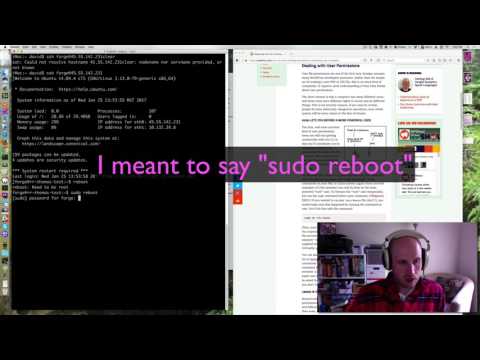
This video demonstrates how to reboot your server over SSH.
The big thing to know if that if you’re logged in as the “root” — most powerful — user on the system, the sudo is unnecessary.
But if you’re instead just a normal user — which is generally recommended as a general security measure — you’ll need it. sudo is a simple command that basically means “for the stuff I type after this, use an elevate permissions level.”
Or, in other words “as a ‘super-user'”.
Because non-root users don’t typically have the ability to reboot over SSH, you’ll need that to do so. But otherwise that’s all you need.
Another thing to note is that you’ll be disconnected if the command executes successfully. This makes sense. A system that’s powering off to then come back up will inherently drop all of it’s external connection, including the one to you via SSH.
For more advice about using the Unix command line and more, check out this recent article: wpshout.com/unix-terminal-working-permissions-n….
Full quick guide is at: wpshout.com/quick-guides/reboot-server-ssh/
If you found this video helpful, give it a like, and subscribe to WPShout for more videos! Have more questions? Leave us a comment below, and we’ll offer what wisdom we can.
Get more quality WordPress tutorials in your inbox every Tuesday: wpshout.com/newsletter/
WPShout: In-Depth WordPress tutorials for Developers.
The big thing to know if that if you’re logged in as the “root” — most powerful — user on the system, the sudo is unnecessary.
But if you’re instead just a normal user — which is generally recommended as a general security measure — you’ll need it. sudo is a simple command that basically means “for the stuff I type after this, use an elevate permissions level.”
Or, in other words “as a ‘super-user'”.
Because non-root users don’t typically have the ability to reboot over SSH, you’ll need that to do so. But otherwise that’s all you need.
Another thing to note is that you’ll be disconnected if the command executes successfully. This makes sense. A system that’s powering off to then come back up will inherently drop all of it’s external connection, including the one to you via SSH.
For more advice about using the Unix command line and more, check out this recent article: wpshout.com/unix-terminal-working-permissions-n….
Full quick guide is at: wpshout.com/quick-guides/reboot-server-ssh/
If you found this video helpful, give it a like, and subscribe to WPShout for more videos! Have more questions? Leave us a comment below, and we’ll offer what wisdom we can.
Get more quality WordPress tutorials in your inbox every Tuesday: wpshout.com/newsletter/
WPShout: In-Depth WordPress tutorials for Developers.
About this tutorial
WPShout published this 1:38 video tutorial on October 29, 2017. It has been watched 40,606 times on YouTube.
Tags
Share
This tutorial in other languages
- FRComment Redémarrez un serveur via SSH
- ESCómo reiniciar un servidor SSH largo
- PTComo reinicializar um servidor através de SSH
- ITCome riavviare un server SSH corso
- DEWie ein Server über SSH für den Neustart
- NLHoe maak je een server via SSH Reboot
- RUКак перезагрузить сервер через SSH
- PLJak uruchomić serwer SSH Ponad się
- JAサーバーオーバーSSHを再起動する方法
- ARكيفية إعادة تشغيل وSSH Server عبر
- HIकैसे एक सर्वर से अधिक SSH रिबूट करने के लिए
- IDBagaimana untuk Reboot SSH Server Selama