Playback starts YouTube’s embedded player (privacy-enhanced mode).
How to resize desktop icons in Windows 7
ChannelBlesson JoseDescription from the creator
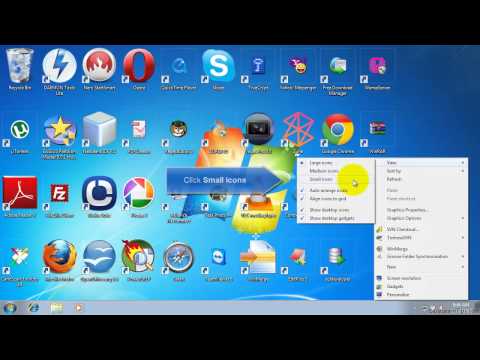
This tutorial shows how to resize desktop icons in Windows 7.
There are 2 ways to resize icons:
1. Right-click the desktop, point to View, and then click Large icons, Medium icons, or Small icons.
2. Press and hold Ctrl while you scroll the mouse wheel to make icons larger or smaller
There are 2 ways to resize icons:
1. Right-click the desktop, point to View, and then click Large icons, Medium icons, or Small icons.
2. Press and hold Ctrl while you scroll the mouse wheel to make icons larger or smaller
About this tutorial
Blesson Jose published this 1:27 video tutorial on October 29, 2013. It has been watched 51,224 times on YouTube.
- Channel
- Blesson Jose
- Category
- Education
- Duration
- 1:27
- Published
- October 29, 2013
- Views
- 51,224
- Likes
- 146
Tags
Share
This tutorial in other languages
- FRComment redimensionner les icônes de bureau dans Windows 7
- ESCómo cambiar el tamaño de los iconos del escritorio en Windows 7
- PTComo redimensionar ícones do desktop no Windows 7
- ITCome ridimensionare le icone del desktop in Windows 7
- DEWie man Desktop-Icons in Windows 7 die Größe
- NLHoe maak je pictogrammen op het bureaublad in Windows 7 formaat
- RUКак изменить размер значков рабочего стола в Windows 7
- PLJak zmienić rozmiar ikon na pulpicie w Windows 7
- JAWindows 7のデスクトップアイコンのサイズを変更する方法
- ARكيفية تغيير حجم أيقونات سطح المكتب في ويندوز 7
- HIविंडोज 7 में डेस्कटॉप चिह्न आकार बदलने के लिए कैसे
- IDCara untuk mengubah ukuran ikon desktop di Windows 7