Playback starts YouTube’s embedded player (privacy-enhanced mode).
How to use a Grid to Draw and Transfer Images
ChannelMr. Otter Art StudioDescription from the creator
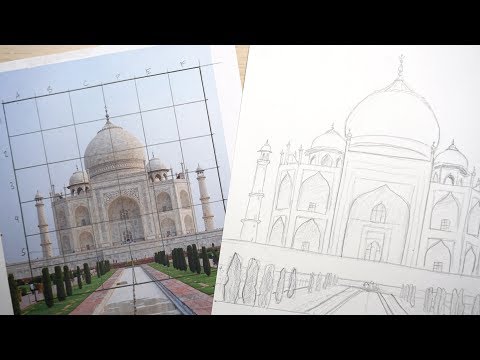
Grids are a tool that artists use to replicate or enlarge images onto paper, canvas, and other drawing surfaces. In this tutorial I will show you how to use a grid to draw and enlarge an image onto another paper. I am using a photo I took of the Taj Mahal as my example. You can use any image you would like, the technique is the same. This technique is great for transferring images onto canvas for painting as well as for painting large scale murals. Enjoy!
Supplies
Image printed on printer paper
Paper or canvas
Ruler
Pencil and eraser
Steps
Draw the grid on your image (or on a piece of clear acetate and place over the image, or use a computer to place a grid on the image before you print it)
Draw a grid on the surface you are transferring the image to making sure it is to scale
Transfer the drawing in pencil square by square
Erase the grid
Add details, shadows, etc.
Tips
Keep the grid square
Draw the grid lightly since it will be erased
Dont draw too many details before the grid is erased
If doing this project with a group, its easy to make the grid in photoshop and place it over the photos before you print them. I did this with my high school class with their portraits and just placed a thin white grid over them in photo shop and printed them out.
Artists that use this technique
Chuck Close is my favorite
Looking for children’s art classes online?
mrotterstudio.com/
Teachers Pay Teachers
teacherspayteachers.com/S...
My Amazon Store
www.amazon.com/shop/mr.otterartstudio
Music
Wheel Of Karma by Audionautix is licensed under a Creative Commons Attribution license (creativecommons.org/licenses/by/4.0/)
Artist: audionautix.com/
This tutorial was create by McCall for Mr Otter Studio
Supplies
Image printed on printer paper
Paper or canvas
Ruler
Pencil and eraser
Steps
Draw the grid on your image (or on a piece of clear acetate and place over the image, or use a computer to place a grid on the image before you print it)
Draw a grid on the surface you are transferring the image to making sure it is to scale
Transfer the drawing in pencil square by square
Erase the grid
Add details, shadows, etc.
Tips
Keep the grid square
Draw the grid lightly since it will be erased
Dont draw too many details before the grid is erased
If doing this project with a group, its easy to make the grid in photoshop and place it over the photos before you print them. I did this with my high school class with their portraits and just placed a thin white grid over them in photo shop and printed them out.
Artists that use this technique
Chuck Close is my favorite
Looking for children’s art classes online?
mrotterstudio.com/
Teachers Pay Teachers
teacherspayteachers.com/S...
My Amazon Store
www.amazon.com/shop/mr.otterartstudio
Music
Wheel Of Karma by Audionautix is licensed under a Creative Commons Attribution license (creativecommons.org/licenses/by/4.0/)
Artist: audionautix.com/
This tutorial was create by McCall for Mr Otter Studio
About this tutorial
Mr. Otter Art Studio published this 7:32 video tutorial on November 8, 2018. It has been watched 163,912 times on YouTube.
- Channel
- Mr. Otter Art Studio
- Category
- Education
- Duration
- 7:32
- Published
- November 8, 2018
- Views
- 163,912
- Likes
- 1,610
Tags
Share
This tutorial in other languages
- FRComment utiliser une grille pour dessiner et Transférer des images
- ESCómo utilizar una cuadrícula para transferir imágenes Dibujar y
- PTComo usar uma grade para desenhar e Transferência de Imagens
- ITCome utilizzare una griglia per disegnare e immagini di trasferimento
- DEZu Zeichnen und Bilder übertragen, wie ein Gitter verwenden, um
- NLHoe maak je een raster gebruiken om te tekenen en Transfer Images
- RUКак использовать сетку для Draw и передачи изображений
- PLJak korzystać z siatki rysować i Transfer Images
- JA画像を描画し、転送するためにグリッドを使用する方法
- ARكيفية استخدام الشبكة رسم ونقل الصور
- HIड्रा और हस्तांतरण छवियाँ करने के लिए एक ग्रिड का उपयोग कैसे करें
- IDCara menggunakan Grid untuk Menggambar dan transfer Images