Playback starts YouTube’s embedded player (privacy-enhanced mode).
How To Use Image Trace and Recolor Artwork - Module 10.1
ChannelRyan HaworthDescription from the creator
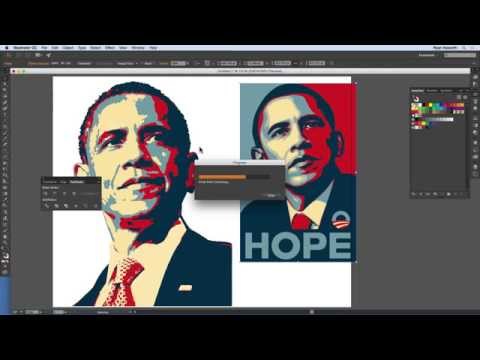
In this tutorial, I show how to add images to artwork by using the Image Trace functions in Adobe Illustrator CC, Revision 2015.
Original image of President Barack Obama designed by artist Shepard Fairey.
I show how to add an image from a file, explore some of the settings of the Image Trace function, and then show how to expand the image for use in artwork. Next, I show how to modify the new vector art by using the Recolor Artwork function, and review changing colors.
This is another lesson in my course "Fundamentals of Industrial Design Software" taught at University of Idaho in Idaho Falls. In the course we cover the basics of Adobe Illustrator CC, Revision 2015, for designers, artists, and illustrators in the various areas of industrial design. The objective of the course is to help beginners and those with little experience with Adobe Illustrator CC become more familiar with the tools and their use in order to improve their current work, and/or move into positions that demand more Illustrator expertise.
If you are interested in taking this course, please contact University of Idaho in Idaho Falls.
======================
Hi! I’m Ryan Haworth. I am a designer and teacher. I made this channel to share things that I have learned over the years in web design, graphics, motion, video, photography, and all sorts of other topics. If you like what you see, like the video, hit the subscribe button, and leave a comment telling me how this helped you.
Thanks for watching!
======================
Portfolio
ryandoeseverything.com
Facebook:
facebook.com/HaworthRyan
======================================================
Original image of President Barack Obama designed by artist Shepard Fairey.
I show how to add an image from a file, explore some of the settings of the Image Trace function, and then show how to expand the image for use in artwork. Next, I show how to modify the new vector art by using the Recolor Artwork function, and review changing colors.
This is another lesson in my course "Fundamentals of Industrial Design Software" taught at University of Idaho in Idaho Falls. In the course we cover the basics of Adobe Illustrator CC, Revision 2015, for designers, artists, and illustrators in the various areas of industrial design. The objective of the course is to help beginners and those with little experience with Adobe Illustrator CC become more familiar with the tools and their use in order to improve their current work, and/or move into positions that demand more Illustrator expertise.
If you are interested in taking this course, please contact University of Idaho in Idaho Falls.
======================
Hi! I’m Ryan Haworth. I am a designer and teacher. I made this channel to share things that I have learned over the years in web design, graphics, motion, video, photography, and all sorts of other topics. If you like what you see, like the video, hit the subscribe button, and leave a comment telling me how this helped you.
Thanks for watching!
======================
Portfolio
ryandoeseverything.com
Facebook:
facebook.com/HaworthRyan
======================================================
About this tutorial
Ryan Haworth published this 24:06 video tutorial on November 15, 2015. It has been watched 474,194 times on YouTube.
- Channel
- Ryan Haworth
- Category
- Education
- Duration
- 24:06
- Published
- November 15, 2015
- Views
- 474,194
- Likes
- 3,578
Tags
Share
This tutorial in other languages
- FRComment faire pour utiliser l'image Trace et recolor Création - Module 10.1
- ESCómo utilizar una imagen de rastreo y Volver a colorear ilustración - Módulo 10.1
- PTComo usar imagem Traço e Recolorir arte - Módulo 10.1
- ITCome utilizzare Immagine Trace e Ricolora Opera - Modulo 10.1
- DEWie zu verwenden Bild Trace und Einfärben-Grafik - Modul 10.1
- NLHoe te gebruiken Image Trace en recolor Kunstwerk - Module 10.1
- RUКак использовать изображения трассировки и Перекрасить Работа - Модуль 10.1
- PLJak korzystać Obraz nazwiska i recolor Artwork - Moduł 10,1
- JAどのようにするために使用するイメージのトレースや色の変更アートワーク - モジュール10.1
- ARكيفية استخدام صورة تتبع وإعادة تلوين العمل الفني - الوحدة 10.1
- HIकैसे करने के लिए चित्र का उपयोग करें ट्रेस और पुन: रंग कलाकृति - मॉड्यूल 10.1
- IDCara Gunakan Gambar Jejak dan Pewarnaan Ulang Artwork - Modul 10.1