Playback starts YouTube’s embedded player (privacy-enhanced mode).
How to use RENDER ELEMENTS / CHANNELS
ChannelArchitecture InspirationsDescription from the creator
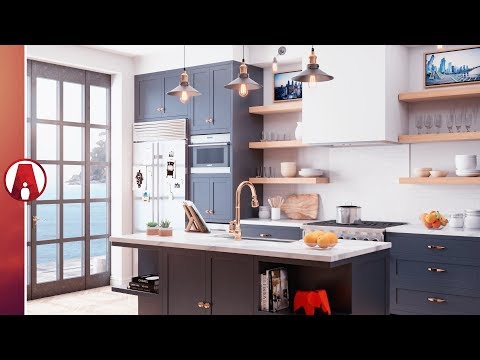
In today’s video, I’m going to show you how to use Vray Render Elements in Photoshop to make your Rendering look more Realistic.
➫ Download V-Ray for Sketchup: bit.ly/vray5skp
➫ Download the Model: gumroad.com/l/AI8
How to use render passes
1. Adding Render Elements
2. Reduce Highlight Burn
3. Adding Effects
4. Import RGB
5. Denoiser
6. Adjusting Base Render
7. Glare Effects
8. background
9. Replacing Ocean
10. Ambient Occlusion Pass
11. Diffuse
12. Material ID
13. RawLight
14. RawShadow
15. Adding Ocean Reflection
16. Refraction
17. Z-Depth for Depth of Field Effect
18. Final Adjustments
➫Subscribe: bit.ly/2ddAwd2
➫Last video: goo.gl/jp9TL4
GET CONNECTED
➫ Website:
archinspirations.com/
➫ Facebook:
facebook.com/ArchInspirations
➫ Instagram:
instagram.com/architecture_inspirations
➫ Twitter:
twitter.com/arch_inspire
LINKS
Vray 3.6 for Sketchup
➫ chaosgroup.com/vray/sketchup
❐ COMPUTER SPECS
➫ archinspirations.com/setup/
MUSIC
Intro:
➫ Song: MindlessFate - Fire Rainbow [Copyright Free]
• youtu.be/ImvXpRIaZF0
MindlessFate
• soundcloud.com/mindlessfate
Background:
➫ Song: Joakim Karud - Waves (Vlog No Copyright Music)
Music provided by Vlog No Copyright
Music. Video Link: youtu.be/VMghJ_civuM
➫ Song: Ikson - Blure And Sky Voice - Faith(DM Galaxy Remix)
Video Link: youtu.be/CQZW2DS3TVk
➫ Song: Fredji - Welcome Sunshine (Vlog No Copyright Music)
Music promoted by Vlog No Copyright Music.
Video Link: youtu.be/cKoTJl4srrM
➫ Song: AK & Bayble - Low Light
• youtu.be/18gP00Tg12U
Bayble
soundcloud.com/bayble
Outro:
➫ Song: AK & Bayble - Low Light
• youtu.be/0xA9PCdhyc0
Snocker Cot
soundcloud.com/nickminutaglio
#vray #sketchup #vrayforsketchup
➫ Download V-Ray for Sketchup: bit.ly/vray5skp
➫ Download the Model: gumroad.com/l/AI8
How to use render passes
1. Adding Render Elements
2. Reduce Highlight Burn
3. Adding Effects
4. Import RGB
5. Denoiser
6. Adjusting Base Render
7. Glare Effects
8. background
9. Replacing Ocean
10. Ambient Occlusion Pass
11. Diffuse
12. Material ID
13. RawLight
14. RawShadow
15. Adding Ocean Reflection
16. Refraction
17. Z-Depth for Depth of Field Effect
18. Final Adjustments
➫Subscribe: bit.ly/2ddAwd2
➫Last video: goo.gl/jp9TL4
GET CONNECTED
➫ Website:
archinspirations.com/
➫ Facebook:
facebook.com/ArchInspirations
➫ Instagram:
instagram.com/architecture_inspirations
➫ Twitter:
twitter.com/arch_inspire
LINKS
Vray 3.6 for Sketchup
➫ chaosgroup.com/vray/sketchup
❐ COMPUTER SPECS
➫ archinspirations.com/setup/
MUSIC
Intro:
➫ Song: MindlessFate - Fire Rainbow [Copyright Free]
• youtu.be/ImvXpRIaZF0
MindlessFate
• soundcloud.com/mindlessfate
Background:
➫ Song: Joakim Karud - Waves (Vlog No Copyright Music)
Music provided by Vlog No Copyright
Music. Video Link: youtu.be/VMghJ_civuM
➫ Song: Ikson - Blure And Sky Voice - Faith(DM Galaxy Remix)
Video Link: youtu.be/CQZW2DS3TVk
➫ Song: Fredji - Welcome Sunshine (Vlog No Copyright Music)
Music promoted by Vlog No Copyright Music.
Video Link: youtu.be/cKoTJl4srrM
➫ Song: AK & Bayble - Low Light
• youtu.be/18gP00Tg12U
Bayble
soundcloud.com/bayble
Outro:
➫ Song: AK & Bayble - Low Light
• youtu.be/0xA9PCdhyc0
Snocker Cot
soundcloud.com/nickminutaglio
#vray #sketchup #vrayforsketchup
About this tutorial
Architecture Inspirations published this 12:36 video tutorial on November 9, 2018. It has been watched 432,339 times on YouTube.
- Channel
- Architecture Inspirations
- Category
- Education
- Duration
- 12:36
- Published
- November 9, 2018
- Views
- 432,339
- Likes
- 12,151
Tags
Share
This tutorial in other languages
- FRComment utiliser / CHAÎNES ELEMENTS DE RENDRE
- ESModo de empleo representan los elementos / CANALES
- PTComo usar RENDEM Elementos / CANAIS
- ITCome utilizzare elementi di rendering / CANALI
- DEWie verwenden ELEMENTS / SENDER RENDER
- NLHoe te gebruiken GEEFT ELEMENTS / PROGRAMMA'S
- RUКак использовать элементы визуализации / КАНАЛОВ
- PLJak korzystać ODPŁACA Elements / KANAŁÓW
- JAELEMENTS / CHANNELSのレンダリングに使用する方法
- ARكيفية استخدام تقديم عناصر / القنوات
- HIप्रस्तुत करना तत्वों / चैनल का उपयोग कैसे करें
- IDCara menggunakan RENDER ELEMENTS / SALURAN