Playback starts YouTube’s embedded player (privacy-enhanced mode).
Introduction to Sticky Notes for Windows 10 / 7 - Tutorial for Beginners
ChannelChris' TutorialsDescription from the creator
introduction to Sticky Notes for Windows 10 / 7 with practical step-by-step instructions and real-world examples.
━━━ ChrisTutorials Links ━━━
🌐 ChrisTutorials — Docs, Plugins, Courses & Assets: christutorials.com
💛 Support on Patreon: patreon.com/ChrisTutorials
☕ Ko-fi: ko-fi.com/chrisTutorials
🎮 YouTube Memberships include plugins, assets & courses
◢ Chris Recommends ◥
Protect Your Online Privacy with NordVPN ►► go.nordvpn.net/SH4A0
Save Money Shopping Online with Honey Extension ►► joinhoney.com/ref/qd04c25
Master Skills with Skillshare Video Courses ►► skillshare.com/r/user/christutorials?gr_tch_ref…
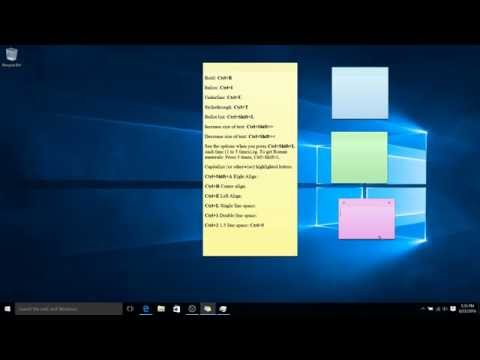
Bold: Ctrl+B
Italics: Ctrl+I
Underline: Ctrl+U
Strikethrough: Ctrl+T
Bullet list: Ctrl+Shift+L
See the options when you press Ctrl+Shift+L (each time 1 to 5 times.eg). To get Roman numerals: Press 5 times, Ctrl+Shift+L.
Capitalize (or otherwise) highlighted letters: Ctrl+Shift+A
Right Align : Ctrl+R
Center align: Ctrl+E
Left Align: Ctrl+L
Single line space: Ctrl+1
Double line space: Ctrl+2
1.5 line space: Ctrl+5
━━━ ChrisTutorials Links ━━━
🌐 ChrisTutorials — Docs, Plugins, Courses & Assets: christutorials.com
💛 Support on Patreon: patreon.com/ChrisTutorials
☕ Ko-fi: ko-fi.com/chrisTutorials
🎮 YouTube Memberships include plugins, assets & courses
◢ Chris Recommends ◥
Protect Your Online Privacy with NordVPN ►► go.nordvpn.net/SH4A0
Save Money Shopping Online with Honey Extension ►► joinhoney.com/ref/qd04c25
Master Skills with Skillshare Video Courses ►► skillshare.com/r/user/christutorials?gr_tch_ref…
Bold: Ctrl+B
Italics: Ctrl+I
Underline: Ctrl+U
Strikethrough: Ctrl+T
Bullet list: Ctrl+Shift+L
See the options when you press Ctrl+Shift+L (each time 1 to 5 times.eg). To get Roman numerals: Press 5 times, Ctrl+Shift+L.
Capitalize (or otherwise) highlighted letters: Ctrl+Shift+A
Right Align : Ctrl+R
Center align: Ctrl+E
Left Align: Ctrl+L
Single line space: Ctrl+1
Double line space: Ctrl+2
1.5 line space: Ctrl+5
About this tutorial
Chris' Tutorials published this 2:53 video tutorial on November 8, 2016. It has been watched 154,393 times on YouTube.
- Channel
- Chris' Tutorials
- Category
- Education
- Duration
- 2:53
- Published
- November 8, 2016
- Views
- 154,393
- Likes
- 415
Tags
Share
This tutorial in other languages
- FRIntroduction à Sticky Notes pour Windows 10/7 - Tutorial pour les débutants
- ESIntroducción a las notas pegajosas para Windows 10/7 - Tutorial para principiantes
- PTIntrodução à Sticky Notes para Windows 07/10 - Tutorial para Iniciantes
- ITIntroduzione alla Sticky Notes per Windows 10/7 - Tutorial per principianti
- DEEinführung in die Haftnotizen für Windows 7.10 - Tutorial für Anfänger
- NLInleiding tot Sticky Notes voor Windows 07/10 - Tutorial voor beginners
- RUВведение в Sticky Notes для Windows, 10/7 - Учебное пособие для начинающих
- PLWprowadzenie do Sticky Notes for Windows 10/7 - Tutorial dla początkujących
- JAWindows用の付箋入門10月7日 - 初心者のためのチュートリアル
- ARمقدمة إلى ملاحظات مثبت ويندوز 07/10 - دروس للمبتدئين
- HIविंडोज के लिए स्टिकी नोट्स का परिचय 10/7 - शुरुआती के लिए ट्यूटोरियल
- IDPengantar Sticky Notes untuk Windows 10/7 - Tutorial untuk Pemula