Playback starts YouTube’s embedded player (privacy-enhanced mode).
Old Tutorial - How to Add Words to Custom Dictionary that stop Spell Check (Office 2010/2007/2003)
ChannelTurner Time ManagementDescription from the creator
Subscribe to our Free Bi-Monthly eNewsletter with free tips to save time and effort while using your technology devices, like iPhone, Android, Laptop/Computer etc. Click the link to signup: news.turnertimemanagement.com/h/r/1DA3FCCF4D84
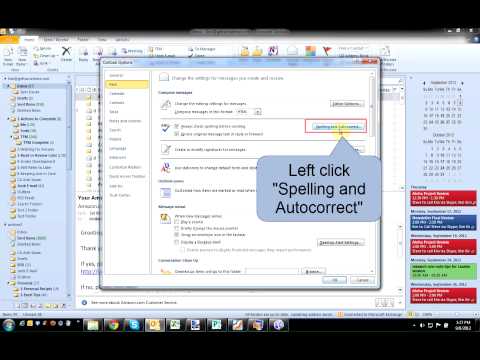
If you frequently use acronyms, type unique names, or have industry specific terms that are not recognized in Spell Check, you may want to add these words to your custom dictionary. This will save time in your day, especially when sending e-mails. Outlook should be set to Spell Check all e-mails before sending. Adding words to the dictionary will speed up the sending process. This will work in all Office 2010, Office 2007, and Office 2003. This includes Outlook 2010, Outloook 2007, and Outlook 2003.
If you frequently use acronyms, type unique names, or have industry specific terms that are not recognized in Spell Check, you may want to add these words to your custom dictionary. This will save time in your day, especially when sending e-mails. Outlook should be set to Spell Check all e-mails before sending. Adding words to the dictionary will speed up the sending process. This will work in all Office 2010, Office 2007, and Office 2003. This includes Outlook 2010, Outloook 2007, and Outlook 2003.
About this tutorial
Turner Time Management published this 1:40 video tutorial on November 2, 2018. It has been watched 348 times on YouTube.
- Channel
- Turner Time Management
- Category
- Education
- Duration
- 1:40
- Published
- November 2, 2018
- Views
- 348
- Likes
- 1
Share
This tutorial in other languages
- FROld Tutorial - Comment ajouter des mots au dictionnaire personnalisé cet arrêt correcteur orthographique (Office 2010/2007/2003)
- ESAntiguo Tutorial - Cómo añadir palabras al diccionario personalizado que parada del corrector ortográfico (Oficina 2010/2007/2003)
- PTOld Tutorial - Como adicionar palavras ao dicionário personalizado que check parada ortográfica (Office 2010/2007/2003)
- ITOld Tutorial - Come aggiungere parole al dizionario personalizzato che si fermano il controllo ortografico (Ufficio 2010/2007/2003)
- DEOld Tutorial - Wie Hinzufügen Wörter im Zusammenhang mit Benutzerwörterbuch, dass Stop-Rechtschreibprüfung (Office 2010/2007/2003)
- NLOld Tutorial - Hoe Woorden toevoegen aan de aangepaste woordenlijst die stop Spell Check (Office 2010/2007/2003)
- RUСтарый Учебник - Как добавить слова в пользовательский словарь, что остановка Spell Check (Office 2010/2007/2003)
- PLStary Tutorial - Jak dodać wyrazy do słownika niestandardowego, które sprawdzają przystanek pisowni (Urząd 2010/2007/2003)
- JA旧チュートリアル - どのように停止スペルチェック(オフィス2010/2007/2003)というカスタム辞書に単語を追加します
- ARقديم دروس - كيفية إضافة كلمات إلى القاموس المخصص الذي توقف التدقيق الإملائي (مكتب 2010/2007/2003)
- HIपुराने ट्यूटोरियल - कैसे कस्टम शब्दकोश में शब्द जोड़ें करने के लिए है कि बंद वर्तनी जाँच (कार्यालय 2010/2007/2003)
- IDOld Tutorial - Cara Tambah Kata-kata untuk Custom Kamus yang berhenti Spell Check (Office 2010/2007/2003)