Playback starts YouTube’s embedded player (privacy-enhanced mode).
Torn Paper Effect | Photoshop Tutorial
ChannelPhotoshop Tutorials | Photo effectsDescription from the creator
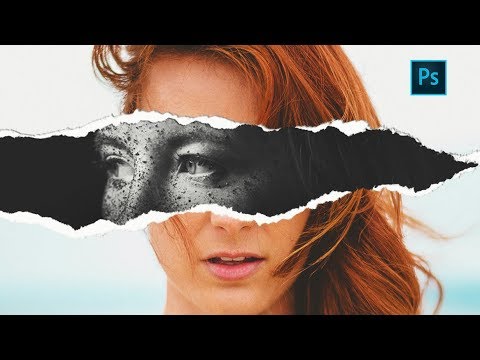
In this photoshop photo effect tutorial we will see how to create this somewhat popular torn paper effect.
The effect is actually very simple to create compare to how good it looks. All we have to do is apply some layers masks and use good quality torn paper brushes.
you will need two portrait photos with slightly different poses to get the best effect.we will keep one in black and white and one is color to make effect more impactful.
In the end we'll add some contact shadows and color correction to finish the effect.
So i hope you learned something from this photoshop tutorial, if you did, share you thoughts in comments. good bye, take care and have some fun with photoshop :)
-----------------------------------------------------------------------------------
Subscribe to Tutorials junction: bit.ly/1Q8u7Op
Instagram: instagram.com/tutorialjunction
Facebook: facebook.com/tutorialsjunction
-----------------------------------------------------------------------------------
Recommendations for designers and content creators ►
✌️Try photoshop for free: prf.hn/l/Y3gaYWg
🖊️Graphic tablet for beginners: amzn.to/3OzT4qI
🎙️Microphone I use: amzn.to/3rNHC0Z
💻Laptop I am using right now: amzn.to/3rMJJSF
🐭Mouse I recommend: amzn.to/37FiBOL
🎧Headphones I use: amzn.to/3KavMEG
🖼️quality premium stock images: 1.envato.market/BX9X3y
-----------------------------------------------------------------------------------
Download Images & Brush
bit.ly/2yszHrP
The effect is actually very simple to create compare to how good it looks. All we have to do is apply some layers masks and use good quality torn paper brushes.
you will need two portrait photos with slightly different poses to get the best effect.we will keep one in black and white and one is color to make effect more impactful.
In the end we'll add some contact shadows and color correction to finish the effect.
So i hope you learned something from this photoshop tutorial, if you did, share you thoughts in comments. good bye, take care and have some fun with photoshop :)
-----------------------------------------------------------------------------------
Subscribe to Tutorials junction: bit.ly/1Q8u7Op
Instagram: instagram.com/tutorialjunction
Facebook: facebook.com/tutorialsjunction
-----------------------------------------------------------------------------------
Recommendations for designers and content creators ►
✌️Try photoshop for free: prf.hn/l/Y3gaYWg
🖊️Graphic tablet for beginners: amzn.to/3OzT4qI
🎙️Microphone I use: amzn.to/3rNHC0Z
💻Laptop I am using right now: amzn.to/3rMJJSF
🐭Mouse I recommend: amzn.to/37FiBOL
🎧Headphones I use: amzn.to/3KavMEG
🖼️quality premium stock images: 1.envato.market/BX9X3y
-----------------------------------------------------------------------------------
Download Images & Brush
bit.ly/2yszHrP
About this tutorial
Photoshop Tutorials | Photo effects published this 8:33 video tutorial on November 5, 2017. It has been watched 885,358 times on YouTube.
- Category
- Education
- Duration
- 8:33
- Published
- November 5, 2017
- Views
- 885,358
- Likes
- 17,330
Tags
Share
This tutorial in other languages
- FRTorn Paper Effet | Tutoriel Photoshop
- ESEfecto rasgado de papel | Tutorial de Photoshop
- PTRasgado efeito de papel | Photoshop Tutorial
- ITTorn Effetto carta | Photoshop Tutorial
- DEHeftiges Papier-Effekt | Photoshop Tutorial
- NLTorn Paper Effect | Photoshop Tutorial
- RUTorn Эффект бумаги | Photoshop учебник
- PLRozdarty efekt papieru | Photoshop Tutorial
- JA引き裂かれた紙の効果| Photoshopのチュートリアル
- ARمزقتها تأثير ورقة | دروس فوتوشوب
- HIटॉर्न कागज प्रभाव | फ़ोटोशॉप ट्यूटोरियल
- IDRobek Kertas Effect | Photoshop Tutorial