Playback starts YouTube’s embedded player (privacy-enhanced mode).
How to Upgrade and keep UNLIMITED DATA with Verizon Wireless (2013)
ChannelMrSwuftDescription from the creator
As of 2021, considering Verizon offers unlimited data again, this video is unnecessary and only kept around for historical purposes.
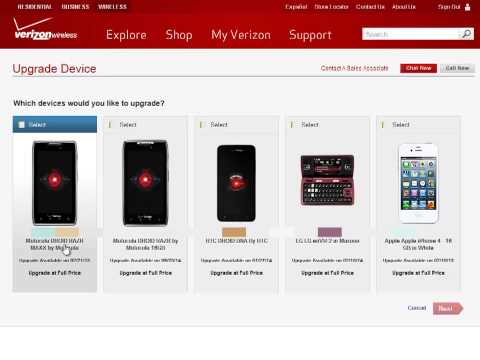
Don't give up your UNLIMITED DATA plan. In this video I show you how to use your upgrade to get a new smartphone at the subsidized price and KEEP UNLIMITED DATA with Verizon Wireless.
Key points to remember:
1. Never run the upgrade through the line you want to keep Unlimited Data on.
2. Pulling off the data plan on the basic phone line (if applicable) does NOT constitute line cancellation and you will not get an ETF. (ie swap in dumb phone then pull of the tiered data plan)
3. You can remove the data plan on a basic phone online at www.vzw.com yourself.
4. Performing a "alternate upgrade" extends the contract on the line the upgrade was originally available on. (I have Unlimited Data lines on contract until mid-2015)
5. If you have to service swap from a 3G smartphone to a 4G smartphone, I'd recommend going to another store and asking them to service swap your 3G smartphone to your 4G smartphone and they will issue you a SIM card. (Yes you will have to provide the IMEI # of your new 4G LTE phone, but it does not constitute an "upgrade" so you will keep your unlimited data plan)
6. If you already have a SIM card, once you have the new phone swapped off the upgraded line, just move your SIM card into the new phone and you're good to go.
7. You can use a grandfathered Unlimited Data SIM card on ANY device, Android tablet, iPad, hotspot, etc. Verizon will not change your plan just because you put your SIM in a non-smartphone device. (See point 7 support.verizonwireless.com/faqs/VZAccess/4g_si…)
!! UNLIMITED DATA IS NEVER COMING BACK, DON'T GIVE IT UP FOR A NEW PHONE !!
Share everything you learn here with your friends and family. =)
Don't give up your UNLIMITED DATA plan. In this video I show you how to use your upgrade to get a new smartphone at the subsidized price and KEEP UNLIMITED DATA with Verizon Wireless.
Key points to remember:
1. Never run the upgrade through the line you want to keep Unlimited Data on.
2. Pulling off the data plan on the basic phone line (if applicable) does NOT constitute line cancellation and you will not get an ETF. (ie swap in dumb phone then pull of the tiered data plan)
3. You can remove the data plan on a basic phone online at www.vzw.com yourself.
4. Performing a "alternate upgrade" extends the contract on the line the upgrade was originally available on. (I have Unlimited Data lines on contract until mid-2015)
5. If you have to service swap from a 3G smartphone to a 4G smartphone, I'd recommend going to another store and asking them to service swap your 3G smartphone to your 4G smartphone and they will issue you a SIM card. (Yes you will have to provide the IMEI # of your new 4G LTE phone, but it does not constitute an "upgrade" so you will keep your unlimited data plan)
6. If you already have a SIM card, once you have the new phone swapped off the upgraded line, just move your SIM card into the new phone and you're good to go.
7. You can use a grandfathered Unlimited Data SIM card on ANY device, Android tablet, iPad, hotspot, etc. Verizon will not change your plan just because you put your SIM in a non-smartphone device. (See point 7 support.verizonwireless.com/faqs/VZAccess/4g_si…)
!! UNLIMITED DATA IS NEVER COMING BACK, DON'T GIVE IT UP FOR A NEW PHONE !!
Share everything you learn here with your friends and family. =)
About this tutorial
MrSwuft published this 5:59 video tutorial on November 9, 2013. It has been watched 56,533 times on YouTube.
- Channel
- MrSwuft
- Category
- Entertainment
- Duration
- 5:59
- Published
- November 9, 2013
- Views
- 56,533
- Likes
- 278
Tags
Share
This tutorial in other languages
- FRComment mettre à jour et conserver les données UNLIMITED avec Verizon Wireless (2013)
- ESCómo actualizar y mantener datos ilimitados con Verizon Wireless (2013)
- PTComo atualizar e manter dados ilimitado com a Verizon Wireless (2013)
- ITCome aggiornare e mantenere dati illimitato con Verizon Wireless (2013)
- DESo aktualisiert und unbegrenzte Daten mit Verizon Wireless (2013) zu halten
- NLHoe te upgraden en te houden onbeperkt data met Verizon Wireless (2013)
- RUКак обновить и сохранить неограниченные данные с Verizon Wireless (2013)
- PLJak uaktualnić i przechowywania danych UNLIMITED z Verizon Wireless (2013)
- JAベライゾン・ワイヤレス(2013)と無制限のデータをアップグレードし、維持する方法
- ARكيفية ترقية والحفاظ على البيانات غير محدود مع فيريزون وايرلس (2013)
- HIअपग्रेड कैसे करें और Verizon वायरलेस के साथ असीमित डेटा रखने के (2013)
- IDCara Upgrade dan menjaga DATA UNLIMITED dengan Verizon Wireless (2013)