Playback starts YouTube’s embedded player (privacy-enhanced mode).
DIY Elgato Stream Deck | Macro Pad Tutorial w/ Free Download
ChannelProtoAMPDescription from the creator
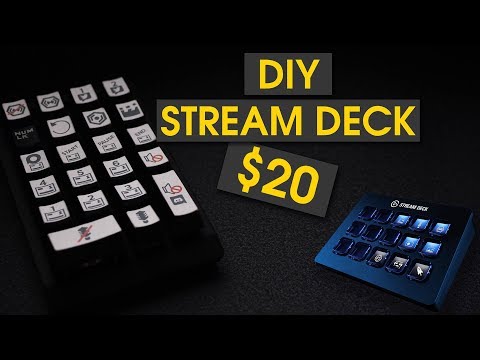
The Elgato Stream Deck is a fantastic tool for streamers and editors. It's also really expensive, costing $150/£140. In this video, I'll show you how to make a similar macro pad for only $20/$15.
The Macro Pad allows you to:
- Start/Stop the Stream
- Start/Stop the Recording
- Start/Stop the OBS replay buffer
- Save the replay buffer
- Switch between 7 scenes seamlessly
- Mute the microphone, Discord and the gameplay
- Send automatic tweets at the touch of a button (beta).
The auto tweet is still in beta as I'm looking to add API integration in the future. That said, it still works and will be what I use. This DIY Stream Deck solution doesn't replace the Elgato Stream Deck. Due to proper API integration with OBS, Twitter, etc, it is far more powerful than what I have coded. That said, if you don't make a living from streaming, it'll be easier to justify spending over $100 less for something that still does the job.
If you have any suggestions, leave them in the comments below. Drop a like rating if you enjoyed and subscribe to my channel to stay updated; I'll see you in my next video. Thanks For Watching!
Disclaimer: This keyboard/keypad was sent to me for free from Banggood. I specifically requested this keypad for the sole purpose of making a DIY stream deck video and I do get to keep it afterwards. I’m no salesman though. I wasn’t influenced to say anything nice, nor would I work with a company that wouldn’t allow me to freely express my own views. If I recommend it, you can be sure that it's MY opinion.
---------- Keypad Links ----------
► Mini Mechanical Numeric Keypad: goo.gl/MUvpXQ
► 15% off for Gaming Accessories: goo.gl/5SijoM
* These links are safe and have been shortened for convenience. If concerned, you can unshorten them using something like unshorten.it/
------- Downloads -------
► HID Macros (Download Version 2.3)
hidmacros.eu/download.php
► Labels, Config File
mega.nz/#F!JagnBSaA!5L4JTrE1GYzoQXOeIKHAKg
------- Source Code (VBS) -------
You can just copy this into the scripted tab if you don't want to replace the config file (above).
► Functions for OBS. Replace F13 with the F-key shown in the video.
HIDMacros.SendKeysSlow "{F13}", 50
► Auto Tweet. Customise your message within the quotation marks on the last line.
Dim WshShell
set WshShell = CreateObject("WScript.Shell")
WshShell.Run "chrome twitter.com/";
WshShell.AppActivate "chrome"
HIDMacros.Sleep 5000
HIDMacros.SendKeys "n"
HIDMacros.Sleep 1500
HIDMacros.SendKeys "I'm streaming over at @Twitch. twitch.tv/...";
---------- Important ----------
* Make sure HID Macros is running when you want to use the DIY Stream Deck
* Make sure OBS is set to run as admin so that it can detect the keystrokes from the Stream Deck.
------ All My Social Media Links ------
► Twitter : twitter.com/ProtoAMP
► Youtube : youtube.com/user/ProtoAMP
► My Gear : kit.co/ProtoAMP
---------------- Music ----------------
► Outro Music: Desmeon - Back From The Dead [NCS Release]
► Production Music courtesy of Epidemic Sound: epidemicsound.com
------ Last Video ------
► The Truth About PC Build Guides On YouTube
youtube.com/watch?v=DpU3YUxCkF0
----------------------------
Proto
ProtoAMP
The Macro Pad allows you to:
- Start/Stop the Stream
- Start/Stop the Recording
- Start/Stop the OBS replay buffer
- Save the replay buffer
- Switch between 7 scenes seamlessly
- Mute the microphone, Discord and the gameplay
- Send automatic tweets at the touch of a button (beta).
The auto tweet is still in beta as I'm looking to add API integration in the future. That said, it still works and will be what I use. This DIY Stream Deck solution doesn't replace the Elgato Stream Deck. Due to proper API integration with OBS, Twitter, etc, it is far more powerful than what I have coded. That said, if you don't make a living from streaming, it'll be easier to justify spending over $100 less for something that still does the job.
If you have any suggestions, leave them in the comments below. Drop a like rating if you enjoyed and subscribe to my channel to stay updated; I'll see you in my next video. Thanks For Watching!
Disclaimer: This keyboard/keypad was sent to me for free from Banggood. I specifically requested this keypad for the sole purpose of making a DIY stream deck video and I do get to keep it afterwards. I’m no salesman though. I wasn’t influenced to say anything nice, nor would I work with a company that wouldn’t allow me to freely express my own views. If I recommend it, you can be sure that it's MY opinion.
---------- Keypad Links ----------
► Mini Mechanical Numeric Keypad: goo.gl/MUvpXQ
► 15% off for Gaming Accessories: goo.gl/5SijoM
* These links are safe and have been shortened for convenience. If concerned, you can unshorten them using something like unshorten.it/
------- Downloads -------
► HID Macros (Download Version 2.3)
hidmacros.eu/download.php
► Labels, Config File
mega.nz/#F!JagnBSaA!5L4JTrE1GYzoQXOeIKHAKg
------- Source Code (VBS) -------
You can just copy this into the scripted tab if you don't want to replace the config file (above).
► Functions for OBS. Replace F13 with the F-key shown in the video.
HIDMacros.SendKeysSlow "{F13}", 50
► Auto Tweet. Customise your message within the quotation marks on the last line.
Dim WshShell
set WshShell = CreateObject("WScript.Shell")
WshShell.Run "chrome twitter.com/";
WshShell.AppActivate "chrome"
HIDMacros.Sleep 5000
HIDMacros.SendKeys "n"
HIDMacros.Sleep 1500
HIDMacros.SendKeys "I'm streaming over at @Twitch. twitch.tv/...";
---------- Important ----------
* Make sure HID Macros is running when you want to use the DIY Stream Deck
* Make sure OBS is set to run as admin so that it can detect the keystrokes from the Stream Deck.
------ All My Social Media Links ------
► Twitter : twitter.com/ProtoAMP
► Youtube : youtube.com/user/ProtoAMP
► My Gear : kit.co/ProtoAMP
---------------- Music ----------------
► Outro Music: Desmeon - Back From The Dead [NCS Release]
► Production Music courtesy of Epidemic Sound: epidemicsound.com
------ Last Video ------
► The Truth About PC Build Guides On YouTube
youtube.com/watch?v=DpU3YUxCkF0
----------------------------
Proto
ProtoAMP
About this tutorial
ProtoAMP published this 14:16 video tutorial on November 11, 2018. It has been watched 220,910 times on YouTube.
Tags
Share
This tutorial in other languages
- FRDIY Elgato flux plate-forme | Tutoriel Macro Pad w / Télécharger
- ESDIY Elgato Corriente cubierta | Macro Tutorial cojín w / Descargar gratis
- PTDIY Elgato Fluxo deck | Macro Pad Tutorial w / Download
- ITFai da te Elgato flusso Deck | Macro Pad Tutorial w / Download
- DEDIY Elgato Stream-Deck | Makro Pad Tutorial w / Free Download
- NLDIY Elgato Stroom Deck | Macro Pad Tutorial w / Download
- RUDIY Elgato поток Deck | Macro Pad Учебник ж / бесплатно
- PLDIY Elgato Stream Deck | Macro Pad Tutorial w / darmo
- JADIY Elgatoのストリームデッキ|マクロパッドチュートリアルワット/無料ダウンロード
- ARDIY Elgato تيار الطابق | ماكرو الوسادة دروس ث / تحميل مجاني
- HIDIY Elgato स्ट्रीम डेक | मैक्रो पैड ट्यूटोरियल w / नि: शुल्क डाउनलोड
- IDDIY ELGATO Streaming Deck | Makro Pad Tutorial w / Free Download