Playback starts YouTube’s embedded player (privacy-enhanced mode).
How to Build a Barebones Laptop (Clevo P641RE/P640RE) Gaming Whitebook Notebook
ChannelBYOGamingPCDescription from the creator
Building your own gaming laptop or workstation notebook is something I wanted to do a long while back and found very few resources on how to do it. This is my second and current whitebook build that I've done and it's a blast to do! It's also EXTREMELY easy to do. This is the same model as the base Sager NP8640 and many other laptop manufacturers build models off of Clevo base laptops.
I'm going to say this up front, building your own laptop isn't always the cheapest and as a matter of fact it's hard to build it cheaper than the manufacturers UNLESS you want to upgrade the base models they sell. Most of their money is made when you select more RAM, larger or faster drives, or any other upgrades you can customize. Once you start down the customization road, the barebones option begins to look more attractive.
On this particular build I saved about $300 off of the retail price if I were to buy it from a manufacturer and customized with the specs I wanted. I also did a lot of shopping around and $300 was the least I saved.
Now on to starting the building process! The trickiest part is finding the barebones notebook which is also called a whitebook. The best place I've found to purchase on in the US is rjtech.com. They have numerous Clevo models as well as some MSI models. I will take a moment to note that the Clevo models have a better price to performance ratio and more options so I would start there.
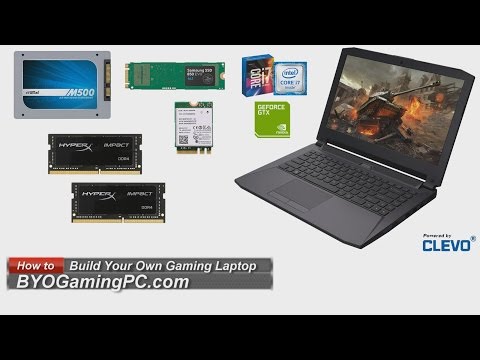
Selecting your base model is really the most important part of the process since whitebooks/barebones laptops come with the CPU and GPU already installed for the most part. Sometimes you can find them with options but those are rare. Once you've selected that part then it's really up to you as to which storage, RAM, wireless, and other peripherals you may want to install and the process is quite easy. Below are all the specs and parts that I used in this build including the tools. They are either the exact parts or equivalent parts listed.
Barebones Notebooks can be found at RJTech.com. (I have no affiliation with them.)
Amazon Links:
Kingston HyperX Impact 16GB (2X8GB) RAM amzn.to/2P0z82a
Samsung 850 EVO 250GB M.2 SSD amzn.to/2UHunQ6
Intel Dual Band Wireless-AC 8260 amzn.to/2WT5MFB
SanDisk Ultra 1TB SSD amzn.to/2X13N29
Rosewill Computer Tool Kit amzn.to/2WUby9W
Rosewill Anti-Static Mat amzn.to/2WYnNlT
Windows 10 Home amzn.to/2D6Arrk
Optional:
Arctic MX-4 amzn.to/2G3zK2Z
ArctiClean Thermal Compound Remover amzn.to/2I6XcQ5
Newegg Links:
Kingston HyperX Impact 16GB (2X8GB) RAM anrdoezrs.net/links/7044210/type/dlg/https://ww…
Samsung 850 EVO 250GB M.2 SSD anrdoezrs.net/links/7044210/type/dlg/https://ww…
Intel Dual Band Wireless-AC 8260 anrdoezrs.net/links/7044210/type/dlg/https://ww…
SanDisk X400 1TB SSD anrdoezrs.net/links/7044210/type/dlg/https://ww…
Rosewill Computer Tool Kit anrdoezrs.net/links/7044210/type/dlg/https://ww…
Rosewill Anti-Static Mat anrdoezrs.net/links/7044210/type/dlg/https://ww…
Windows 10 Pro anrdoezrs.net/links/7044210/type/dlg/https://ww…
Optional:
Arctic MX-4 Thermal Compound anrdoezrs.net/links/7044210/type/dlg/https://ww…
ArctiClean Thermal Compound Remover anrdoezrs.net/links/7044210/type/dlg/https://ww…
You can download the Intel XTU (Extreme Tuning Utility) here: goo.gl/LT0ykR
Feel free to check out more of my YouTube videos or get some tips on building your own Gaming PC, NAS, or HTPC at BYOGamingPC.com.
I'm going to say this up front, building your own laptop isn't always the cheapest and as a matter of fact it's hard to build it cheaper than the manufacturers UNLESS you want to upgrade the base models they sell. Most of their money is made when you select more RAM, larger or faster drives, or any other upgrades you can customize. Once you start down the customization road, the barebones option begins to look more attractive.
On this particular build I saved about $300 off of the retail price if I were to buy it from a manufacturer and customized with the specs I wanted. I also did a lot of shopping around and $300 was the least I saved.
Now on to starting the building process! The trickiest part is finding the barebones notebook which is also called a whitebook. The best place I've found to purchase on in the US is rjtech.com. They have numerous Clevo models as well as some MSI models. I will take a moment to note that the Clevo models have a better price to performance ratio and more options so I would start there.
Selecting your base model is really the most important part of the process since whitebooks/barebones laptops come with the CPU and GPU already installed for the most part. Sometimes you can find them with options but those are rare. Once you've selected that part then it's really up to you as to which storage, RAM, wireless, and other peripherals you may want to install and the process is quite easy. Below are all the specs and parts that I used in this build including the tools. They are either the exact parts or equivalent parts listed.
Barebones Notebooks can be found at RJTech.com. (I have no affiliation with them.)
Amazon Links:
Kingston HyperX Impact 16GB (2X8GB) RAM amzn.to/2P0z82a
Samsung 850 EVO 250GB M.2 SSD amzn.to/2UHunQ6
Intel Dual Band Wireless-AC 8260 amzn.to/2WT5MFB
SanDisk Ultra 1TB SSD amzn.to/2X13N29
Rosewill Computer Tool Kit amzn.to/2WUby9W
Rosewill Anti-Static Mat amzn.to/2WYnNlT
Windows 10 Home amzn.to/2D6Arrk
Optional:
Arctic MX-4 amzn.to/2G3zK2Z
ArctiClean Thermal Compound Remover amzn.to/2I6XcQ5
Newegg Links:
Kingston HyperX Impact 16GB (2X8GB) RAM anrdoezrs.net/links/7044210/type/dlg/https://ww…
Samsung 850 EVO 250GB M.2 SSD anrdoezrs.net/links/7044210/type/dlg/https://ww…
Intel Dual Band Wireless-AC 8260 anrdoezrs.net/links/7044210/type/dlg/https://ww…
SanDisk X400 1TB SSD anrdoezrs.net/links/7044210/type/dlg/https://ww…
Rosewill Computer Tool Kit anrdoezrs.net/links/7044210/type/dlg/https://ww…
Rosewill Anti-Static Mat anrdoezrs.net/links/7044210/type/dlg/https://ww…
Windows 10 Pro anrdoezrs.net/links/7044210/type/dlg/https://ww…
Optional:
Arctic MX-4 Thermal Compound anrdoezrs.net/links/7044210/type/dlg/https://ww…
ArctiClean Thermal Compound Remover anrdoezrs.net/links/7044210/type/dlg/https://ww…
You can download the Intel XTU (Extreme Tuning Utility) here: goo.gl/LT0ykR
Feel free to check out more of my YouTube videos or get some tips on building your own Gaming PC, NAS, or HTPC at BYOGamingPC.com.
About this tutorial
BYOGamingPC published this 16:23 video tutorial on November 9, 2016. It has been watched 581,108 times on YouTube.
- Channel
- BYOGamingPC
- Category
- Gaming
- Duration
- 16:23
- Published
- November 9, 2016
- Views
- 581,108
- Likes
- 5,327
Share
This tutorial in other languages
- FRComment construire un ordinateur portable barebone (Clevo P641RE / P640RE) Gaming Notebook Whitebook
- ESCómo construir un ordenador portátil barebones (Clevo P641RE / P640RE) Gaming Notebook Libro blanco
- PTComo construir um Barebones Laptop (Clevo P641RE / P640RE) Gaming Notebook Whitebook
- ITCome costruire un computer portatile Barebone (Clevo P641RE / P640RE) Gaming Notebook Whitebook
- DEWie baue ich eine Barebones Laptop (Clevo P641RE / P640RE) Gaming White Notebook
- NLHoe maak je een Barebones Laptop (Clevo P641RE / P640RE) Gaming Whitebook Notebook
- RUКак построить ноутбук Barebones (Clevo P641RE / P640RE) Gaming Whitebook Notebook
- PLJak zbudować Barebone Laptop (Clevo P641RE / P640RE) Gry Whitebook Notebook
- JA(CLEVO P641RE / P640RE)ゲームホワイトブックノートブックベアボーンのノートPCを構築する方法
- ARكيفية بناء أجهزة الكمبيوتر المحمول المجردة (CLEVO P641RE / P640RE) الألعاب Whitebook المحمول
- HIएक Barebones लैपटॉप का निर्माण कैसे (Clevo P641RE / P640RE) गेमिंग Whitebook नोटबुक
- IDCara Buat Laptop Barebones (Clevo P641RE / P640RE) Gaming Whitebook Notebook