Playback starts YouTube’s embedded player (privacy-enhanced mode).
How to Get Cover Art FreeStyle Dash 3 (RGH/JTAG)
ChannelMatt DarnellDescription from the creator
Subscribe for new videos every week! -- full.sc/1NRNMzp
Visit my Twitch! -- twitch.tv/mrmattdarnell
↓Click to Expand for Links, Specs, and More Information↓
NOTE: You WILL need a RGH Xbox 360, or a JTAG Xbox 360 as well as XeXMenu with FreeStyle Dash 3 installed. If you do not have one or XeXMenu and FreeStyle Dash 3 installed than this WILL NOT WORK
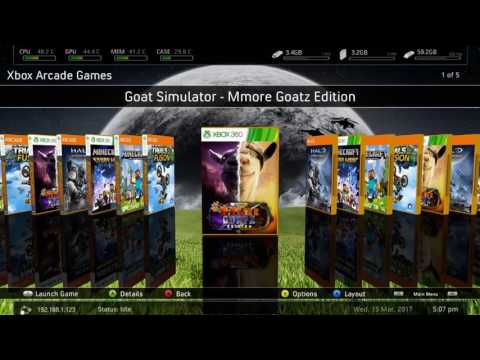
Hey guys, in this video I will show you how you can download and get cover art for your Xbox 360 games, emulators, and homebrew programs on your JTAG or RGH Xbox 360. This video will show both ways that you can add cover art, and I hope that at least one of these works out for you. Hope this video helped you out, and you can find links to everything needed below!
Be sure to visit my Twitch!
twitch.tv/mrmattdarnell
Social Links
YouTube: full.sc/1NRNMzp
Discord: discord.gg/6jDbxdq
Twitter: full.sc/1NRNKr0
Instagram: full.sc/1NRNLvc
Website Links
Website: full.sc/1QKhQmG
Join the Discord: discord.gg/6jDbxdq
Video Links
XboxUnity: bit.ly/1DSMGTd
Thank You
This is just a new style of videos I am testing out, so I can get more videos out for you guys! As well as show you what I am up to, and some of the stuff I do at my work. If you like these types of videos, please remember to like, comment, and subscribe!
Visit my Twitch! -- twitch.tv/mrmattdarnell
↓Click to Expand for Links, Specs, and More Information↓
NOTE: You WILL need a RGH Xbox 360, or a JTAG Xbox 360 as well as XeXMenu with FreeStyle Dash 3 installed. If you do not have one or XeXMenu and FreeStyle Dash 3 installed than this WILL NOT WORK
Hey guys, in this video I will show you how you can download and get cover art for your Xbox 360 games, emulators, and homebrew programs on your JTAG or RGH Xbox 360. This video will show both ways that you can add cover art, and I hope that at least one of these works out for you. Hope this video helped you out, and you can find links to everything needed below!
Be sure to visit my Twitch!
twitch.tv/mrmattdarnell
Social Links
YouTube: full.sc/1NRNMzp
Discord: discord.gg/6jDbxdq
Twitter: full.sc/1NRNKr0
Instagram: full.sc/1NRNLvc
Website Links
Website: full.sc/1QKhQmG
Join the Discord: discord.gg/6jDbxdq
Video Links
XboxUnity: bit.ly/1DSMGTd
Thank You
This is just a new style of videos I am testing out, so I can get more videos out for you guys! As well as show you what I am up to, and some of the stuff I do at my work. If you like these types of videos, please remember to like, comment, and subscribe!
About this tutorial
Matt Darnell published this 7:59 video tutorial on November 11, 2017. It has been watched 142,219 times on YouTube.
- Channel
- Matt Darnell
- Category
- Gaming
- Duration
- 7:59
- Published
- November 11, 2017
- Views
- 142,219
- Likes
- 1,112
Tags
Share
This tutorial in other languages
- FRComment obtenir Couverture FreeStyle Dash 3 (RGH / JTAG)
- ESCómo obtener Cover Art FreeStyle Dash 3 (RGH / JTAG)
- PTComo Chegar Cover Art FreeStyle Traço 3 (RGH / JTAG)
- ITCome ottenere Cover Art FreeStyle Dash 3 (RGH / JTAG)
- DEWie Cover Art FreeStyle Dash 3 (RGH / JTAG) Get
- NLHow to Get Cover Art FreeStyle Dash 3 (RGH / JTAG)
- RUКак получить Cover Art FreeStyle Даш 3 (RGH / JTAG)
- PLJak uzyskać Cover Art FreeStyle Dash 3 (RGH / JTAG)
- JAカバーアートフリースタイルダッシュ3(RGH / JTAG)を取得する方法
- ARكيفية الحصول على تغطية الفن حرة داش 3 (RGH / JTAG)
- HIकैसे आवरण कला फ्री स्टाइल डैश 3 प्राप्त करने (RGH / JTAG)
- IDBagaimana Mendapatkan Sampul FreeStyle Dash 3 (RGH / JTAG)