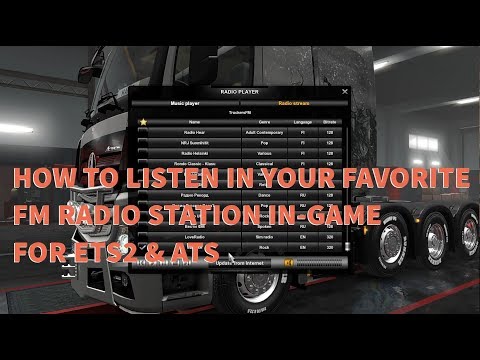
Playback starts YouTube’s embedded player (privacy-enhanced mode).
Listen to your favorite FM radio station in ETS2 & ATS (Tutorial)
ChannelmarcopoLo_30Description from the creator
Please READ this for more information!!!
How to add your favorite online radio to the game
Open the file „Documents\Euro Truck Simulator 2\live_streams.sii“ in your favorite text editor. Here you can add as many radio streams as you want following these steps:
1. Copy the line below to the location hinted in the file, or just under the similar items:
stream_data[]: "RADIO_URL|RADIO_NAME|GENRE|LANGUAGE|BITRATE"
2. Replace RADIO_URL with the URL address of the radio stream. Then replace RADIO_NAME with the name you want to see in the game, the same applies for GENRE, LANGUAGE and BITRATE. Remember to keep proper formatting, especially the "|" character that separates the radio URL from the name.
After you are done, save the file and close it. Launch the game and open Radio. You should see the radio streams you just added on the list. Double-click one and it should start playing.
Example live_streams.sii file
live_stream_def : .live_streams {
stream_data[]: "123.123.123.123:8000|My Favourite Radio|Rock|EN|128"
stream_data[]: "anotherradio.com/stream.mp3|Another Radio|Pop|RU|320"
}
Supported streams
The game supports all MP3-type streams (except MMS). With proper codecs, which are often already installed, you can also listen to many other stream formats.
Hi guys! In this video I will show to you how to listen in your favorite FM radio station in game on Euro Truck Simulator 2 and American Truck Simulator. Thank you so much for watching and please like, share and subscribe and don't forget to hit the bell notification bell button for more videos.
ABOUT ME!
I'm a HELLA casual gamer. I don't think I'm very good at any of these games I play, but if you're into watching a noob get their ass kicked an embarrassing amount of times, this is the place for you.
DONATIONS!
Wow that would be so crazy if you donated but HOLY COW THANK YOU?!?!
I put this link here because Facebook Gaming really wanted me too, but it is totally optional to donate! I'll keep doing what I'm doing no matter what! However I do display most recent donations on my live stream!
Donations are used for upgrading my Computer Hardware and ensuring the stream can be the best quality it can possibly be.
* STREAMLAB: streamlabs.com/marcopolo_30
* PAYPAL.ME: paypal.me/marcopoLo30
* STAR DONATION: via Facebook Live Gaming
Note:
* Please leave a comment in the chat box if you will make a donation via PayPal.Me so I can give you a huge THANKS! and SHOUT OUT!
Thank you always for your support!
CHAT/COMMENTS RULES!
* No racism, discrimination, or harassment.
* Please do not spam the chat!
* No promotion of other page or links to other channels without permission (i will probably tell you yes).
* English and Tagalog only in the chat/comment.
I really want this to be a friendly atmosphere so please just treat others with kindness and don't be crazy or rude!
HARDWARES!
* CPU Type : AMD Ryzen 7 2700x
* Graphic Chipset : AMD Radeon (TM) R9 390 GDDR5 1500MHz 8192 MB
* System Memory : Corsair Vengeance RGB Pro 8 Gig (x2) 3200 Mhz
* Motherboard : TUF X470 Gaming Plus
* PSU : Corsair RM750x Gold
* SSD : Samsung 850 EVO 250 GB (x2)
* M.2 : Samsung 970 EVO 250 GB
* CAM : Logitech C920 Pro HD
* Microphone : Behringer Condenser B1
* Headphone : Razer Thresher Tournament Edition
* Keyboard : Razer Blackwidow Ultimate Stealth 2016 Edition
* Controllers : Logitech G29 Driving Force with Shifter | Logitech Extreme 3D Pro Joystick | TrackIR 5
DISCORD SERVER
discord.gg/gyNE5By
How to add your favorite online radio to the game
Open the file „Documents\Euro Truck Simulator 2\live_streams.sii“ in your favorite text editor. Here you can add as many radio streams as you want following these steps:
1. Copy the line below to the location hinted in the file, or just under the similar items:
stream_data[]: "RADIO_URL|RADIO_NAME|GENRE|LANGUAGE|BITRATE"
2. Replace RADIO_URL with the URL address of the radio stream. Then replace RADIO_NAME with the name you want to see in the game, the same applies for GENRE, LANGUAGE and BITRATE. Remember to keep proper formatting, especially the "|" character that separates the radio URL from the name.
After you are done, save the file and close it. Launch the game and open Radio. You should see the radio streams you just added on the list. Double-click one and it should start playing.
Example live_streams.sii file
live_stream_def : .live_streams {
stream_data[]: "123.123.123.123:8000|My Favourite Radio|Rock|EN|128"
stream_data[]: "anotherradio.com/stream.mp3|Another Radio|Pop|RU|320"
}
Supported streams
The game supports all MP3-type streams (except MMS). With proper codecs, which are often already installed, you can also listen to many other stream formats.
Hi guys! In this video I will show to you how to listen in your favorite FM radio station in game on Euro Truck Simulator 2 and American Truck Simulator. Thank you so much for watching and please like, share and subscribe and don't forget to hit the bell notification bell button for more videos.
ABOUT ME!
I'm a HELLA casual gamer. I don't think I'm very good at any of these games I play, but if you're into watching a noob get their ass kicked an embarrassing amount of times, this is the place for you.
DONATIONS!
Wow that would be so crazy if you donated but HOLY COW THANK YOU?!?!
I put this link here because Facebook Gaming really wanted me too, but it is totally optional to donate! I'll keep doing what I'm doing no matter what! However I do display most recent donations on my live stream!
Donations are used for upgrading my Computer Hardware and ensuring the stream can be the best quality it can possibly be.
* STREAMLAB: streamlabs.com/marcopolo_30
* PAYPAL.ME: paypal.me/marcopoLo30
* STAR DONATION: via Facebook Live Gaming
Note:
* Please leave a comment in the chat box if you will make a donation via PayPal.Me so I can give you a huge THANKS! and SHOUT OUT!
Thank you always for your support!
CHAT/COMMENTS RULES!
* No racism, discrimination, or harassment.
* Please do not spam the chat!
* No promotion of other page or links to other channels without permission (i will probably tell you yes).
* English and Tagalog only in the chat/comment.
I really want this to be a friendly atmosphere so please just treat others with kindness and don't be crazy or rude!
HARDWARES!
* CPU Type : AMD Ryzen 7 2700x
* Graphic Chipset : AMD Radeon (TM) R9 390 GDDR5 1500MHz 8192 MB
* System Memory : Corsair Vengeance RGB Pro 8 Gig (x2) 3200 Mhz
* Motherboard : TUF X470 Gaming Plus
* PSU : Corsair RM750x Gold
* SSD : Samsung 850 EVO 250 GB (x2)
* M.2 : Samsung 970 EVO 250 GB
* CAM : Logitech C920 Pro HD
* Microphone : Behringer Condenser B1
* Headphone : Razer Thresher Tournament Edition
* Keyboard : Razer Blackwidow Ultimate Stealth 2016 Edition
* Controllers : Logitech G29 Driving Force with Shifter | Logitech Extreme 3D Pro Joystick | TrackIR 5
DISCORD SERVER
discord.gg/gyNE5By
About this tutorial
marcopoLo_30 published this 13:22 video tutorial on November 14, 2019. It has been watched 165,794 times on YouTube.
- Channel
- marcopoLo_30
- Category
- Gaming
- Duration
- 13:22
- Published
- November 14, 2019
- Views
- 165,794
- Likes
- 1,114
Tags
Share
This tutorial in other languages
- FRÉcoutez votre station de radio préférée FM dans ETS2 et ATS (Tutorial)
- ESEscuchar su estación de radio FM favorita en ETS2 y ATS (Tutorial)
- PTOuça a sua estação de rádio FM favorita no ETS2 & ATS (Tutorial)
- ITAscolta la tua stazione radio FM preferita in ETS2 & ATS (Tutorial)
- DEHören Sie Ihre Lieblings-UKW-Sender in der ETS2 & ATS (Tutorial)
- NLLuister naar je favoriete FM-radiostation in ETS2 & ATS (zelfstudie)
- RUСлушайте ваши любимые FM радиостанции в ETS2 и АТС (учебное пособие)
- PLSłuchać ulubionej stacji radiowej FM w ETS2 & ATS (samouczek)
- JAETS2&ATSでお気に入りのFMラジオ局を聴く(チュートリアル)
- ARالاستماع إلى المفضلة لمحطة إذاعية FM الخاصة بك في ETS2 وATS (دروس)
- HIETS2 और एटीएस में अपने पसंदीदा एफएम रेडियो स्टेशन को सुनें (ट्यूटोरियल)
- IDMendengarkan stasiun radio FM favorit Anda di ETS2 & ATS (Tutorial)