Playback starts YouTube’s embedded player (privacy-enhanced mode).
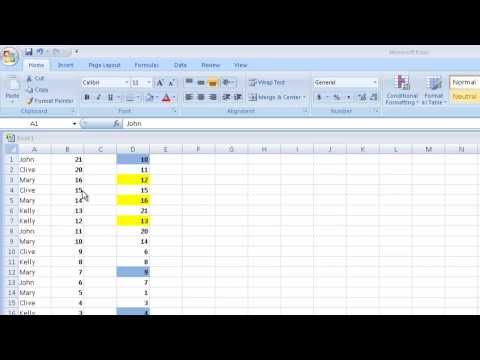
Basic Excel Tutorial - Sort a Column in Excel in Ascending or Descending Order
ChannelComputerbasicsChapters
Description from the creator
Want to quickly sort your data in Excel without messing up your spreadsheet? In this easy tutorial, you’ll learn how to sort a column in Excel in ascending or descending order, with step-by-step instructions. Whether you're using Excel 2007, 2010, or 2013, this method works perfectly.
📊 In this Excel tutorial, you’ll learn:
How to sort numbers in a column
How to sort data by cell color
How to keep related data together (like names and sales)
How to use Excel’s Sort & Filter tool
How to undo sorting mistakes using Ctrl + Z
⏱️ Chapters / Timestamps:
00:00 – Intro: How to Sort in Excel (Ascending & Descending Order)
00:09 – Sorting a Column in Excel 2007, 2010, 2013
00:24 – Select Entire Column or Use Drag Selection
01:01 – Open Sort & Filter from Excel Toolbar
01:18 – Sort Numbers from Smallest to Largest
01:44 – Sorting Results: Number Order Updated
01:50 – Sort by Cell Color in Excel
02:06 – Use Custom Sort for Cell Colors (Yellow, Blue)
02:33 – Color-Based Sorting Results
02:49 – Undo Sort with Ctrl + Z Shortcut
03:38 – Sorting Data with Names and Sales Together
04:09 – Custom Sort by Column with Sales Data
04:34 – Sort Sales from Largest to Smallest
05:01 – Sort Alphabetically by Name (A to Z)
05:22 – Keep Related Data Together When Sorting
06:00 – Final Tip: Always Select Related Columns for Accurate Sorting
06:08 – Outro: Sort Data Easily in Excel
📌 This works with:
Microsoft Excel 2007
Microsoft Excel 2010
Microsoft Excel 2013
Basic Excel datasets and tables
💡 More Excel Tips Coming Soon!
📥 Subscribe for more tutorials on formulas, formatting, charts, and more!
👍 Like this video if it helped, and drop a comment if you want more Excel basics!
🔖 Hashtags:
#ExcelTutorial #SortInExcel #ExcelTips #MicrosoftExcel #SortColumn #ExcelBeginner #CustomSort #ExcelData #SpreadsheetTips #Excel2007 #Excel2010 #Excel2013
📊 In this Excel tutorial, you’ll learn:
How to sort numbers in a column
How to sort data by cell color
How to keep related data together (like names and sales)
How to use Excel’s Sort & Filter tool
How to undo sorting mistakes using Ctrl + Z
⏱️ Chapters / Timestamps:
00:00 – Intro: How to Sort in Excel (Ascending & Descending Order)
00:09 – Sorting a Column in Excel 2007, 2010, 2013
00:24 – Select Entire Column or Use Drag Selection
01:01 – Open Sort & Filter from Excel Toolbar
01:18 – Sort Numbers from Smallest to Largest
01:44 – Sorting Results: Number Order Updated
01:50 – Sort by Cell Color in Excel
02:06 – Use Custom Sort for Cell Colors (Yellow, Blue)
02:33 – Color-Based Sorting Results
02:49 – Undo Sort with Ctrl + Z Shortcut
03:38 – Sorting Data with Names and Sales Together
04:09 – Custom Sort by Column with Sales Data
04:34 – Sort Sales from Largest to Smallest
05:01 – Sort Alphabetically by Name (A to Z)
05:22 – Keep Related Data Together When Sorting
06:00 – Final Tip: Always Select Related Columns for Accurate Sorting
06:08 – Outro: Sort Data Easily in Excel
📌 This works with:
Microsoft Excel 2007
Microsoft Excel 2010
Microsoft Excel 2013
Basic Excel datasets and tables
💡 More Excel Tips Coming Soon!
📥 Subscribe for more tutorials on formulas, formatting, charts, and more!
👍 Like this video if it helped, and drop a comment if you want more Excel basics!
🔖 Hashtags:
#ExcelTutorial #SortInExcel #ExcelTips #MicrosoftExcel #SortColumn #ExcelBeginner #CustomSort #ExcelData #SpreadsheetTips #Excel2007 #Excel2010 #Excel2013
About this tutorial
Computerbasics published this 6:19 video tutorial on October 25, 2014. It has been watched 504,733 times on YouTube.
- Channel
- Computerbasics
- Category
- Howto & Style
- Duration
- 6:19
- Published
- October 25, 2014
- Views
- 504,733
- Likes
- 1,464
Tags
Share
This tutorial in other languages
- FRBasic Excel Tutorial - Trier une colonne dans Excel en ordre croissant ou décroissant
- ESExcel Básico Tutorial - ordenar una columna en Excel en orden ascendente o descendente
- PTBásico Excel Tutorial - ordenar uma coluna no Excel em ordem crescente ou decrescente
- ITBase Excel Tutorial - ordinare una colonna in Excel in ordine crescente o decrescente
- DEGrundlegender Excel Tutorial - Sortieren eine Spalte in Excel in aufsteigender oder absteigender Reihenfolge
- NLBasic Excel Tutorial - Sorteer een kolom in Excel in oplopende of aflopende volgorde
- RUBasic Excel Учебник - сортировки столбцов в Excel в порядке возрастания или убывания
- PLPodstawowe Excel Tutorial - Sortowanie kolumny w Excelu w porządku rosnącym lub malejącym
- JA基本エクセルチュートリアル - 昇順または降順でExcelで並べ替えるには、列
- ARالأساسية أكسل تعليمي - ترتيب عمود في Excel تصاعدي أو تنازلي
- HIबेसिक एक्सेल ट्यूटोरियल - बढ़ते या घटते क्रम में Excel में क्रमबद्ध एक स्तंभ
- IDDasar Excel Tutorial - Urutkan Kolom di Excel di Ascending atau Descending Orde