Playback starts YouTube’s embedded player (privacy-enhanced mode).
How To Calibrate Digital Pocket Scales WITHOUT a Calibration Weight
ChannelSpaceshanty101Description from the creator
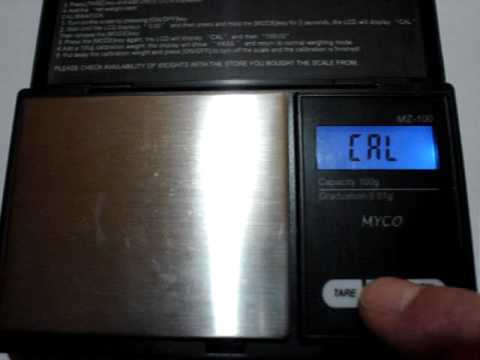
This video shows you how to calibrate a set of digital scales without a weight by using coins.
*Scales still totally busted?*
*New 200g x 0.01g Scales with Calibration Weight INCLUDED Only $9.99* - amzn.to/42TTmQf
Just use 14 x 2p coins (United Kingdom) or 20 x nickles (USA) to replace a 100g calibration weight.
***USA 20 x nickles (5 cent coins) = 100g***
***UK 14 x 2p coins (2 pence coins) = 100g***
14 x 2p coins = 99.5g
(This is not exactly 100g but will work in emergencies. The difference will only be 0.005g per gram which is nothing really)
The calibration process is very similar to the one show in the video for most scales however just search for the manual online for the correct procedure & the calibration weight needed.
Usually the scale will display the required weight during the calibration process (As shown in the video)
1. Turn Scale On
2. Press and hold CAL button or MODE/UNIT button until CAL or weight needed is displayed (You may need to release & press it again as in video)
3. Place weight on scale. The scale should show PASS or F (You may need to press CAL/MODE button again)
4. Remove weight. ( You may need to turn scale off)
5. Finish!
If you need a larger weight just multiply the number of coins
7 x 2p = 50g
14 x 2p = 100g
28 x 2p = 200g
etc..........
*Scales still totally busted?*
*New 200g x 0.01g Scales with Calibration Weight INCLUDED Only $9.99* - amzn.to/42TTmQf
Just use 14 x 2p coins (United Kingdom) or 20 x nickles (USA) to replace a 100g calibration weight.
***USA 20 x nickles (5 cent coins) = 100g***
***UK 14 x 2p coins (2 pence coins) = 100g***
14 x 2p coins = 99.5g
(This is not exactly 100g but will work in emergencies. The difference will only be 0.005g per gram which is nothing really)
The calibration process is very similar to the one show in the video for most scales however just search for the manual online for the correct procedure & the calibration weight needed.
Usually the scale will display the required weight during the calibration process (As shown in the video)
1. Turn Scale On
2. Press and hold CAL button or MODE/UNIT button until CAL or weight needed is displayed (You may need to release & press it again as in video)
3. Place weight on scale. The scale should show PASS or F (You may need to press CAL/MODE button again)
4. Remove weight. ( You may need to turn scale off)
5. Finish!
If you need a larger weight just multiply the number of coins
7 x 2p = 50g
14 x 2p = 100g
28 x 2p = 200g
etc..........
About this tutorial
Spaceshanty101 published this 0:44 video tutorial on November 13, 2010. It has been watched 1,233,266 times on YouTube.
- Channel
- Spaceshanty101
- Category
- Howto & Style
- Duration
- 0:44
- Published
- November 13, 2010
- Views
- 1,233,266
- Likes
- 1,700
Tags
Share
This tutorial in other languages
- FRComment Calibrer Digital Pocket Balance SANS Poids d'étalonnage
- ESCómo calibrar digital de bolsillo Escalas SIN un peso de calibración
- PTComo calibrar Digital Pocket escalas sem um peso de calibração
- ITCome calibrare Digital Pocket scale senza la massa di calibrazione
- DEWie zu kalibrieren Digitale Taschenwaage OHNE Kalibriergewicht
- NLHow To Calibrate Digital Pocket Weegschalen ZONDER Calibration Weight
- RUКак калибровать цифровые карманные весы без грузила калибровки
- PLJak skalibrować cyfrowy kieszonkowy Wagi BEZ kalibracja Waga
- JAどのようにするにはキャリブレーションデジタルポケットスケール校正重量WITHOUT
- ARكيف الميزان لمعايرة الجيب الرقمية دون الوزن المعايرة
- HIकैसे करने के लिए जांचना डिजिटल पॉकेट के बिना एक अंशांकन भार Scales
- IDCara Kalibrasi Digital Pocket Timbangan TANPA Berat Badan Kalibrasi