Playback starts YouTube’s embedded player (privacy-enhanced mode).
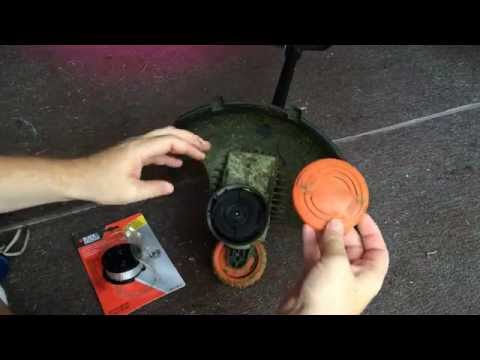
How to Change the Automatic Feed Spool (AFS) line on Black & Decker Trimmers
ChannelTom's Home Improvement VideosDescription from the creator
Last spool of line? Get more here: amzn.to/3RdgPrN
Here's a quick demo of how to replace the AFS spool on most Black & Decker trimmers. A lot, if not most, of the Black & Decker electric trimmers use an Automatic Feed Spool system which means you don't have to bump your trimmer on the ground to make the line extend out. Instead, the line automatically feeds out as needed.
Want more product reviews of cool gadgets, home electronics, clever tools, men's clothing and more? Check out our review channel: youtube.com/@UCJ988Z4kyjSJ3r0zFL2WXYg
They work pretty well and rarely jam in my experience. Here's a quick demo of how to change the spool out. It's a pretty simple operation:
1. Flip over the trimmer and remove the spool plate.
2. Pull out the old empty line spool.
3. Take the tape off the new line spool.
4. Feed the end of the line through the hole in the trimmer.
5. Place the new spool in the trimmer.
6. Put the bottom spool plate back on.
You're done!
All the products I recommend: amazon.com/shop/tomshomeimprovementvideos
Twitter: twitter.com/homehobbyist
Tom is a participant in the Amazon Services LLC Associates Program, an affiliate advertising program designed to provide a means for sites to earn advertising fees by advertising and linking to Amazon.com. Using affiliate links does not cost you any more but it does show your support for the content and creators that share them.
Here's a quick demo of how to replace the AFS spool on most Black & Decker trimmers. A lot, if not most, of the Black & Decker electric trimmers use an Automatic Feed Spool system which means you don't have to bump your trimmer on the ground to make the line extend out. Instead, the line automatically feeds out as needed.
Want more product reviews of cool gadgets, home electronics, clever tools, men's clothing and more? Check out our review channel: youtube.com/@UCJ988Z4kyjSJ3r0zFL2WXYg
They work pretty well and rarely jam in my experience. Here's a quick demo of how to change the spool out. It's a pretty simple operation:
1. Flip over the trimmer and remove the spool plate.
2. Pull out the old empty line spool.
3. Take the tape off the new line spool.
4. Feed the end of the line through the hole in the trimmer.
5. Place the new spool in the trimmer.
6. Put the bottom spool plate back on.
You're done!
All the products I recommend: amazon.com/shop/tomshomeimprovementvideos
Twitter: twitter.com/homehobbyist
Tom is a participant in the Amazon Services LLC Associates Program, an affiliate advertising program designed to provide a means for sites to earn advertising fees by advertising and linking to Amazon.com. Using affiliate links does not cost you any more but it does show your support for the content and creators that share them.
About this tutorial
Tom's Home Improvement Videos published this 1:51 video tutorial on November 7, 2015. It has been watched 561,582 times on YouTube.
- Category
- Howto & Style
- Duration
- 1:51
- Published
- November 7, 2015
- Views
- 561,582
- Likes
- 1,860
Tags
Share
This tutorial in other languages
- FRComment changer la ligne Spool alimentation automatique (AFS) sur soutiers Black & Decker
- ESCómo cambiar el carrete de alimentación automática (AFS) en la línea de Black & Decker recortadores
- PTComo alterar a alimentação automática Spool (AFS) linha em Black & Decker Trimmers
- ITCome modificare il feed automatico Spool (AFS) sulla linea di Black & Decker Trimmer
- DESo ändern Sie die automatische Zuführung Spool (AFS) Linie auf Black & Decker Trimmer
- NLHoe de Automatic Feed Spool (AFS) lijn op Black & Decker Trimmers wijzigen
- RUКак изменить автоматическую подачу золотника (AFS) линия на Black & Decker подстроечного
- PLJak zmienić Automatyczny posuw szpuli (AFS) linia na Black & Decker Trimmers
- JAどのように変更に自動ブラック&デッカートリマにスプール(AFS)ラインフィード
- ARكيفية تغيير تغذية التلقائي بكرة (AFS) خط على بلاك اند ديكر قادين
- HIकैसे स्वत: फ़ीड स्पूल (एएफसी) पर ब्लैक एंड डेकर Trimmers लाइन बदलने के लिए
- IDCara Mengubah Feed otomatis Spool (AFS) garis pada Black & Decker pemangkas