Playback starts YouTube’s embedded player (privacy-enhanced mode).
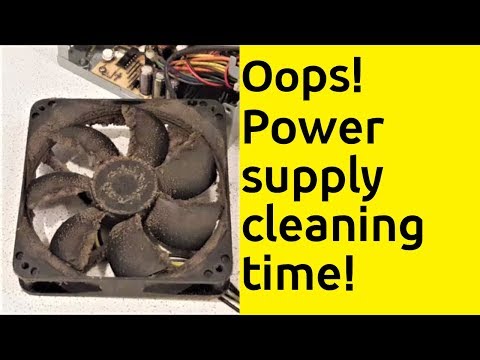
How to clean computer power supply unit
Channelk-nemoDescription from the creator
Don't touch electric parts inside the power supply with bare hands! Messing with loaded capacitors can be fatal!
When was the last time you have cleaned the power supply in your PC? Occasional dust removal from inside the tower is not enough to ensure long and trouble-free operation, particularly when you keep it on the floor. Also, there is always more dust inside the tower than you expect. Cleaning the power supply is critical as it supplies power to all the components in the computer. Computer cooling systems cannot tolerate dust and pollen so proper air circulation must be maintained. Without this the temperature increases and parts can overheat causing various problems, possibly even a total shut down of your computer.
Components inside the computer look more fragile than they really are, so don’t be afraid to touch them or treat them with air under pressure. Most maintenance work doesn’t require tools any more sophisticated than a screwdriver as you will need take the power supply apart before starting a job. There are many types of power supplies which means there are slightly different ways to dismantle them. In my film I give a few examples how to do it as some models are more tricky than the others.
During regular cleaning it is enough to remove the visible dust. Knock off the dust stuck to the fan and external parts of the components with a brush. If you use a vacuum cleaner to suck up the dirt remember to set it to minimum power. If you prefer it's possible use a can of compressed air to blow out the dust instead, but in this case you’d better do the work outside!
So if you haven’t cleaned the power supply for a while (or never!) and even worse, you hear some weird noises coming from your power supply fan, it is a clear indicator that it requires a good cleaning. Watch my film to see how to do it quickly and efficiently. Not only will your power supply work properly but you will also considerably prolong its life.
-***********************************
- If you enjoy my content and like to support me then I’d be so grateful for a virtual „coffee“. Any amount is welcome and goes a long way to keep me going. Thank you. buymeacoffee.com/knemo
- I'd love to hear your thoughts. Please comment, like and let me know what you'd like to see next.
Subscribe for the latest videos:
youtube.com/c/knemo?sub_confirmation=1
#knemo #PCcleaning #ComputerCleaning #PCmaintenance
When was the last time you have cleaned the power supply in your PC? Occasional dust removal from inside the tower is not enough to ensure long and trouble-free operation, particularly when you keep it on the floor. Also, there is always more dust inside the tower than you expect. Cleaning the power supply is critical as it supplies power to all the components in the computer. Computer cooling systems cannot tolerate dust and pollen so proper air circulation must be maintained. Without this the temperature increases and parts can overheat causing various problems, possibly even a total shut down of your computer.
Components inside the computer look more fragile than they really are, so don’t be afraid to touch them or treat them with air under pressure. Most maintenance work doesn’t require tools any more sophisticated than a screwdriver as you will need take the power supply apart before starting a job. There are many types of power supplies which means there are slightly different ways to dismantle them. In my film I give a few examples how to do it as some models are more tricky than the others.
During regular cleaning it is enough to remove the visible dust. Knock off the dust stuck to the fan and external parts of the components with a brush. If you use a vacuum cleaner to suck up the dirt remember to set it to minimum power. If you prefer it's possible use a can of compressed air to blow out the dust instead, but in this case you’d better do the work outside!
So if you haven’t cleaned the power supply for a while (or never!) and even worse, you hear some weird noises coming from your power supply fan, it is a clear indicator that it requires a good cleaning. Watch my film to see how to do it quickly and efficiently. Not only will your power supply work properly but you will also considerably prolong its life.
-***********************************
- If you enjoy my content and like to support me then I’d be so grateful for a virtual „coffee“. Any amount is welcome and goes a long way to keep me going. Thank you. buymeacoffee.com/knemo
- I'd love to hear your thoughts. Please comment, like and let me know what you'd like to see next.
Subscribe for the latest videos:
youtube.com/c/knemo?sub_confirmation=1
#knemo #PCcleaning #ComputerCleaning #PCmaintenance
About this tutorial
k-nemo published this 3:59 video tutorial on October 28, 2019. It has been watched 97,525 times on YouTube.
- Channel
- k-nemo
- Category
- Howto & Style
- Duration
- 3:59
- Published
- October 28, 2019
- Views
- 97,525
- Likes
- 1,021
Tags
Share
This tutorial in other languages
- FRComment l'unité d'alimentation d'ordinateur propre
- ESComo fuente de alimentación equipo limpio
- PTComo fonte de alimentação computador limpo
- ITCome unità di alimentazione computer pulito
- DEWie zu reinigen Computer-Netzteil
- NLHoe schoon computer voedingseenheid
- RUКак чистый компьютерный блок питания
- PLJak zasilacza komputerowego czyste
- JAどのようにクリーンなコンピュータの電源ユニットへ
- ARكيفية حدة تزويد الطاقة كمبيوتر نظيف
- HIकैसे साफ कंप्यूटर बिजली की आपूर्ति इकाई के लिए
- IDCara komputer bersih unit catu daya