Playback starts YouTube’s embedded player (privacy-enhanced mode).
HOW TO CLEAN RESIN PRINTS
ChannelMiniCraftDescription from the creator
#3DB #ANYCUBIC #RESIN
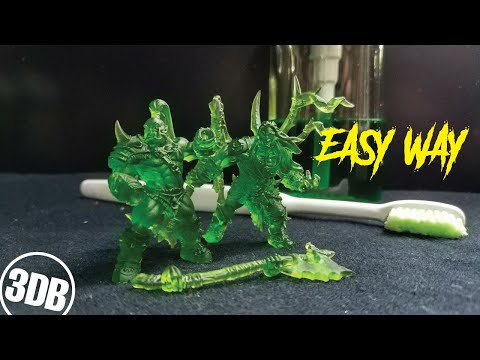
Today i will show the easy way that i found to remove supports, of my resin print.
The rogram i use is CHITUBOX, many people do not like using auto-support, but for me up to now it works. I use medium and not fine supports, help to avoid failed printing if i use fine i have to use much more supports, this means more scars. Another important thing, making the base be a single piece to distribute the strength when the table rises to the next layer.
The resin i use is from ANYCUBIC TRANSPARENT GREEN, transparent helps the UV light pass, what helps a better cure of the piece and its interior, i do not use IPA Alcohol, or other kind of chemical, they are expensive, and after some use that will placing resin residues in small spaces, eliminating details.
What do we do, is to use hot water, the hot water will soft the supports, they almost came out with any help, if you feel some kind of resistance, put them under the water again, you will see them turn almost white, thats when they are good to remove, but be careful with the thin parts, like hair for exemple.
After you remove the supports, we goimg to finish with dishwash soap and a tooth brush, rube everything and pass under the water, after this the print its completed clean to cure the resin, the its the best option, the UV light its only good if you dont have any choice, one thing that i do its to lift the lights a bit away from the parts, i do this just because of the heat that came from the lamps can deform the parts.
This mostley happen when the piece its hollow. For full resin prints not that much, i let them cure for a long time, for pieces like this maybe 2 hours.
⚠️ dont wash you resin parts on your drain, use some place with some kind of filter, or warm some water and put in a container ⚠️
FILE
------------------------------------------------------------------------
myminifactory.com/users/Artisan_Guild
ANYCUBIC PHOTON
------------------------------------------------------------------------
anycubic3dprinter.pt.aliexpress.com/store/group…?
spm=2114.12010612.pcShopHead_5876471.1_3_0
RESIN
------------------------------------------------------------------------
anycubic3dprinter.pt.aliexpress.com/store/group…?
spm=a2g03.12010612.0.0.146c43fbmjHGGN
MATERIALS
------------------------------------------------------------------------
MOLOTOW
shop.molotow.com
VALLEJO
acrylicosvallejo.com/categoria/modelismo/
CITADEL
citadelcolour.com/
AMESTERDAM ACRYLICS
royaltalens.com/en/brands/amsterdam/
RUB´N BUFF
amaco.com/t/mixed-media/metallic-finishes/rub-n…
SOCIAL
------------------------------------------------------------------------
PATREON - patreon.com/3DB
FACEBOOK - facebook.com/3DBPRINTS/
TWITTER - @3dbprints
Today i will show the easy way that i found to remove supports, of my resin print.
The rogram i use is CHITUBOX, many people do not like using auto-support, but for me up to now it works. I use medium and not fine supports, help to avoid failed printing if i use fine i have to use much more supports, this means more scars. Another important thing, making the base be a single piece to distribute the strength when the table rises to the next layer.
The resin i use is from ANYCUBIC TRANSPARENT GREEN, transparent helps the UV light pass, what helps a better cure of the piece and its interior, i do not use IPA Alcohol, or other kind of chemical, they are expensive, and after some use that will placing resin residues in small spaces, eliminating details.
What do we do, is to use hot water, the hot water will soft the supports, they almost came out with any help, if you feel some kind of resistance, put them under the water again, you will see them turn almost white, thats when they are good to remove, but be careful with the thin parts, like hair for exemple.
After you remove the supports, we goimg to finish with dishwash soap and a tooth brush, rube everything and pass under the water, after this the print its completed clean to cure the resin, the its the best option, the UV light its only good if you dont have any choice, one thing that i do its to lift the lights a bit away from the parts, i do this just because of the heat that came from the lamps can deform the parts.
This mostley happen when the piece its hollow. For full resin prints not that much, i let them cure for a long time, for pieces like this maybe 2 hours.
⚠️ dont wash you resin parts on your drain, use some place with some kind of filter, or warm some water and put in a container ⚠️
FILE
------------------------------------------------------------------------
myminifactory.com/users/Artisan_Guild
ANYCUBIC PHOTON
------------------------------------------------------------------------
anycubic3dprinter.pt.aliexpress.com/store/group…?
spm=2114.12010612.pcShopHead_5876471.1_3_0
RESIN
------------------------------------------------------------------------
anycubic3dprinter.pt.aliexpress.com/store/group…?
spm=a2g03.12010612.0.0.146c43fbmjHGGN
MATERIALS
------------------------------------------------------------------------
MOLOTOW
shop.molotow.com
VALLEJO
acrylicosvallejo.com/categoria/modelismo/
CITADEL
citadelcolour.com/
AMESTERDAM ACRYLICS
royaltalens.com/en/brands/amsterdam/
RUB´N BUFF
amaco.com/t/mixed-media/metallic-finishes/rub-n…
SOCIAL
------------------------------------------------------------------------
PATREON - patreon.com/3DB
FACEBOOK - facebook.com/3DBPRINTS/
TWITTER - @3dbprints
About this tutorial
MiniCraft published this 8:38 video tutorial on May 1, 2020. It has been watched 12,658 times on YouTube.
- Channel
- MiniCraft
- Category
- Howto & Style
- Duration
- 8:38
- Published
- May 1, 2020
- Views
- 12,658
- Likes
- 223
Share
This tutorial in other languages
- FRCOMMENT À IMPRIME Le nettoyage de résine
- ESCOMO ESTAMPAS para limpiar RESINA
- PTCOMO IMPRESSÕES para limpar RESINA
- ITCome pulire RESINA STAMPE
- DESo reinigen HARZ PRINTS
- NLHoe schoon te maken RESIN PRINTS
- RUКАК ЧИСТЫЙ СМОЛ PRINTS
- PLJAK GRAFIKA TO CZYSTA ŻYWICA
- JAHOW TO CLEAN樹脂PRINTS
- ARHOW TO CLEAN PRINTS RESIN
- HIकैसे करने के लिए स्वच्छ राल प्रिंट
- IDCARA BERSIH RESIN Mencetak