Playback starts YouTube’s embedded player (privacy-enhanced mode).
How To Convert .SWF To FLA
ChannelVideo Editing and 3D Modelling Tutorials and Courses from HowTechDescription from the creator
Follow this tutorial to learn how to convert a .swf in a fla. Learn how to change the file type into FLA format.
Don't forget to check out our site howtech.tv/ for more free how-to videos!
youtube.com/ithowtovids - our feed
facebook.com/howtechtv - join us on facebook
plus.google.com/103440382717658277879 - our group in Google+
In this tutorial, we will teach you how To Convert .swf To FLA. We have already created a swf file and saved it on the desktop.
Step 1 -- Create new actionscript
Follow this tutorial to learn how To Convert .swf To FLA.
First of all, go to the start menu and from there, open adobe flash professional.
Once flash opens up, create a new action script 2.0.
Step 2 -- Import to Stage option
In the Flash program, go to the "file" tab and under import, select the "import to stage" option. You can always use the "ctrl+r" shortcut key.
Step 3 -- Import swf
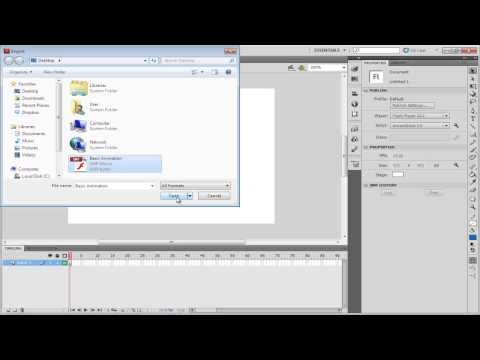
In the import window, select the swf file that you want to convert. After you have selected the file, click on the open button. Once done, press the "enter" key in order to preview your motion tween.
Step 4 -- Save as fla
Once you are done, go to the file tab and click on the save as option. Type in the name for the fla file and then click on the save button. In this manner, you can convert .swf into a fla.
Step 5 -- View fla file
Once the file is saved, go to the location of the file and you'd see that the fla file present there. This is how you can change a .swf to fla format.
Don't forget to check out our site howtech.tv/ for more free how-to videos!
youtube.com/ithowtovids - our feed
facebook.com/howtechtv - join us on facebook
plus.google.com/103440382717658277879 - our group in Google+
In this tutorial, we will teach you how To Convert .swf To FLA. We have already created a swf file and saved it on the desktop.
Step 1 -- Create new actionscript
Follow this tutorial to learn how To Convert .swf To FLA.
First of all, go to the start menu and from there, open adobe flash professional.
Once flash opens up, create a new action script 2.0.
Step 2 -- Import to Stage option
In the Flash program, go to the "file" tab and under import, select the "import to stage" option. You can always use the "ctrl+r" shortcut key.
Step 3 -- Import swf
In the import window, select the swf file that you want to convert. After you have selected the file, click on the open button. Once done, press the "enter" key in order to preview your motion tween.
Step 4 -- Save as fla
Once you are done, go to the file tab and click on the save as option. Type in the name for the fla file and then click on the save button. In this manner, you can convert .swf into a fla.
Step 5 -- View fla file
Once the file is saved, go to the location of the file and you'd see that the fla file present there. This is how you can change a .swf to fla format.
About this tutorial
Video Editing and 3D Modelling Tutorials and Courses from HowTech published this 0:54 video tutorial on October 26, 2013. It has been watched 114,642 times on YouTube.
- Category
- Howto & Style
- Duration
- 0:54
- Published
- October 26, 2013
- Views
- 114,642
- Likes
- 328
Share
This tutorial in other languages
- FRComment convertir .SWF Pour FLA
- ESCómo convertir SWF a FLA
- PTComo converter SWF para FLA
- ITCome convertire SWF a FLA
- DEWie Konvertieren von SWF in FLA
- NLHoe te converteren SWF naar FLA
- RUКак конвертировать .swf To FLA
- PLJak konwertować SWF do FLA
- JA.SWFにFLAを変換する方法
- ARكيفية تحويل فرنك سويسري لFLA
- HI.SWF के लिए FLA कन्वर्ट करने के लिए कैसे
- IDCara Mengkonversi SWF Untuk FLA