Playback starts YouTube’s embedded player (privacy-enhanced mode).
How to Create an Awesome (Harmless) Computer Virus Prank (Fake Virus)
ChannelSandeep SinghIn brief
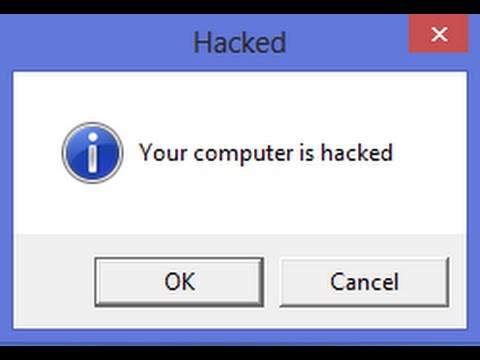
You’ll create a harmless pop-up prank using simple VBScript code that mimics a fake virus warning. This is a fun, non-destructive way to play a joke on someone by customizing message buttons and icons—no technical skills needed.
Description from the creator
Create an awesome computer Virus prank, this is harmless and does not affect anything, this is the secure way to create prank virus.
Code-
Write this code first-
X=MsgBox("Message Description",0+16,"Title")
1. You can write any number from 1,2,3 or 4 instead of 0 (before the '+' symbol)
Below is the meaning of these numbers:
0 = OK Button,
1 = OK / Cancel Button,
2 = Abort / Retry / Ignore Button,
3 = Yes / No / Cancel Button,
4 = Yes / No Button,
5 = Retry / Cancel Button
2. You can write 32 or 48 or 64 instead of 16.
Below is the meaning of each number:
16 = Critical Icon,
32 = Help Icon,
48 = Warning Icon,
64 = Information Icon,
If you are unable to create this prank Virus OR want the same Prank as in the video then you can download the text from here -
itechfever.com/create-prank-virus/
It is just a simple VBS code to create message boxes, there is no harm in any way.
After you are done with the prank let them know it was a harmless prank.
Follow me on Instagram - instagram.com/sparnidya/
Get the best tech products - amazon.com/shop/sandeepsingh
Code-
Write this code first-
X=MsgBox("Message Description",0+16,"Title")
1. You can write any number from 1,2,3 or 4 instead of 0 (before the '+' symbol)
Below is the meaning of these numbers:
0 = OK Button,
1 = OK / Cancel Button,
2 = Abort / Retry / Ignore Button,
3 = Yes / No / Cancel Button,
4 = Yes / No Button,
5 = Retry / Cancel Button
2. You can write 32 or 48 or 64 instead of 16.
Below is the meaning of each number:
16 = Critical Icon,
32 = Help Icon,
48 = Warning Icon,
64 = Information Icon,
If you are unable to create this prank Virus OR want the same Prank as in the video then you can download the text from here -
itechfever.com/create-prank-virus/
It is just a simple VBS code to create message boxes, there is no harm in any way.
After you are done with the prank let them know it was a harmless prank.
Follow me on Instagram - instagram.com/sparnidya/
Get the best tech products - amazon.com/shop/sandeepsingh
About this tutorial
Sandeep Singh published this 9:52 video tutorial on November 2, 2014. It has been watched 5,270,101 times on YouTube.
- Channel
- Sandeep Singh
- Category
- Howto & Style
- Duration
- 9:52
- Published
- November 2, 2014
- Views
- 5,270,101
- Likes
- 89,552
Tags
Share
This tutorial in other languages
- FRComment créer un impressionnant (Inoffensif) Computer Virus Prank (Faux virus)
- ESCómo crear un impresionante (inofensivo) Computer Virus Prank (Virus falso)
- PTComo criar um impressionante Virus (inofensivo) Computer Prank (vírus falso)
- ITCome creare un Awesome (innocuo) Computer Virus Prank (Virus Falso)
- DESo erstellen Sie einen ehrfürchtigen (Harmlos) Computer-Virus Prank (Fake-Virus)
- NLHoe kan ik een geweldig (Harmless) Computer Virus Prank (Fake Virus) Creëer
- RUКак создать Потрясающий (безвредный) Компьютерный вирус Шутки (Fake Virus)
- PLJak utworzyć Awesome (Nieszkodliwe) Computer Virus Prank (Fałszywy Virus)
- JA恐ろしい(無害)コンピュータウイルスのいたずら(偽ウイルス)を作成する方法
- ARكيفية إنشاء ممتاز (غير ضارة) الكمبيوتر الفيروسات المزحة (الفيروسات وهمية)
- HIएक बहुत बढ़िया (हानिरहित) कम्प्यूटर वायरस शरारत (नकली वायरस) बनाने के लिए कैसे
- IDCara Buat mengagumkan Virus (Harmless) Komputer Prank (Virus Palsu)