Playback starts YouTube’s embedded player (privacy-enhanced mode).
How to Cut Intricate Wedding Invitation Pocket using Cricut | Craft with Love
ChannelCraft with Love by LeanaDescription from the creator
CRAFTING VIDEO NO. 4
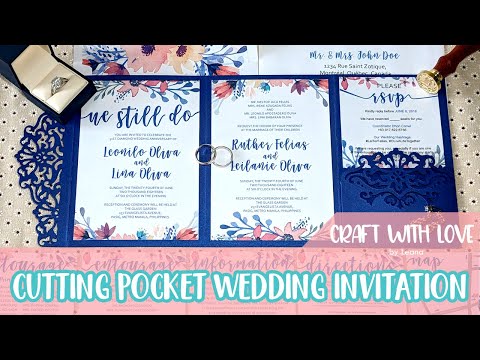
Hello loves! In today's video, I am going to show you how I cut an intricate Wedding Invitation Pocketfold for my parent's renewal of vows and my sister and brother-in-law's wedding using a special Metallic Cardstock, Cricut design space, and Cricut Explore Air! I hope you'll learn something and enjoy this video!
You can find the template I used at Etsy. The store name is NarisariDigitalArt.
Thank you very much for watching!!!
If you are not a subscriber yet, please do subscribe to our channel and click the bell button so you'll get notification from us once we upload a new video or when we go live!
Website: beyondcreativity.ca
Etsy: etsy.com/ca/shop/ABeyondCreativityWS
SOCIAL MEDIAS:
Facebook: facebook.com/ateliersbeyondcreativity
Instagram: instagram.com/ateliersbeyondcreativity
YouTube: youtube.com/@ateliersbeyondcreativity
Pinterest: ca.pinterest.com/ateliersbeyondcreativity
WHAT WE USE:
Cricut: Explore Air
Mat: StandardGrip 12x24 Mat
Material: 111 lbs. 11"x17" Metallic Blueprint Cardstock
Editor: Filmora
Camera: Samsung S6, Nexus 6p, Pixel 2 XL
Stabilizer: Zhiyun Smooth Q
Screen Recorder: Filmora Scrn
MUSIC BY:
Alumo - alumomusic.com/
Epidemic Sound - epidemicsound.com
TAGS:
#craftwithlove, #cricutdesignspace, #cricutexploreair, #craftwithlovebyleana, #doityourself, #diy, #howtomake
Hello loves! In today's video, I am going to show you how I cut an intricate Wedding Invitation Pocketfold for my parent's renewal of vows and my sister and brother-in-law's wedding using a special Metallic Cardstock, Cricut design space, and Cricut Explore Air! I hope you'll learn something and enjoy this video!
You can find the template I used at Etsy. The store name is NarisariDigitalArt.
Thank you very much for watching!!!
If you are not a subscriber yet, please do subscribe to our channel and click the bell button so you'll get notification from us once we upload a new video or when we go live!
Website: beyondcreativity.ca
Etsy: etsy.com/ca/shop/ABeyondCreativityWS
SOCIAL MEDIAS:
Facebook: facebook.com/ateliersbeyondcreativity
Instagram: instagram.com/ateliersbeyondcreativity
YouTube: youtube.com/@ateliersbeyondcreativity
Pinterest: ca.pinterest.com/ateliersbeyondcreativity
WHAT WE USE:
Cricut: Explore Air
Mat: StandardGrip 12x24 Mat
Material: 111 lbs. 11"x17" Metallic Blueprint Cardstock
Editor: Filmora
Camera: Samsung S6, Nexus 6p, Pixel 2 XL
Stabilizer: Zhiyun Smooth Q
Screen Recorder: Filmora Scrn
MUSIC BY:
Alumo - alumomusic.com/
Epidemic Sound - epidemicsound.com
TAGS:
#craftwithlove, #cricutdesignspace, #cricutexploreair, #craftwithlovebyleana, #doityourself, #diy, #howtomake
About this tutorial
Craft with Love by Leana published this 6:17 video tutorial on October 26, 2019. It has been watched 125,012 times on YouTube.
- Channel
- Craft with Love by Leana
- Category
- Howto & Style
- Duration
- 6:17
- Published
- October 26, 2019
- Views
- 125,012
Tags
Share
This tutorial in other languages
- FRComment couper Intricate mariage Invitation de poche en utilisant Cricut | Artisanat avec amour
- ESCómo cortar el complejo entramado de boda Invitación de bolsillo usando Cricut | Craft con Amor
- PTComo Cut intrincada casamento convite bolso usando Cricut | Craft com Amor
- ITCome taglio intricato Nozze Pocket usando Cricut | Craft with Love
- DEWie schneidet Komplizierte Einladung Wedding Tasche Cricut mit | Craft mit Liebe
- NLHoe kan Cut Ingewikkelde Uitnodiging Pocket gebruiken Cricut | Craft met Liefde
- RUКак вырезания Свадебные приглашения Карман с помощью Cricut | Craft с любовью
- PLJak wycinanie skomplikowanych Zaproszenie ślubne kieszeni za pomocą Cricut | Craft with Love
- JAどのようにカットのCricutを使って複雑な結婚式の招待状ポケットへ|愛とクラフト
- ARكيفية قص معقد دعوة زفاف الجيب باستخدام Cricut | الحرفية مع الحب
- HIकैसे कट जटिल शादी का निमंत्रण पॉकेट के लिए Cricut का उपयोग कर | प्यार के साथ क्राफ्ट
- IDCara Cut rumit Undangan Pernikahan Pocket menggunakan Cricut | Kerajinan dengan Cinta