Playback starts YouTube’s embedded player (privacy-enhanced mode).
How to eject a CD stuck in an iMac superdrive with a small card
ChannelMad BDescription from the creator
Many iMac superdrives will not eject a certain type of CD/DVD. It is not an OS problem where the CD does not appear in the mounted devices/drives. The mechanism will try to eject the DVD, you hear the eject noise, but nothing. The CD will spin up and is automatically remounted.
You can always try the command "drutil eject" in the console or right click in Disk utility, but it will not work if the problem is mechanical. All standard attempts using hotkeys rebooting with specials keys pressed etc... does not work.
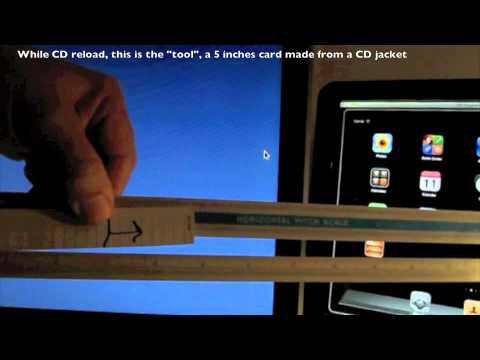
The card trick works 99% of the time on the two first attempts. The card dimensions is 3.5 x 0.75 inches or 9 x 2 cm. Use a thick card paper or plastic (credit cards are too thick).
You need to insert at the right spot and the correct depth. The top of my card is 2 inches from bottom of the superdrive slot, and the card is inserted 2 inches slightly slanted toward the front to pass in front of the CD. Check the video at the end and note that the card is in the front.
1. Drag the CD/DVD icon to the Trash, reboot the Mac and hold down the mouse button, or the "Eject" button on your keyboard.
2. Launch Apple's Disk Utility application, select the stuck CD/DVD and hit the "Eject" button.
3. Using the Terminal, enter the following command: drutil eject
Apple paper clip 'Method' bit.ly/12oh9kE
Apple Reset SMC bit.ly/12ohYtH
You can always try the command "drutil eject" in the console or right click in Disk utility, but it will not work if the problem is mechanical. All standard attempts using hotkeys rebooting with specials keys pressed etc... does not work.
The card trick works 99% of the time on the two first attempts. The card dimensions is 3.5 x 0.75 inches or 9 x 2 cm. Use a thick card paper or plastic (credit cards are too thick).
You need to insert at the right spot and the correct depth. The top of my card is 2 inches from bottom of the superdrive slot, and the card is inserted 2 inches slightly slanted toward the front to pass in front of the CD. Check the video at the end and note that the card is in the front.
1. Drag the CD/DVD icon to the Trash, reboot the Mac and hold down the mouse button, or the "Eject" button on your keyboard.
2. Launch Apple's Disk Utility application, select the stuck CD/DVD and hit the "Eject" button.
3. Using the Terminal, enter the following command: drutil eject
Apple paper clip 'Method' bit.ly/12oh9kE
Apple Reset SMC bit.ly/12ohYtH
About this tutorial
Mad B published this 0:47 video tutorial on November 7, 2012. It has been watched 114,133 times on YouTube.
- Channel
- Mad B
- Category
- Howto & Style
- Duration
- 0:47
- Published
- November 7, 2012
- Views
- 114,133
- Likes
- 129
Tags
Share
This tutorial in other languages
- FRComment éjecter un CD coincé dans un superdrive iMac avec une petite carte
- ESCómo expulsar un CD atascado en un SuperDrive iMac con una pequeña tarjeta
- PTComo ejetar um CD preso em um superdrive iMac com um pequeno cartão
- ITCome espellere un CD bloccato in un SuperDrive iMac con una piccola scheda
- DEWie auszuwerfen eine CD in einem iMac Superdrive mit einer kleinen Karte stecken
- NLHoe uit te werpen een CD vast te zitten in een iMac SuperDrive met een kleine kaart
- RUКак извлечь компакт-диск застрял в SuperDrive ИМАКА с небольшой картой
- PLJak wysunąć CD tkwi w SuperDrive iMac z małej karcie
- JACDを取り出す方法小さなカードでのiMacのSuperDriveで立ち往生
- ARكيفية إخراج تمسك CD في سوبر درايف إيماك مع بطاقة صغيرة
- HIबेदखल कैसे एक सीडी एक छोटा सा कार्ड के साथ एक आईमैक superdrive में फंस
- IDBagaimana untuk mengeluarkan CD terjebak dalam superdrive iMac dengan kartu kecil