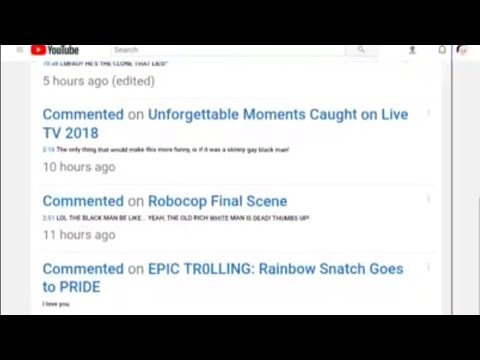
Playback starts YouTube’s embedded player (privacy-enhanced mode).
How to Find Your YouTube Comment History With Android 2019 - Step by Step
ChannelRough WoofDescription from the creator
June 11, 2019
A step by step guide and video on: How to locate and review your old YouTube comments, with an android cellphone.
WATCH THIS VIDEO FOR A 2020 UPDATED VERSION
youtu.be/qWyxuDfWWs4
*Make sure to be signed in.
This link is a shortcut. Copy and paste into your internet browser or simply click.
youtube.com/feed/history/comment_history?app=de…
If the link is not working, follow the written steps below.
**USE THE SAMSUNG BROWSER**
(ONCE AGAIN)
**USE THE SAMSUNG BROWSER**
Step One - Go into your YouTube Library (bottom right)
Step Two - Go into your History
Step Three - Next to YouTube search bar, tap the drop down button (the three dots on top of each other) and click "History Controls".
Step Four - Click "Manage all activity".
*A NEW window will open up to the internet.
Step Five - On the new window that opened, click the drop down icon and tap the "Other Google activity" option.
Step Six - Scroll down and locate "COMMENTS ON YOUTUBE COMMUNITY POSTS"
*Make sure you are NOT looking at "Comments on YouTube Videos".
Step Seven - Tap the "Learn More" button. *DO NOT click View Community Post
Step Eight - Scroll down and click, "Comment History".
Step Nine - Scroll down and click the load more if you are looking for really old comments you made. Don't forget to use the "find on page" option to speed up your search!
*IF YOUR ANDROID IS GIVING YOU PROBLEMS STILL.... LOG INTO THE INTERNET AND CLICK "DESKTOP VIEW". DO NOT USE THE YOUTUBE APP. USE THE BROWSER IN DESKTOP VIEW FORMAT AND DO THE STEPS ONE LAST TIME.
THIS VIDEO TOOK A LONG TIME TO MAKE AND EDIT. EDITING VIDEOS WITH ONLY A CELLPHONE, IS VERY TIME CONSUMING!
*PLEASE LIKE, SHARE, AND COMMENT!!*
A step by step guide and video on: How to locate and review your old YouTube comments, with an android cellphone.
WATCH THIS VIDEO FOR A 2020 UPDATED VERSION
youtu.be/qWyxuDfWWs4
*Make sure to be signed in.
This link is a shortcut. Copy and paste into your internet browser or simply click.
youtube.com/feed/history/comment_history?app=de…
If the link is not working, follow the written steps below.
**USE THE SAMSUNG BROWSER**
(ONCE AGAIN)
**USE THE SAMSUNG BROWSER**
Step One - Go into your YouTube Library (bottom right)
Step Two - Go into your History
Step Three - Next to YouTube search bar, tap the drop down button (the three dots on top of each other) and click "History Controls".
Step Four - Click "Manage all activity".
*A NEW window will open up to the internet.
Step Five - On the new window that opened, click the drop down icon and tap the "Other Google activity" option.
Step Six - Scroll down and locate "COMMENTS ON YOUTUBE COMMUNITY POSTS"
*Make sure you are NOT looking at "Comments on YouTube Videos".
Step Seven - Tap the "Learn More" button. *DO NOT click View Community Post
Step Eight - Scroll down and click, "Comment History".
Step Nine - Scroll down and click the load more if you are looking for really old comments you made. Don't forget to use the "find on page" option to speed up your search!
*IF YOUR ANDROID IS GIVING YOU PROBLEMS STILL.... LOG INTO THE INTERNET AND CLICK "DESKTOP VIEW". DO NOT USE THE YOUTUBE APP. USE THE BROWSER IN DESKTOP VIEW FORMAT AND DO THE STEPS ONE LAST TIME.
THIS VIDEO TOOK A LONG TIME TO MAKE AND EDIT. EDITING VIDEOS WITH ONLY A CELLPHONE, IS VERY TIME CONSUMING!
*PLEASE LIKE, SHARE, AND COMMENT!!*
About this tutorial
Rough Woof published this 8:49 video tutorial on November 11, 2019. It has been watched 334,734 times on YouTube.
- Channel
- Rough Woof
- Category
- Howto & Style
- Duration
- 8:49
- Published
- November 11, 2019
- Views
- 334,734
- Likes
- 5,011
Share
This tutorial in other languages
- FRComment trouver votre histoire Commentaire YouTube avec Android 2019 - Étape par étape
- ESCómo encontrar su YouTube Comment historia con Android 2019 - Paso a paso
- PTComo encontrar o seu YouTube Histórico de Comentários Com o Android 2019 - Passo a Passo
- ITCome Trova il tuo commento su YouTube Storia Con Android 2019 - Step by Step
- DESo finden Sie Ihre YouTube Kommentar Geschichte Mit Android 2019 - Schritt für Schritt
- NLHoe vindt u uw YouTube Comment geschiedenis met Android 2019 - Step by Step
- RUКак найти свой YouTube комментарий История с Android 2019 - шаг за шагом
- PLJak znaleźć YouTube komentarz historię z Androida 2019 - krok po kroku
- JAアンドロイド2019であなたのYouTubeのコメント履歴を検索する方法 - ステップバイステップを
- ARكيفية العثور على يوتيوب تعليق التاريخ مع الروبوت 2019 - خطوة خطوة
- HIकैसे एंड्रॉयड 2019 के साथ अपने YouTube टिप्पणी इतिहास का पता लगाएं करने के लिए - चरण दर चरण
- IDCara Cari Komentar Anda Sejarah YouTube Dengan Android 2019 - Langkah demi langkah