Playback starts YouTube’s embedded player (privacy-enhanced mode).
How to fix "DNS_PROBE_FINISHED_NO_INTERNET" - Unable to connect to the internet Chrome
ChanneltroubleshooterrorsDescription from the creator
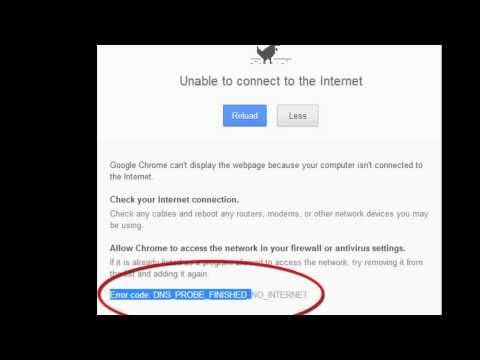
Error code: DNS_PROBE_FINISHED_NO_INTERNET. unable to connect to the internet. Google chrome can't display the webpage because your computer isn't connected to the internet.
Check your internet connection. Check any cables and reboot any routers, modems or other network devices you may be using.
Allow chrome to access the network in your firewall or antivirus settings. If it is already listed as a program allowed to access the network, try removing it from the list and adding it again.
Solution: Ping request timed out. Also troubleshooter said there is a broken access point. Turn off your modem or router and wait for a few minutes, then turn on again. It works for me.
Note: If you are using the internet through mobile phone, then do the following steps:
1. Check whether the internet is connected on mobile. Try to visit the sites from mobile and know whether it is accessible or not. If it is accessible. Then do the step2.
2. If you are using wifi portable hotspot, then turn off the hotspot for few minutes and then turn it on again.
It works for me!
3. This problem occurs when H+ switches to E, that is high speed to edge connection. So, for such cases: search for networks and register your device on 3G or H+.
Check your internet connection. Check any cables and reboot any routers, modems or other network devices you may be using.
Allow chrome to access the network in your firewall or antivirus settings. If it is already listed as a program allowed to access the network, try removing it from the list and adding it again.
Solution: Ping request timed out. Also troubleshooter said there is a broken access point. Turn off your modem or router and wait for a few minutes, then turn on again. It works for me.
Note: If you are using the internet through mobile phone, then do the following steps:
1. Check whether the internet is connected on mobile. Try to visit the sites from mobile and know whether it is accessible or not. If it is accessible. Then do the step2.
2. If you are using wifi portable hotspot, then turn off the hotspot for few minutes and then turn it on again.
It works for me!
3. This problem occurs when H+ switches to E, that is high speed to edge connection. So, for such cases: search for networks and register your device on 3G or H+.
About this tutorial
troubleshooterrors published this 0:30 video tutorial on October 28, 2014. It has been watched 213,860 times on YouTube.
- Channel
- troubleshooterrors
- Category
- Howto & Style
- Duration
- 0:30
- Published
- October 28, 2014
- Views
- 213,860
- Likes
- 167
Tags
Share
This tutorial in other languages
- FRComment corriger « DNS_PROBE_FINISHED_NO_INTERNET » - Impossible de se connecter à Internet Chrome
- ESCómo arreglar "DNS_PROBE_FINISHED_NO_INTERNET" - No se puede conectar a internet Chrome
- PTComo corrigir "DNS_PROBE_FINISHED_NO_INTERNET" - Não foi possível conectar-se à internet Chrome
- ITCome risolvere "DNS_PROBE_FINISHED_NO_INTERNET" - Impossibile connettersi a Internet Chrome
- DEWie zu beheben „DNS_PROBE_FINISHED_NO_INTERNET“ - kann keine Verbindung zum Internet verbinden Chrome
- NLHoe op te lossen "DNS_PROBE_FINISHED_NO_INTERNET" - geen verbinding maken met het internet Chrome
- RUКак исправить «DNS_PROBE_FINISHED_NO_INTERNET» - Невозможно подключиться к Интернету Chrome
- PLJak naprawić „DNS_PROBE_FINISHED_NO_INTERNET” - Nie można połączyć się z internetem Chrome
- JA「DNS_PROBE_FINISHED_NO_INTERNET」を修正する方法 - インターネットChromeに接続できません
- ARكيفية إصلاح "DNS_PROBE_FINISHED_NO_INTERNET" - غير قادر على الاتصال بالإنترنت كروم
- HIकैसे "DNS_PROBE_FINISHED_NO_INTERNET" ठीक करने के लिए - असमर्थ इंटरनेट क्रोम से कनेक्ट करने के
- IDCara untuk memperbaiki "DNS_PROBE_FINISHED_NO_INTERNET" - Tidak dapat terhubung ke internet Chrome