Playback starts YouTube’s embedded player (privacy-enhanced mode).
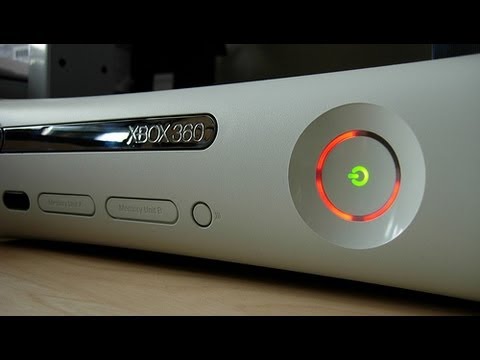
How To | Fix The Xbox 360 Red Ring Of Death
ChannelTheLethalStuffDescription from the creator
How To Fix Xbox 360 Red Ring Of Death (NO TOWELS) - This is how to fix the xbox 360 red ring of death this will last a few days to about a week. The RROD is caused by a fail in the Xbox 360's cooling system which causes the thermal compound (paste on the processor which cools it by transferring heat to the cooling system) to basically melt and splatter a mess on your motherboard. You can permanently fix this by cleaning up and replacing the thermal compound, then over heat it to fuse it back together with the processor and heat sink (cooling system). However, it has been found that if you overheat your Xbox, it will refuse some of the thermal compound and trick the Xbox into thinking it has been fixed. Most people do this by wrapping it in a towel. They don't realize shutting off the fans on the Xbox is easier and the easiest way to do so is by jamming the fans from the outside.
Step 1: Find the two fans on the back of your Xbox and get 2 cotton buds.
Step 2: Take the cotton off one side of the cotton buds.
Step 3: stick them through the blades of the fans.
Step 4: Turn on your Xbox and wait 5-6 minutes for the overheat lights. (You xbox should still be flashing the red rings and you should not be able to hear the fan. Wait until the 3 Red rings turns into 2 Red rings-meaning your Xbox has overheated.)
Step 5: Pull out the cotton buds and the cables and let the xbox cool down for 3-4 minutes then plug all the cables back in and start playing!
Twitter: www.twitter.com/thelethalstuff
Youtube: www.youtube.com/thelethalstuff
Step 1: Find the two fans on the back of your Xbox and get 2 cotton buds.
Step 2: Take the cotton off one side of the cotton buds.
Step 3: stick them through the blades of the fans.
Step 4: Turn on your Xbox and wait 5-6 minutes for the overheat lights. (You xbox should still be flashing the red rings and you should not be able to hear the fan. Wait until the 3 Red rings turns into 2 Red rings-meaning your Xbox has overheated.)
Step 5: Pull out the cotton buds and the cables and let the xbox cool down for 3-4 minutes then plug all the cables back in and start playing!
Twitter: www.twitter.com/thelethalstuff
Youtube: www.youtube.com/thelethalstuff
About this tutorial
TheLethalStuff published this 1:49 video tutorial on November 7, 2013. It has been watched 933,196 times on YouTube.
- Channel
- TheLethalStuff
- Category
- Howto & Style
- Duration
- 1:49
- Published
- November 7, 2013
- Views
- 933,196
- Likes
- 6,627
Share
This tutorial in other languages
- FRComment | Fixer la Xbox 360 Red Ring Of Death
- ESCómo | Fijar la Xbox 360 anillo rojo de la muerte
- PTComo | Fix O Xbox 360 Red Ring Of Death
- ITCome | Fissare il Red Ring Of Death di Xbox 360
- DEHow To | Fix Die Xbox 360 Red Ring Of Death
- NLHow To | Fix De Xbox 360 Red Ring Of Death
- RUКак | Fix Xbox 360 красное кольцо смерти
- PLJak | Naprawić Xbox 360 czerwony pierścień śmierci
- JAどのようにするには|死のXbox 360のレッドリングを修正
- ARكيفية | إصلاح أجهزة إكس بوكس 360 حلقة من الموت الاحمر
- HIकैसे करने के लिए | फिक्स मौत के 360 लाल अंगूठी
- IDCara | Perbaiki Xbox 360 Red Ring Of Death