Playback starts YouTube’s embedded player (privacy-enhanced mode).
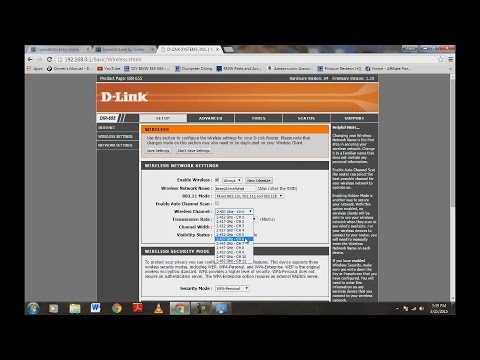
How To Increase Your Internet Speed By Changing Your Router's Channel
ChannelTipsNNTricksDescription from the creator
My Desktop Recorder: amzn.to/1wYFV12
Router In Video: amzn.to/1HIPQIb
Editing Software In Video: amzn.to/1xApWX6
****************************************************************************Head To:
My V-Log Videos: youtube.com/bensbergfilms
Dumpster Diving Web Series: dumpsterdivinghq.com
Product Review Site: productreviewshq.net
****************************************************************************
Want to Buy a cup of coffee for me?
Thank you coffee keeps me making great videos:
Bitcoin Send Here: 1EbhbFNx5Er3xbn9gJB7xr7NuNERzYzRfz
PayPal Address: [email protected]
Ripple XRP Here: rG6MDJomMSnpiDNFjJXm6e5GsWCcg6REWb
FairCoin Here: fMU2dYDhj4MEDQ8Jkj83hnzbdMj4h1qHR7
****************************************************************************
My How To Start A Website or Blog Video:
youtu.be/i--FqFMAdD0
****************************************************************************
Like Me On Facebook: facebook.com/cbensberg
Twitter: twitter.com/chrisbensberg
Instatgram: instagram.com/chrisbensberg
****************************************************************************
Subscribe Here For More Amazing Videos
youtube.com/TipsNNTricks
Music by Kevin MacLeod: (music at outro)
incompetech.com/m/c/royalty-free
****************************************************************************
Thanks for watching.
God Bless
****************************************************************************
This video will show you how to increase your internet speeds by changing your routers channel settings. What happened was my internet speeds were very sporadic it would be super fast then super slow, I called my provider which was Time Warner and stating the problem, he 1st reset my modem on his end, I guess they need a soft/hard reset couple times a year or more, then I pulled my Ethernet cable directly into my desktop, I then got super fast speeds and maxed out, but then after plugging my Ethernet cable back into my router it slowed down to half speed downloads. So I had to log into my routers settings which I show in the video and messed with my channel settings until I found a channel with super fast speeds. Hope this video helped:)
Thank you for your time.
Router In Video: amzn.to/1HIPQIb
Editing Software In Video: amzn.to/1xApWX6
****************************************************************************Head To:
My V-Log Videos: youtube.com/bensbergfilms
Dumpster Diving Web Series: dumpsterdivinghq.com
Product Review Site: productreviewshq.net
****************************************************************************
Want to Buy a cup of coffee for me?
Thank you coffee keeps me making great videos:
Bitcoin Send Here: 1EbhbFNx5Er3xbn9gJB7xr7NuNERzYzRfz
PayPal Address: [email protected]
Ripple XRP Here: rG6MDJomMSnpiDNFjJXm6e5GsWCcg6REWb
FairCoin Here: fMU2dYDhj4MEDQ8Jkj83hnzbdMj4h1qHR7
****************************************************************************
My How To Start A Website or Blog Video:
youtu.be/i--FqFMAdD0
****************************************************************************
Like Me On Facebook: facebook.com/cbensberg
Twitter: twitter.com/chrisbensberg
Instatgram: instagram.com/chrisbensberg
****************************************************************************
Subscribe Here For More Amazing Videos
youtube.com/TipsNNTricks
Music by Kevin MacLeod: (music at outro)
incompetech.com/m/c/royalty-free
****************************************************************************
Thanks for watching.
God Bless
****************************************************************************
This video will show you how to increase your internet speeds by changing your routers channel settings. What happened was my internet speeds were very sporadic it would be super fast then super slow, I called my provider which was Time Warner and stating the problem, he 1st reset my modem on his end, I guess they need a soft/hard reset couple times a year or more, then I pulled my Ethernet cable directly into my desktop, I then got super fast speeds and maxed out, but then after plugging my Ethernet cable back into my router it slowed down to half speed downloads. So I had to log into my routers settings which I show in the video and messed with my channel settings until I found a channel with super fast speeds. Hope this video helped:)
Thank you for your time.
About this tutorial
TipsNNTricks published this 7:25 video tutorial on October 29, 2015. It has been watched 1,887,620 times on YouTube.
- Channel
- TipsNNTricks
- Category
- Howto & Style
- Duration
- 7:25
- Published
- October 29, 2015
- Views
- 1,887,620
- Likes
- 7,961
Tags
Share
This tutorial in other languages
- FRComment faire pour augmenter votre vitesse d'Internet en changeant de canal de votre routeur
- ESCómo aumentar su velocidad de Internet en el cambio de canal de su router
- PTComo aumentar a sua velocidade de Internet mudando o canal do roteador
- ITCome aumentare la velocità di Internet Cambiando il canale del router
- DEWie Sie Ihre Internet-Geschwindigkeit erhöhen Routers Channel Veränderbare
- NLHoe kunt u uw Internet snelheid te verhogen door het veranderen van uw router Channel
- RUКак увеличить скорость интернета Изменение канала вашего маршрутизатора
- PLJak zwiększyć szybkość internetu, zmieniając kanał routera
- JAルーターのチャンネルを変更することで、あなたのインターネット速度を上げる方法
- ARكيفية زيادة سرعة الانترنت الخاص بك عن طريق تغيير قناتك جهاز التوجيه
- HIकैसे अपने इंटरनेट की गति को बढ़ाने के लिए अपने राउटर के चैनल बदल कर
- IDCara Meningkatkan Kecepatan Internet Dengan Mengubah Router Anda Channel