Playback starts YouTube’s embedded player (privacy-enhanced mode).
How to: Make Windows XP faster and more efficient
ChannelKeifkerDescription from the creator
howtoforcomputers.com/
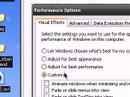
In this quick tutorial, I will show you how to make your Windows XP computer faster using two tweaks. For both of these, right click on my computer and select properties. In the properties window, select advanced. From there select settings under performance. A new window will open up and this is were the two small tweaks change. For the fist one, stay in the visual effects tab and select custom. I would then suggest checking the following boxes: use visual styles on windows and buttons, use common tasks on folders, smooth edges of screen fonts, and show window's contents while dragging. Once you have selected the options you would like, click apply. For the next tweak, you go to advanced instead of visual effects. Select change under virtual memory. As an initial and maximum value, use double your memory, For example, I have 512 mb of ram, so my initial and maximum value would be 1024 mb or 1000 mb. For 1024 mb or 1 gb, it would be 2048 mb or 2000 mb.
Please post any comments you think of and keep posted for more updates.
In this quick tutorial, I will show you how to make your Windows XP computer faster using two tweaks. For both of these, right click on my computer and select properties. In the properties window, select advanced. From there select settings under performance. A new window will open up and this is were the two small tweaks change. For the fist one, stay in the visual effects tab and select custom. I would then suggest checking the following boxes: use visual styles on windows and buttons, use common tasks on folders, smooth edges of screen fonts, and show window's contents while dragging. Once you have selected the options you would like, click apply. For the next tweak, you go to advanced instead of visual effects. Select change under virtual memory. As an initial and maximum value, use double your memory, For example, I have 512 mb of ram, so my initial and maximum value would be 1024 mb or 1000 mb. For 1024 mb or 1 gb, it would be 2048 mb or 2000 mb.
Please post any comments you think of and keep posted for more updates.
About this tutorial
Keifker published this 3:50 video tutorial on November 5, 2008. It has been watched 136,015 times on YouTube.
- Channel
- Keifker
- Category
- Howto & Style
- Duration
- 3:50
- Published
- November 5, 2008
- Views
- 136,015
- Likes
- 233
Tags
Share
This tutorial in other languages
- FRComment: rendre Windows XP plus rapide et plus efficace
- ESCómo hacer que Windows XP más rápido y más eficiente
- PTComo: Fazer Windows XP mais rápido e eficiente
- ITCome: fare di Windows XP più veloce ed efficiente
- DEGewusst wie: Machen Sie Windows XP schneller und effizienter
- NLHow to: Maak Windows XP sneller en efficiënter
- RUКак: Сделать Windows XP быстрее и эффективнее
- PLJak: Dodać Windows XP szybsze i bardziej wydajne
- JAより速く、より効率的にWindows XPを作る方法:
- ARكيفية: جعل ويندوز XP بشكل أسرع وأكثر كفاءة
- HIकैसे करें: Windows XP तेजी से और अधिक कुशल बनाने
- IDCara: Membuat Windows XP cepat dan lebih efisien