Playback starts YouTube’s embedded player (privacy-enhanced mode).
How To Make Your Facebook Profile Private (2020 UPDATE)
ChannelFreewaySocialDescription from the creator
Would you like to make your Facebook profile private? In this video I will show you how to make your Facebook profile private fast & easy!
------
👉 Get more Facebook page likes here: freewaysocial.com/buy-facebook-fanpage-likes
👉 Get more Facebook followers here: freewaysocial.com/buy-facebook-followers
👉 Read our article on how to make your Facebook profile private: freewaysocial.com/how-to-make-your-facebook-pro…
------
You cannot just make your Facebook profile private by a click of a button, but you can tweak your Facebook settings so that only your friends could see your pictures and posts on Facebook.
Just follow these steps below:
1. Open up Facebook app and login to your profile if you haven’t already;
2. Click on the menu icon at the top right corner of your screen;
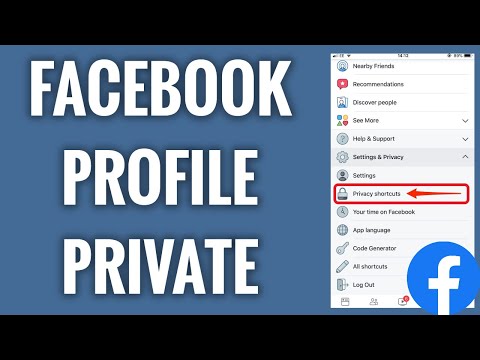
3. Select “Settings & Privacy”. From the drop-down menu select “Privacy shortcuts”;
4. Under the “Privacy” tab, select “Review a few important privacy settings”;
5. Select “Who can see what you share”;
6. Click on “Continue”;
7. Under the “Friends and Following” tab, select who can see your friends list on your profile. Choose “Only me” or “Friends”. Select who can see the people, pages and lists you follow, choose from “Only me” or “Friends”.
8. Afterwards, click on “Next”. Choose who can see your future posts on Facebook. Select that only your friends could see your posts. Also, limit past posts so that your posts that were published earlier would be seen only by your friends and not available to public. Click on “Limit” and confirm it by clicking on “Limit” one more time again;
9. Click on “Next” and tap on “Next” one more time. Done! Now your Facebook profile is private!
I hope this guide was helpful and you were able to make your Facebook profile private. Don’t forget to like this video and visit us at freewaysocial.com/how-to-make-your-profile-priv…
------
👉 Get more Facebook page likes here: freewaysocial.com/buy-facebook-fanpage-likes
👉 Get more Facebook followers here: freewaysocial.com/buy-facebook-followers
👉 Read our article on how to make your Facebook profile private: freewaysocial.com/how-to-make-your-facebook-pro…
------
You cannot just make your Facebook profile private by a click of a button, but you can tweak your Facebook settings so that only your friends could see your pictures and posts on Facebook.
Just follow these steps below:
1. Open up Facebook app and login to your profile if you haven’t already;
2. Click on the menu icon at the top right corner of your screen;
3. Select “Settings & Privacy”. From the drop-down menu select “Privacy shortcuts”;
4. Under the “Privacy” tab, select “Review a few important privacy settings”;
5. Select “Who can see what you share”;
6. Click on “Continue”;
7. Under the “Friends and Following” tab, select who can see your friends list on your profile. Choose “Only me” or “Friends”. Select who can see the people, pages and lists you follow, choose from “Only me” or “Friends”.
8. Afterwards, click on “Next”. Choose who can see your future posts on Facebook. Select that only your friends could see your posts. Also, limit past posts so that your posts that were published earlier would be seen only by your friends and not available to public. Click on “Limit” and confirm it by clicking on “Limit” one more time again;
9. Click on “Next” and tap on “Next” one more time. Done! Now your Facebook profile is private!
I hope this guide was helpful and you were able to make your Facebook profile private. Don’t forget to like this video and visit us at freewaysocial.com/how-to-make-your-profile-priv…
About this tutorial
FreewaySocial published this 2:30 video tutorial on May 4, 2020. It has been watched 804,565 times on YouTube.
- Channel
- FreewaySocial
- Category
- Howto & Style
- Duration
- 2:30
- Published
- May 4, 2020
- Views
- 804,565
- Likes
- 4,950
Tags
Share
This tutorial in other languages
- FRComment rendre votre profil Facebook privé (2020 UPDATE)
- ESCómo hacer que su perfil de Facebook privado (2020 ACTUALIZACIÓN)
- PTComo fazer seu Facebook perfil privado (2020 UPDATE)
- ITCome creare il vostro Facebook profilo privato (2020 UPDATE)
- DEHow To Make Your Facebook Profil Private (2020 UPDATE)
- NLHoe je je Facebook-profiel Private (2020 UPDATE)
- RUКак сделать свой Facebook профиль Личное (2020 ДОПОЛНЕНО)
- PLJak sprawić, by Twój profil na Facebooku prywatnego (2020 AKTUALIZACJA)
- JAあなたのFacebookはプライベートプロフィール作成する方法(2020 UPDATE)
- ARكيفية جعل الفيسبوك ملفك الشخصي الخاصة (2020 UPDATE)
- HIकैसे आपका फेसबुक प्रोफाइल निजी बनाने के लिए (2020 अपडेट)
- IDCara Membuat Facebook Anda Profil Swasta (2020 UPDATE)