Playback starts YouTube’s embedded player (privacy-enhanced mode).
How to Paint Bob Ross Style Artrage-Brush Demo Concept Art
ChannelTNArtistDescription from the creator
Today I thought we could paint together and that I could give you a quick "crash course" in using some of the ArtRage brushes.
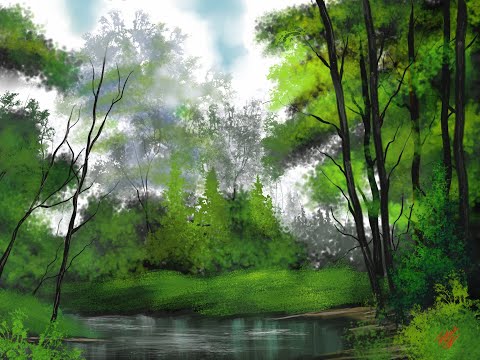
I have always loved watching Bob Ross, Bill Alexander, Jerry Yarnell, and other painting demonstrators. I followed along with a Bob Ross painting demonstration, without any audio to see if I could recreate it digitally and then maybe push a bit further. I hope you’ll enjoy following along with me while I demonstrate the techniques that I use for painting my version of Hidden Creek, a Bob Ross landscape in ArtRage 6. As with my other one, I’m using the default brushes (until the end) and the techniques taught by Bob in the episode. Also, right before we get started I’ll spend some time explaining the tools.
Quick note… towards the end, I use some custom stencils some are mine, and others that were created from a Skillshare class taught by Harley Fowler. I can’t recommend his class or quite a few others I’m taking at Skillshare. Feel free to use this link to get 2 free months…
Get a copy at skl.sh/2wf8k7h
Patreon: patreon.com/TNArtist
Etsy: etsy.com/shop/tnartistshop
Get a FREE, fully-functional trial of the ArtRage software you can at bit.ly/ArtRage6
(you just can't save or print from the trial version)
Make life a bit easier as you keep following along by using my Custom Hand-Painted ArtRage stencils and brushes (2 choices) –
gum.co/ThTFw
Over 70 Artrage Landscape and Watercolor Brushes & Stencils with Lifetime Updates!
gumroad.com/l/znZKO
(name your own price, so get them for free or pitch a little money my way to help support the work).
As you’ll see in this video and my others, I use a lot of traditional acrylics, watercolor, and oil painting techniques when painting digitally within any of the programs I use such as Rebelle 3, ArtRage or Photoshop. It’s my hope that you can learn how to create artwork and painterly textures.
For this video, I’m primarily using the "out of the box" tools. I do use a few custom stencils at the end but it's not needed to get the same look.
I hope this quick video shows how you can use Artrage to get the analog world look while not creating an overly digital look (i.e., keep it natural and painterly).
Leave comments and questions below. I try to respond as quickly as I can.
And try out the free trial of ArtRage 6! bit.ly/ArtRage6-FreeTrial
------------------------------------------
Did you enjoy this?
Come join my private Facebook group for tutorials, art lessons, and pleasant conversation.
Facebook Private Art Lessons Group: tinyurl.com/PrivateFaceBookArtLessons
------------------------------------------
Follow Me on Twitter: Twitter.com/TheTNArtist
Follow Me on Pinterest: Pinterest.com/TheTNArtist
Follow Me on Instagram: Instagram.com/thetnartist
Visit my Etsy store: etsy.com/shop/tnartistshop
Website: TNArtist.me
------------------------------------------
Free Use Music Supplied by YouTube
-~-~~-~~~-~~-~-
Please watch: "Rebelle 6 Newbies Guide - How to Paint The Old Store"
youtube.com/watch?v=J6t4fOPiHEk
-~-~~-~~~-~~-~-
I have always loved watching Bob Ross, Bill Alexander, Jerry Yarnell, and other painting demonstrators. I followed along with a Bob Ross painting demonstration, without any audio to see if I could recreate it digitally and then maybe push a bit further. I hope you’ll enjoy following along with me while I demonstrate the techniques that I use for painting my version of Hidden Creek, a Bob Ross landscape in ArtRage 6. As with my other one, I’m using the default brushes (until the end) and the techniques taught by Bob in the episode. Also, right before we get started I’ll spend some time explaining the tools.
Quick note… towards the end, I use some custom stencils some are mine, and others that were created from a Skillshare class taught by Harley Fowler. I can’t recommend his class or quite a few others I’m taking at Skillshare. Feel free to use this link to get 2 free months…
Get a copy at skl.sh/2wf8k7h
Patreon: patreon.com/TNArtist
Etsy: etsy.com/shop/tnartistshop
Get a FREE, fully-functional trial of the ArtRage software you can at bit.ly/ArtRage6
(you just can't save or print from the trial version)
Make life a bit easier as you keep following along by using my Custom Hand-Painted ArtRage stencils and brushes (2 choices) –
gum.co/ThTFw
Over 70 Artrage Landscape and Watercolor Brushes & Stencils with Lifetime Updates!
gumroad.com/l/znZKO
(name your own price, so get them for free or pitch a little money my way to help support the work).
As you’ll see in this video and my others, I use a lot of traditional acrylics, watercolor, and oil painting techniques when painting digitally within any of the programs I use such as Rebelle 3, ArtRage or Photoshop. It’s my hope that you can learn how to create artwork and painterly textures.
For this video, I’m primarily using the "out of the box" tools. I do use a few custom stencils at the end but it's not needed to get the same look.
I hope this quick video shows how you can use Artrage to get the analog world look while not creating an overly digital look (i.e., keep it natural and painterly).
Leave comments and questions below. I try to respond as quickly as I can.
And try out the free trial of ArtRage 6! bit.ly/ArtRage6-FreeTrial
------------------------------------------
Did you enjoy this?
Come join my private Facebook group for tutorials, art lessons, and pleasant conversation.
Facebook Private Art Lessons Group: tinyurl.com/PrivateFaceBookArtLessons
------------------------------------------
Follow Me on Twitter: Twitter.com/TheTNArtist
Follow Me on Pinterest: Pinterest.com/TheTNArtist
Follow Me on Instagram: Instagram.com/thetnartist
Visit my Etsy store: etsy.com/shop/tnartistshop
Website: TNArtist.me
------------------------------------------
Free Use Music Supplied by YouTube
-~-~~-~~~-~~-~-
Please watch: "Rebelle 6 Newbies Guide - How to Paint The Old Store"
youtube.com/watch?v=J6t4fOPiHEk
-~-~~-~~~-~~-~-
About this tutorial
TNArtist published this 19:44 video tutorial on May 12, 2020. It has been watched 1,943 times on YouTube.
- Channel
- TNArtist
- Category
- Howto & Style
- Duration
- 19:44
- Published
- May 12, 2020
- Views
- 1,943
- Likes
- 48
Share
This tutorial in other languages
- FRComment peindre Bob Ross style Artrage-Brush Démo Concept Art
- ESCómo pintar Bob Ross Estilo Artrage-Brush demostración Concept Art
- PTComo pintar Bob Ross Estilo Artrage-Brush Demonstração Concept Art
- ITCome dipingere Bob Ross Stile Artrage-Brush Demo Concept Art
- DEMalen wie Bob Ross Stil Artrage-Brush Demo Concept Art
- NLHoe te Paint Bob Ross Style Artrage-Brush Demo Concept Art
- RUКак Нарисовать Боб Росс Стиль Artrage-Brush Demo Concept Art
- PLJak malować Bob Ross Styl ArtRage szczotka Demo Art Concept
- JAボブ・ロススタイルArtrage-ブラシデモコンセプトアートをペイントする方法
- ARكيفية الطلاء بوب روس نمط النداوي الشعبية فرشاة تجريبي مفهوم الفن
- HIपेंट कैसे बॉब रॉस शैली ArtRage-ब्रश डेमो संकल्पना कला
- IDCara Cat Bob Ross Style ArtRage-Brush Demo Concept Art