Playback starts YouTube’s embedded player (privacy-enhanced mode).
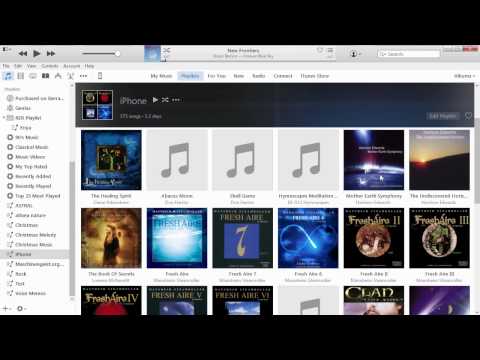
How to put CD music on iPhone iPad or iPod using iTunes 12.2 Playlist Manually (no sync)
ChannelSierraTechDescription from the creator
Apple's new iTunes 12.x looks a lot different than version 11. The sidebar can no longer be enabled, but will appear when necessary to move a playlist of albums to your iPhone. If you can't seem to figure out how to simplify managing music CDs in your iTunes library, and export to iPhone using iTunes 12.x then this is the video for you.
It assumes you understand what a playlist is.
You will not be able to manually manage music if you're a member of Apple Music or have an iTunes Match subscription, and have iCloud Music Library turned on. When you have iCloud Music Library turned on, you will not see, "manually manage music". You can still manage videos. See Apple Article below:
support.apple.com/en-us/HT201593
It assumes you understand what a playlist is.
You will not be able to manually manage music if you're a member of Apple Music or have an iTunes Match subscription, and have iCloud Music Library turned on. When you have iCloud Music Library turned on, you will not see, "manually manage music". You can still manage videos. See Apple Article below:
support.apple.com/en-us/HT201593
About this tutorial
SierraTech published this 6:25 video tutorial on November 11, 2015. It has been watched 43,000 times on YouTube.
- Channel
- SierraTech
- Category
- Howto & Style
- Duration
- 6:25
- Published
- November 11, 2015
- Views
- 43,000
- Likes
- 188
Tags
Share
This tutorial in other languages
- FRComment mettre de la musique CD sur l'utilisation de l'iPhone iPad ou iPod iTunes 12.2 Playlist manuellement (pas de synchronisation)
- ES¿Cómo poner música de CD en el iPhone iPad o iPod a través de iTunes 12.2 Lista de reproducción manualmente (sin sincronización)
- PTComo colocar música CD no iPad iPhone ou iPod usando o iTunes 12.2 Playlist manualmente (sem sincronização)
- ITCome mettere la musica CD su iPhone iPad o iPod utilizzando iTunes 12.2 Playlist manualmente (senza sincronizzazione)
- DEWie CD Musik auf iPhone iPad oder iPod mit iTunes 12.2 Playlist manuell (kein sync) setzen
- NLHoe maak je CD muziek zetten iPhone iPad of iPod met iTunes 12.2 Playlist Handmatig (geen sync)
- RUКак поставить музыку на CD iPhone IPad или IPod ITunes 12.2 с помощью списка воспроизведения вручную (без синхронизации)
- PLJak umieścić muzykę na CD iPhone iPad lub iPod za pomocą iTunes 12.2 Playlist ręcznie (bez synchronizacji)
- JAiTunesのプレイリストを手動で12.2(同期なし)を使用してiPhone iPadやiPodでCDの音楽を入れる方法
- ARكيفية وضع CD الموسيقى على اي فون باد أو آي بود باستخدام اي تيونز 12.2 التشغيل يدويا (لا مزامنة)
- HIiPhone iPad या iPod iTunes का उपयोग करने पर सीडी संगीत डाल करने के लिए कैसे 12.2 प्लेलिस्ट मैन्युअल (कोई सिंक)
- IDBagaimana menempatkan musik CD pada iPhone iPad atau iPod menggunakan iTunes 12.2 Playlist manual (tidak ada sync)