Playback starts YouTube’s embedded player (privacy-enhanced mode).
How to Redirect Outlook 2010 Emails to Another Email Address
ChannelExcel, Word and PowerPoint Tutorials from HowtechDescription from the creator
Learn how to redirect emails to another email address in Microsoft Outlook.
Don't forget to check out our site howtech.tv/ for more free how-to videos!
youtube.com/ithowtovids - our feed
facebook.com/howtechtv - join us on facebook
plus.google.com/103440382717658277879 - our group in Google+
In this video tutorial we will show you how to redirect outlook emails to another email address.
Launch Microsoft Outlook. In the "Home" tab, click on "Rules" and in the popup menu choose "Manage Rules & Alerts".
In the following window, press "New rule". In the "Rules Wizard" window select "Apply rule on messages I receive" and press "Next".
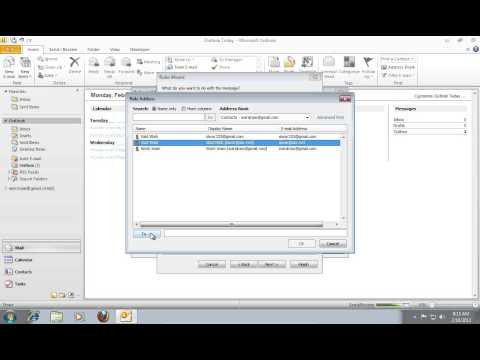
In the next window, check "sent only to me" and "where my name is in the To or Cc box" options, then press "Next". In the following window, check "forward it to people or public group". When it's done, click on "people or public group". In the next window, select the e-mail address where you want to redirect your messages and press "To -". If you need, you can add a few email addresses, and then press "Ok".
In the "Rules Wizard" window, press "Next". In the next window, if you don't need any exceptions in your rule, press "next" again. In the following window, enter a name for your rule and then press "Finish".
To launch the rule, press "Apply" and then press "Ok".
Don't forget to check out our site howtech.tv/ for more free how-to videos!
youtube.com/ithowtovids - our feed
facebook.com/howtechtv - join us on facebook
plus.google.com/103440382717658277879 - our group in Google+
In this video tutorial we will show you how to redirect outlook emails to another email address.
Launch Microsoft Outlook. In the "Home" tab, click on "Rules" and in the popup menu choose "Manage Rules & Alerts".
In the following window, press "New rule". In the "Rules Wizard" window select "Apply rule on messages I receive" and press "Next".
In the next window, check "sent only to me" and "where my name is in the To or Cc box" options, then press "Next". In the following window, check "forward it to people or public group". When it's done, click on "people or public group". In the next window, select the e-mail address where you want to redirect your messages and press "To -". If you need, you can add a few email addresses, and then press "Ok".
In the "Rules Wizard" window, press "Next". In the next window, if you don't need any exceptions in your rule, press "next" again. In the following window, enter a name for your rule and then press "Finish".
To launch the rule, press "Apply" and then press "Ok".
About this tutorial
Excel, Word and PowerPoint Tutorials from Howtech published this 1:51 video tutorial on November 11, 2013. It has been watched 161,591 times on YouTube.
- Category
- Howto & Style
- Duration
- 1:51
- Published
- November 11, 2013
- Views
- 161,591
- Likes
- 247
Share
This tutorial in other languages
- FRComment Redirect Outlook 2010 e-mails à une autre adresse e-mail
- ESCómo redirigir los correos electrónicos de Outlook 2010 a otra dirección de correo electrónico
- PTComo redirecionar Outlook 2010 e-mails para outro endereço de email
- ITCome Redirect Outlook 2010 Messaggi di posta elettronica a un altro indirizzo e-mail
- DEWie man Redirect Outlook 2010 E-Mails an eine andere E-Mail-Adresse
- NLHoe kan Redirect Outlook 2010 e-mails naar een ander e-mailadres
- RUКак Перенаправление Outlook 2010 сообщений электронной почты на другой адрес электронной почты
- PLJak przekierować Outlook 2010 wiadomości e-mail na inny adres e-mail
- JAどのように別のメールアドレスにリダイレクトOutlook 2010通の電子メールへ
- ARكيفية إعادة توجيه رسائل البريد الإلكتروني 2010 Outlook إلى عنوان بريد إلكتروني آخر
- HIकैसे किसी अन्य ईमेल पते पर रीडायरेक्ट आउटलुक 2010 ईमेल करने के लिए
- IDCara Redirect Outlook 2010 Email ke lain Alamat Email