Playback starts YouTube’s embedded player (privacy-enhanced mode).
How to Restore Reset a iMac to Factory Settings ║ macOS Mojave
ChannelSerg TechDescription from the creator
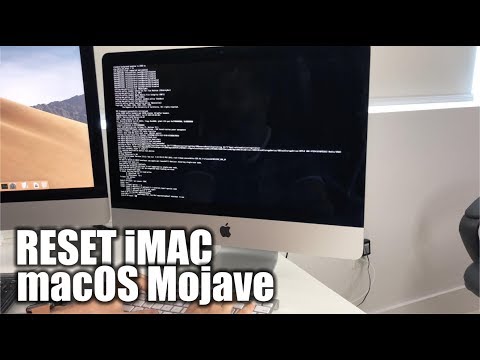
This is a video on how to perform a hard reset factory restore on a iMac running Mac OS Mojave. I show you 2 methods to reset your Apple iMac to factory settings.
Steps
1. Power off the iMac
2. Power it on and hold "Command" key and "S" key at the same time.
3. Hold until the black screen with all the coding appears.
4. Type in the following
mount -uw / (hit Enter)
rm /var/db/.applesetupdone (hit Enter)
shutdown -h now (hit Enter)
5. The iMac will power off, so just power it back on.
6. Congrats if you got this far your iMac should have been reset.
Disclaimer - A factory data reset both hard or soft will erase all of your personal information on your device and return it to its out of the box state. You are doing this factory data wipe/reset on your device at your own risk. We are not responsible for any problems or technical difficulties caused from trying these techniques.
Instagram - instagram.com/serg.tech/
Things I use in this video
- Camera: amzn.to/2DuPJbV
- Microphone: amzn.to/2DWnDTV
- Lighting Kit: amzn.to/2DqOKoI
- Video Editor: kqzyfj.com/click-8541081-11245643
Disclosure: This video and description contains affiliate links, which means that if you click on one of the product links, I’ll receive a small commission. This helps support the channel and allows us to continue to make videos like this. Thank you for the support!
Steps
1. Power off the iMac
2. Power it on and hold "Command" key and "S" key at the same time.
3. Hold until the black screen with all the coding appears.
4. Type in the following
mount -uw / (hit Enter)
rm /var/db/.applesetupdone (hit Enter)
shutdown -h now (hit Enter)
5. The iMac will power off, so just power it back on.
6. Congrats if you got this far your iMac should have been reset.
Disclaimer - A factory data reset both hard or soft will erase all of your personal information on your device and return it to its out of the box state. You are doing this factory data wipe/reset on your device at your own risk. We are not responsible for any problems or technical difficulties caused from trying these techniques.
Instagram - instagram.com/serg.tech/
Things I use in this video
- Camera: amzn.to/2DuPJbV
- Microphone: amzn.to/2DWnDTV
- Lighting Kit: amzn.to/2DqOKoI
- Video Editor: kqzyfj.com/click-8541081-11245643
Disclosure: This video and description contains affiliate links, which means that if you click on one of the product links, I’ll receive a small commission. This helps support the channel and allows us to continue to make videos like this. Thank you for the support!
About this tutorial
Serg Tech published this 6:37 video tutorial on November 11, 2019. It has been watched 1,113,398 times on YouTube.
- Channel
- Serg Tech
- Category
- Howto & Style
- Duration
- 6:37
- Published
- November 11, 2019
- Views
- 1,113,398
- Likes
- 7,331
Share
This tutorial in other languages
- FRComment restaurer Réinitialiser un iMac aux réglages par défaut de macOS Mojave
- ESCómo restaurar Restablecer un iMac a la configuración de fábrica ║ macOS Mojave
- PTComo restaurar redefinir um iMac as definições de fábrica ║ MacOS Mojave
- ITCome ripristinare un reset delle impostazioni di fabbrica iMac ║ MacOS Mojave
- DEWie Wiederherstellen ║ einen iMac auf die Werkseinstellungen zurücksetzen macOS Mojave
- NLHoe te herstellen Reset een iMac naar fabrieksinstellingen ║ MacOS Mojave
- RUКак восстановить Сброс ИМАКА к заводским установкам ║ Macos Мохаве
- PLJak przywrócić iMac Resetowanie do ustawień fabrycznych ║ MacOS Mojave
- JA工場出荷時設定║MacOSのモハーベにリセットのiMacを復元する方法
- ARكيفية استعادة إعادة تعيين إيماك إلى إعدادات المصنع ║ ماك موهافي
- HIकैसे पुनर्स्थापित करने के लिए फैक्टरी सेटिंग्स ║ MacOS मोजावे करने के लिए एक आईमैक रीसेट
- IDCara Kembalikan Mereset iMac ke Pengaturan Pabrik ║ MacOS Mojave