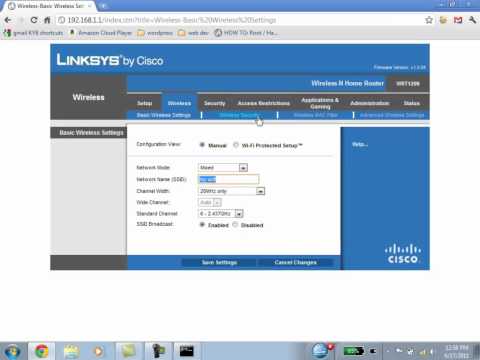
Playback starts YouTube’s embedded player (privacy-enhanced mode).
How to Setup and Configure Any Wireless Router. Tech Lab Tutorial
ChannelLai Tran Mix FixChapters
Description from the creator
Learn how to set up and configure any wireless router in this easy, step-by-step tutorial. Whether you have a brand new router or need to reset an old one, this universal guide walks you through finding your IP address, logging in, changing your Wi-Fi name (SSID), and setting a secure password.
⚙️ About This Video:
Setting up a home network can feel overwhelming, but you only need a few simple steps to get it running safely. In this Tech Lab tutorial, we break down the universal configuration method that works for Linksys, Netgear, D-Link, TP-Link, and most major router brands. You'll learn how to navigate the command prompt, access your router's default gateway web interface, and secure your wireless connection against unauthorized users.
⏱️ Timestamps for Easy Navigation:
00:00 - Introduction to Router Setup
00:24 - Connecting the Router Hardware and Ethernet Cables
01:11 - Using CMD (ipconfig) to Find Your Router's Default Gateway IP
02:35 - How to Access the Router Login Page via Web Browser
03:30 - Default Router Usernames & Passwords (Linksys, D-Link, etc.)
04:45 - Changing Your Wireless Network Name (SSID)
05:53 - Setting Up Wireless Security (WPA Personal) & Passphrases
07:23 - Testing Your Wireless Connection
08:53 - Connecting Your Internet Modem (ISP Setup)
💡 Key Takeaways & Common Router Defaults:
• Windows Shortcut: Press Start, type 'CMD', and use 'ipconfig' to find your gateway IP.
• Common Gateway IPs: 192.168.1.1 or 192.168.0.1
• Default Credentials: Often admin/admin, admin/password, or leaving the password blank.
• Security Recommendation: Always choose WPA Personal (WPA2/WPA3) with at least an 8-character password mixing letters, numbers, and symbols.
If you found this network setup tutorial helpful, please give the video a like, leave a comment if you hit any snags, and subscribe to Tech Lab for more straightforward computer repair and tech support guides!
#RouterSetup #WiFiConfiguration #TechLab #HowToSetupRouter #NetworkingTutorial #ComputerRepair #WirelessRouter
⚙️ About This Video:
Setting up a home network can feel overwhelming, but you only need a few simple steps to get it running safely. In this Tech Lab tutorial, we break down the universal configuration method that works for Linksys, Netgear, D-Link, TP-Link, and most major router brands. You'll learn how to navigate the command prompt, access your router's default gateway web interface, and secure your wireless connection against unauthorized users.
⏱️ Timestamps for Easy Navigation:
00:00 - Introduction to Router Setup
00:24 - Connecting the Router Hardware and Ethernet Cables
01:11 - Using CMD (ipconfig) to Find Your Router's Default Gateway IP
02:35 - How to Access the Router Login Page via Web Browser
03:30 - Default Router Usernames & Passwords (Linksys, D-Link, etc.)
04:45 - Changing Your Wireless Network Name (SSID)
05:53 - Setting Up Wireless Security (WPA Personal) & Passphrases
07:23 - Testing Your Wireless Connection
08:53 - Connecting Your Internet Modem (ISP Setup)
💡 Key Takeaways & Common Router Defaults:
• Windows Shortcut: Press Start, type 'CMD', and use 'ipconfig' to find your gateway IP.
• Common Gateway IPs: 192.168.1.1 or 192.168.0.1
• Default Credentials: Often admin/admin, admin/password, or leaving the password blank.
• Security Recommendation: Always choose WPA Personal (WPA2/WPA3) with at least an 8-character password mixing letters, numbers, and symbols.
If you found this network setup tutorial helpful, please give the video a like, leave a comment if you hit any snags, and subscribe to Tech Lab for more straightforward computer repair and tech support guides!
#RouterSetup #WiFiConfiguration #TechLab #HowToSetupRouter #NetworkingTutorial #ComputerRepair #WirelessRouter
About this tutorial
Lai Tran Mix Fix published this 9:48 video tutorial on October 25, 2011. It has been watched 1,103,878 times on YouTube.
- Channel
- Lai Tran Mix Fix
- Category
- Howto & Style
- Duration
- 9:48
- Published
- October 25, 2011
- Views
- 1,103,878
- Likes
- 2,412
Tags
Share
This tutorial in other languages
- FRComment installer et configurer un routeur sans fil. Tech Lab Tutorial
- ESCómo instalar y configurar cualquier router inalámbrico. Tutorial Lab Tech
- PTComo instalar e configurar Qualquer Wireless Router. Tutorial Tecnologia do laboratório
- ITCome impostare e configurare qualsiasi router wireless. Tech Lab Tutorial
- DEWie zum Einrichten und Konfigurieren aller Wireless-Router. Tech Lab Tutorial
- NLHoe te installeren en configureren Elke Wireless Router. Tech Lab Tutorial
- RUКак установить и настроить любой беспроводной маршрутизатор. Учебник Lab Tech
- PLJak skonfigurować i skonfigurować dowolny Wireless Router. Tech Lab Tutorial
- JAどのようにセットアップして構成する任意のワイヤレスルータへ。テックラボのチュートリアル
- ARكيفية إعداد وتكوين أي جهاز التوجيه اللاسلكي. التكنولوجيا مختبر تعليمي
- HIकैसे सेटअप और कॉन्फ़िगर किसी भी वायरलेस रूटर करने के लिए। टेक लैब ट्यूटोरियल
- IDCara Setup dan Konfigurasi Setiap Wireless Router. Tech Lab Tutorial