Playback starts YouTube’s embedded player (privacy-enhanced mode).
how to setup static ip address Ubuntu
ChannelDiako MDescription from the creator
in the video , i am going to show you how to set up static ip address on Ubuntu.
1.. change user to root user by typing sudo -s
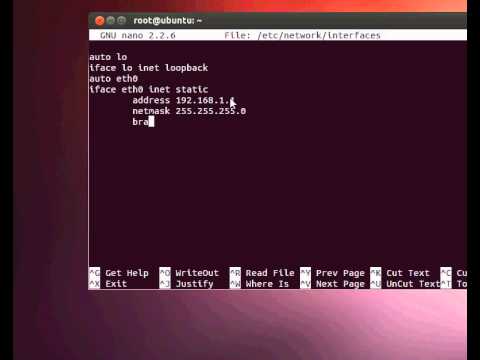
2.. nano /etc/network/interfaces and edit it in configuration, for example .
auto lo
iface lo inet loopback
auto eth0
iface eth0 inet static
address 192.168.1.193
netmask 255.255.255.192
broadcast 192.168.1.255
gateway 192.168.1.254
dns-nameservers 192.168.1.254
dns-search lan
and we save it by doing CTRL X, and type yes to confirm.
3.. we need to restart the network, type sudo /etc/init.d/networking restart.
by now you should have a static ip address.. thank for watching this video and apologize for my English. thanks
Please like my Facebook page
facebook.com/diakopc
facebook.com/chchphonrepair
1.. change user to root user by typing sudo -s
2.. nano /etc/network/interfaces and edit it in configuration, for example .
auto lo
iface lo inet loopback
auto eth0
iface eth0 inet static
address 192.168.1.193
netmask 255.255.255.192
broadcast 192.168.1.255
gateway 192.168.1.254
dns-nameservers 192.168.1.254
dns-search lan
and we save it by doing CTRL X, and type yes to confirm.
3.. we need to restart the network, type sudo /etc/init.d/networking restart.
by now you should have a static ip address.. thank for watching this video and apologize for my English. thanks
Please like my Facebook page
facebook.com/diakopc
facebook.com/chchphonrepair
About this tutorial
Diako M published this 3:38 video tutorial on November 9, 2012. It has been watched 114,220 times on YouTube.
- Channel
- Diako M
- Category
- Howto & Style
- Duration
- 3:38
- Published
- November 9, 2012
- Views
- 114,220
- Likes
- 272
Tags
Share
This tutorial in other languages
- FRComment configurer l'adresse IP dans Redhat 7 || RHEL7 ou Centos7 étape par étape
- ESCómo configurar la dirección IP en Redhat 7 || RHEL7 o Centos7 paso a paso
- PTComo definir o endereço IP no Redhat 7 || RHEL7 ou Centos7 Passo a Passo
- ITCome impostare l'indirizzo IP in Redhat 7 || RHEL7 o Centos7 Step by Step
- DESo stellen Sie die IP-Adresse in Redhat 7 || RHEL7 oder Centos7 Schritt für Schritt
- NLHet instellen van het IP-adres in Redhat 7 || RHEL7 of Centos7 Step by Step
- RUКак установить IP-адрес в Redhat 7 || RHEL7 или Centos7 шаг за шагом
- PLJak ustawić adres IP w RedHat 7 || RHEL7 lub Centos7 krok po kroku
- JARedHatの7でIPアドレスを設定する方法||ステップバイRHEL7またはCentos7ステップ
- ARكيفية تعيين عنوان IP في ردهات 7 || RHEL7 أو Centos7 خطوة خطوة
- HIकैसे Redhat 7 में आईपी पता सेट करने के लिए || RHEL7 या Centos7 चरण दर चरण
- IDcara men-setup statis Ubuntu alamat ip