Playback starts YouTube’s embedded player (privacy-enhanced mode).
How To Setup Your PDA & Computer For Microsoft ActiveSync Partnership
ChannelDiamond LotDescription from the creator
Installing DiamondLot PDA Program: Before installation, verify you have Microsoft Active Sync / Mobile Device Center installed on you computer.
Windows XP & Older: Microsoft Active Sync Required
Windows Vista: Windows Mobile Device Center Required
Windows 7: Windows Mobile Device Center Required
Step 1) Connect the PDA to your computer via a docking cradle or USB connection.
If this is the first time you are connecting your PDA to this computer a 'Connection Setup Wizard' window will display, proceed with the setup to complete a connection.
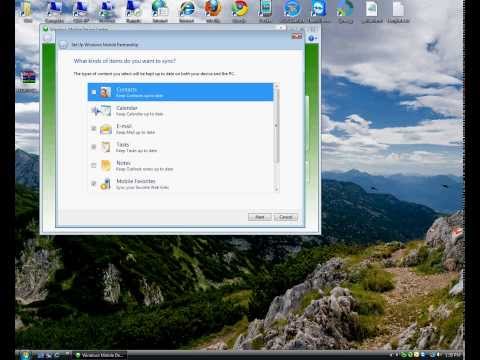
Active Sync / Mobile Device Center allows you to synchronize multiple items between your desktop and PDA. These items ARE NOT needed to use the DiamondLot Program. It is recommended that you uncheck these items on the 'Sync Options' menu, you can include later at any given time if needed but for first time installation it is best to have them unchecked.
Windows XP & Older: Microsoft Active Sync Required
Windows Vista: Windows Mobile Device Center Required
Windows 7: Windows Mobile Device Center Required
Step 1) Connect the PDA to your computer via a docking cradle or USB connection.
If this is the first time you are connecting your PDA to this computer a 'Connection Setup Wizard' window will display, proceed with the setup to complete a connection.
Active Sync / Mobile Device Center allows you to synchronize multiple items between your desktop and PDA. These items ARE NOT needed to use the DiamondLot Program. It is recommended that you uncheck these items on the 'Sync Options' menu, you can include later at any given time if needed but for first time installation it is best to have them unchecked.
About this tutorial
Diamond Lot published this 0:53 video tutorial on October 26, 2010. It has been watched 6,942 times on YouTube.
- Channel
- Diamond Lot
- Category
- Howto & Style
- Duration
- 0:53
- Published
- October 26, 2010
- Views
- 6,942
- Likes
- 6
Tags
Share
This tutorial in other languages
- FRComment configurer votre PDA et l'ordinateur Pour Microsoft ActiveSync partenariat
- ES¿Cómo configurar su ordenador para PDA y Microsoft ActiveSync Asociación
- PTComo configurar o seu PDA & computador Para o Microsoft ActiveSync Parceria
- ITCome installare il vostro PDA e computer Per Microsoft ActiveSync Partnership
- DESo richten Sie Ihr PDA & Computer für Microsoft ActiveSync-Partnerschaft
- NLHoe je je PDA en Computer Voor Microsoft ActiveSync Partnership
- RUКак настроить Ваш КПК и компьютер для Microsoft ActiveSync Partnership
- PLJak skonfigurować PDA & Computer System Microsoft ActiveSync Partnership
- JAどのようにセットアップするためにあなたのPDA&コンピュータ用のMicrosoft ActiveSyncのパートナーシップ
- ARكيفية الإعداد الخاص PDA والكمبيوتر للحصول على الشراكة اكتف مايكروسوفت
- HIकैसे सेटअप करने के लिए आपका पीडीए और कंप्यूटर के लिए Microsoft ActiveSync भागीदारी
- IDCara Setup Anda PDA & Komputer Untuk Microsoft ActiveSync Kemitraan