Playback starts YouTube’s embedded player (privacy-enhanced mode).
How to Update Adobe InDesign CS5 plugins
ChannelMarkzwareDescription from the creator
Wondering how to Update Adobe InDesign CS5 plugins? This video tutorial shows how to update InDesign CS5 plugins. These end with the .InDesignPlugin file extension. For this "how to" Adobe InDesign CS5 plugins tutorial, we show you an InDesign CS5 plugin, the Q2ID (Quark to InDesign) file converter.
Note: The stand-alone QXPMarkz app replaces the Q2ID InDesign plugin and can convert QuarkXPress to InDesign, Affinity Publisher, older QuarkXPress versions, and more:
markzware.com/products/qxpmarkz/
[Start of Transcript]
How to Update Adobe InDesign CS5 plugins
How to Update Adobe CS5 plugins: Today, we're going to learn how to update those Adobe InDesign CS5 plugins, but first of all, what is a plugin? Well, we read here the InDesign plugin modules are software programs developed by the Adobe Systems and other software developers, third-party software developers, working in conjunction with Adobe, to add features to Adobe software.
A number of importing, exporting, automation, and special effects plug-ins come with your program, and automatically are installed, in the plugins folder. Let's go look at that, over there, in the Adobe Applications folder, right now.
Okay, so on this Mac, here in the Applications folder, and I cruise into Adobe InDesign CS5. And inside Adobe InDesign CS5, you see several folders, one, which is the plugins folder, just mentioned in the "Help" page on the Adobe.com site. So, if you click on this Plug-Ins folder, once again, we're in CS5, the "CS5 Plug-Ins" folder. We see, inside of there, several different subfolders.
So, how do we get third-party plug-ins? How do we add features and functions to Adobe InDesign, without plugging into Adobe, themselves? Let's go check that out.
Okay, I'm over, here, at a third-party developer for CS5 plugins, called "Markzware," markzware.com, and we make several plugins and XTensions for InDesign and other DTP applications: Quark, Illustrator, Photoshop, etc.
We cruise on, into one particular Adobe InDesign CS5 plugin, which is Q2ID. We can, there, read that Q2ID imports Quark files into InDesign. It'll open Quark files in InDesign. So, this is a very handy CS5 plugin. So, we can buy that now and, once we get this product, we'll install it and show you how it looks, in the Adobe CS5 Plug-Ins folder.
Here's an example of an Adobe InDesign CS5.5 plugin. You see the .InDesignPlugin gives it away, as an Adobe InDesign CS5 plugin, in this case. We see different versions of InDesign plugins, as well. Let's look, add this into our InDesign folder, under the "Plug-Ins and Filters" folder, and see how that works.
Okay, so, now we've added or used the third-party developer's installer, to install the plugin, and, in this case, we'll go under "Filters" in the "Plug-Ins" folder, and we'll see, in there, are several other plugins. You'll notice that they all have the .InDesignPlugin extension.
And you'll see that one of those is the one we just showed you, from Markzware, Q2ID v5.5 plugin for CS5.5. And this plugin will, now, show up, within our Adobe InDesign CS5 application. So, that is how you can update Adobe InDesign CS5 plugins, by simply reinstalling a version of that plugin. In this case, we get a fresh install.
Alright, how does it look, inside InDesign? How does this update of Adobe InDesign CS5 plugin look, once we've launched Adobe InDesign? Let's go check it out.
So, here we are within InDesign, where you will see updated Adobe InDesign CS5 plugins and where you'll need to install them. It really depends on the manufacturer.
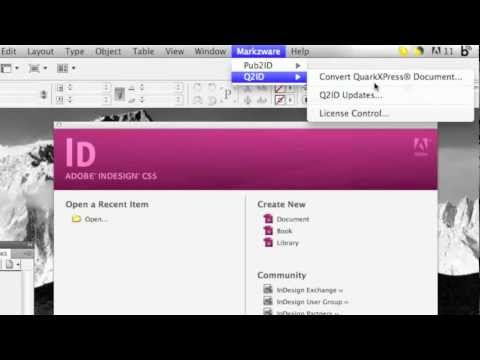
InDesign CS5 plugins can be built to work, in the background, with InDesign. Markzware, in this case, adds a "Markzware" menu item, up top, in the "InDesign" menu item. So, you see this updated InDesign CS5 plugin shows up, right within InDesign. Alright, everybody. This has been the "How to Update InDesign CS5 plugins". I hope it's been helpful. It's quite a simple process.
You simply must just go to the developer, to Adobe's webpage, and find the updated version of that plugin. And basically, generally do a fresh install, or update, or reinstall the plugin. Plugins are very useful. They can help you enhance Adobe InDesign incredibly, saving you even more time and money. This is David Dilling, for Markzware, on how to update Adobe InDesign CS5 plugins.
[End of Transcript]
Like this Video & Subscribe to our YouTube channel:
youtube.com/c/Markzware
Follow us on Social Media:
LinkedIn: linkedin.com/company/markzware/
Facebook: facebook.com/MarkzwareSoftware
GETTR: gettr.com/user/markzware/
Pinterest: pinterest.com/markzware/
Tumblr: markzware.tumblr.com/
Twitter: twitter.com/markzware
Visit our Website:
markzware.com
Read Industry Articles:
markzware.com/blog/
Get the Latest Markzware News:
markzware.com/support/mailing-list/
#UpdatePlugins #InDesign #InDesignPlugins
How to Update Adobe InDesign CS5 plugins
Note: The stand-alone QXPMarkz app replaces the Q2ID InDesign plugin and can convert QuarkXPress to InDesign, Affinity Publisher, older QuarkXPress versions, and more:
markzware.com/products/qxpmarkz/
[Start of Transcript]
How to Update Adobe InDesign CS5 plugins
How to Update Adobe CS5 plugins: Today, we're going to learn how to update those Adobe InDesign CS5 plugins, but first of all, what is a plugin? Well, we read here the InDesign plugin modules are software programs developed by the Adobe Systems and other software developers, third-party software developers, working in conjunction with Adobe, to add features to Adobe software.
A number of importing, exporting, automation, and special effects plug-ins come with your program, and automatically are installed, in the plugins folder. Let's go look at that, over there, in the Adobe Applications folder, right now.
Okay, so on this Mac, here in the Applications folder, and I cruise into Adobe InDesign CS5. And inside Adobe InDesign CS5, you see several folders, one, which is the plugins folder, just mentioned in the "Help" page on the Adobe.com site. So, if you click on this Plug-Ins folder, once again, we're in CS5, the "CS5 Plug-Ins" folder. We see, inside of there, several different subfolders.
So, how do we get third-party plug-ins? How do we add features and functions to Adobe InDesign, without plugging into Adobe, themselves? Let's go check that out.
Okay, I'm over, here, at a third-party developer for CS5 plugins, called "Markzware," markzware.com, and we make several plugins and XTensions for InDesign and other DTP applications: Quark, Illustrator, Photoshop, etc.
We cruise on, into one particular Adobe InDesign CS5 plugin, which is Q2ID. We can, there, read that Q2ID imports Quark files into InDesign. It'll open Quark files in InDesign. So, this is a very handy CS5 plugin. So, we can buy that now and, once we get this product, we'll install it and show you how it looks, in the Adobe CS5 Plug-Ins folder.
Here's an example of an Adobe InDesign CS5.5 plugin. You see the .InDesignPlugin gives it away, as an Adobe InDesign CS5 plugin, in this case. We see different versions of InDesign plugins, as well. Let's look, add this into our InDesign folder, under the "Plug-Ins and Filters" folder, and see how that works.
Okay, so, now we've added or used the third-party developer's installer, to install the plugin, and, in this case, we'll go under "Filters" in the "Plug-Ins" folder, and we'll see, in there, are several other plugins. You'll notice that they all have the .InDesignPlugin extension.
And you'll see that one of those is the one we just showed you, from Markzware, Q2ID v5.5 plugin for CS5.5. And this plugin will, now, show up, within our Adobe InDesign CS5 application. So, that is how you can update Adobe InDesign CS5 plugins, by simply reinstalling a version of that plugin. In this case, we get a fresh install.
Alright, how does it look, inside InDesign? How does this update of Adobe InDesign CS5 plugin look, once we've launched Adobe InDesign? Let's go check it out.
So, here we are within InDesign, where you will see updated Adobe InDesign CS5 plugins and where you'll need to install them. It really depends on the manufacturer.
InDesign CS5 plugins can be built to work, in the background, with InDesign. Markzware, in this case, adds a "Markzware" menu item, up top, in the "InDesign" menu item. So, you see this updated InDesign CS5 plugin shows up, right within InDesign. Alright, everybody. This has been the "How to Update InDesign CS5 plugins". I hope it's been helpful. It's quite a simple process.
You simply must just go to the developer, to Adobe's webpage, and find the updated version of that plugin. And basically, generally do a fresh install, or update, or reinstall the plugin. Plugins are very useful. They can help you enhance Adobe InDesign incredibly, saving you even more time and money. This is David Dilling, for Markzware, on how to update Adobe InDesign CS5 plugins.
[End of Transcript]
Like this Video & Subscribe to our YouTube channel:
youtube.com/c/Markzware
Follow us on Social Media:
LinkedIn: linkedin.com/company/markzware/
Facebook: facebook.com/MarkzwareSoftware
GETTR: gettr.com/user/markzware/
Pinterest: pinterest.com/markzware/
Tumblr: markzware.tumblr.com/
Twitter: twitter.com/markzware
Visit our Website:
markzware.com
Read Industry Articles:
markzware.com/blog/
Get the Latest Markzware News:
markzware.com/support/mailing-list/
#UpdatePlugins #InDesign #InDesignPlugins
How to Update Adobe InDesign CS5 plugins
About this tutorial
Markzware published this 4:42 video tutorial on October 30, 2011. It has been watched 159,123 times on YouTube.
- Channel
- Markzware
- Category
- Howto & Style
- Duration
- 4:42
- Published
- October 30, 2011
- Views
- 159,123
Tags
Share
This tutorial in other languages
- FRComment plug-ins Adobe InDesign Update CS5
- ESComo los plugins de Adobe InDesign CS5 actualización
- PTComo plugins Atualização Adobe InDesign CS5
- ITCome plugin Aggiornamento Adobe InDesign CS5
- DEWie Aktualisieren von Adobe InDesign CS5-Plugins
- NLHoe updaten Adobe InDesign CS5 plugins
- RUКак плагинов Обновление Adobe InDesign CS5
- PLJak Aktualizacja wtyczek Adobe InDesign CS5
- JAどのようにアップデートはAdobe InDesignのCS5のプラグインへ
- ARكيفية الإضافات تحديث برنامج Adobe InDesign CS5
- HIकैसे अद्यतन Adobe InDesign CS5 प्लगइन्स को
- IDCara plugin Perbarui Adobe InDesign CS5