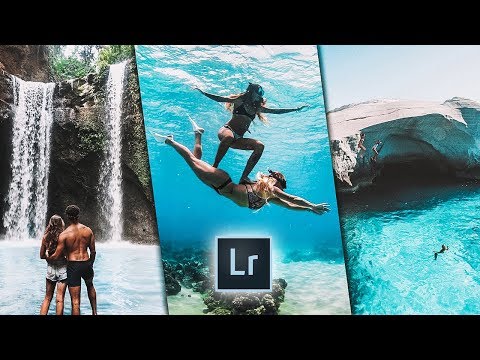
Playback starts YouTube’s embedded player (privacy-enhanced mode).
Mobile Lightroom Tutorial DoYouTravel
ChannelBeyond the gridDescription from the creator
Thank you so much for watching!
Your support on my videos means the world to me 🙏🙏🙏
Let me know what you thought of it down in the comments below😀👇
If you liked the video, please leave a like👍 If you're new around here, hit that subscribe button👊 and in the meantime, lets get into this tutorial!!!
So if you guys don’t know who DoYouTravel or Gypsy Lust are then obviously you need to get out and do some exploring because DoYouTravel and Gypsy Lust are massive Instagram influencers and I absolutely love DoYouTravel ‘s editing style.
With that being said, In this mobile Lightroom tutorial, I am going to show you how DoYouTravel edits his Instagram photos to achieve that beautiful Instagram theme that is known by so many.
To start with, you need to jump into your mobile Lightroom and load a photo into the mobile app that you want to edit, then follow along with this mobile lightroom tutorial of how Do you travel edits in Lightroom and at the end of the video I show you how you can save the settings you just did as a mobile preset and apply them across all of your photos.
~ ~ ~ ~ ~ ~ ~~ ~ ~ ~ ~ ~ ~~ ~ ~ ~ ~ ~ ~~~ ~ ~ ~ ~ ~ ~
My Mobile Lightroom Presets: www.beyondthegrid.co/presets
~ ~ ~ ~ ~ ~ ~~ ~ ~ ~ ~ ~ ~~ ~ ~ ~ ~ ~ ~~~ ~ ~ ~ ~ ~ ~
Like, Comment & Subscribe to stay updated on the latest Videos!!
bit.ly/2tZFAu8
FIND ME: Instagram | instagram.com/adam_beyondthegrid
#lightroom #lightroommobile #doyoutravel #instagramtheme #editlike #lightroomtutorial #mobilephotography #photoediting
Your support on my videos means the world to me 🙏🙏🙏
Let me know what you thought of it down in the comments below😀👇
If you liked the video, please leave a like👍 If you're new around here, hit that subscribe button👊 and in the meantime, lets get into this tutorial!!!
So if you guys don’t know who DoYouTravel or Gypsy Lust are then obviously you need to get out and do some exploring because DoYouTravel and Gypsy Lust are massive Instagram influencers and I absolutely love DoYouTravel ‘s editing style.
With that being said, In this mobile Lightroom tutorial, I am going to show you how DoYouTravel edits his Instagram photos to achieve that beautiful Instagram theme that is known by so many.
To start with, you need to jump into your mobile Lightroom and load a photo into the mobile app that you want to edit, then follow along with this mobile lightroom tutorial of how Do you travel edits in Lightroom and at the end of the video I show you how you can save the settings you just did as a mobile preset and apply them across all of your photos.
~ ~ ~ ~ ~ ~ ~~ ~ ~ ~ ~ ~ ~~ ~ ~ ~ ~ ~ ~~~ ~ ~ ~ ~ ~ ~
My Mobile Lightroom Presets: www.beyondthegrid.co/presets
~ ~ ~ ~ ~ ~ ~~ ~ ~ ~ ~ ~ ~~ ~ ~ ~ ~ ~ ~~~ ~ ~ ~ ~ ~ ~
Like, Comment & Subscribe to stay updated on the latest Videos!!
bit.ly/2tZFAu8
FIND ME: Instagram | instagram.com/adam_beyondthegrid
#lightroom #lightroommobile #doyoutravel #instagramtheme #editlike #lightroomtutorial #mobilephotography #photoediting
About this tutorial
Beyond the grid published this 6:01 video tutorial on November 4, 2018. It has been watched 22,432 times on YouTube.
- Channel
- Beyond the grid
- Category
- Howto & Style
- Duration
- 6:01
- Published
- November 4, 2018
- Views
- 22,432
- Likes
- 381
Tags
Share
This tutorial in other languages
- FRTutoriel mobile Lightroom DoYouTravel
- ESLightroom móvil Tutorial DoYouTravel
- PTMóvel Lightroom Tutorial DoYouTravel
- ITCellulare Lightroom Tutorial DoYouTravel
- DEMobile Lightroom Tutorial DoYouTravel
- NLMobile Lightroom Tutorial DoYouTravel
- RUМобильный Lightroom Учебник DoYouTravel
- PLKomórka Lightroom Tutorial DoYouTravel
- JAモバイルLightroomのチュートリアルDoYouTravel
- ARموبايل لايت دروس DoYouTravel
- HIमोबाइल Lightroom ट्यूटोरियल DoYouTravel
- IDPonsel Lightroom Tutorial DoYouTravel