Playback starts YouTube’s embedded player (privacy-enhanced mode).
Plasma TV Repair Ribbon Cable Removal & Install Tutorial Overview
ChannelShopJimmy.comDescription from the creator
Video overview showing how to remove & install plasma TV & ribbon cables - Important for plasma TV repair help for fixes
Click Here to BUY TV REPAIR PARTS: shopjimmy.com
I would like to say that if you are having a problem with your TV, be sure to check the model number first. You will see the model number and serial number in a box like this. The model number and serial number are very important because that is what will help you to identify what parts are needed to repair your TV.
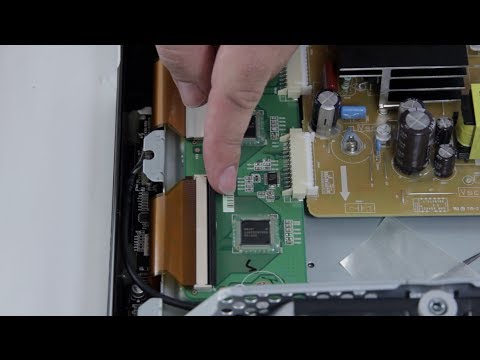
So, now we are going to take a closer look at the ribbon cable connections on this y-buffer board. These connections are very fragile and they are actually bonded into the panel on the other side here, so the ribbon cable is bonded into the panel here which you cannot remove, and then comes up here into the y-buffer which you can disconnect if you need to replace the board.
Now you will always want to be gentle and remove this tape very smoothly. After you have removed that tape, you can flip up the tab here, this black tab very carefully. Never use a screwdriver or any tool to open this, only use your finger. After you have that pulled up, you can simply pull out the ribbon cable connection here. Sometimes it can be a little bit difficult. Once you have that pulled out you can go ahead and continue with the rest of them and then remove your board.
To connect them back in, you will want to just slide it in here and you will hear it pop a little bit on this model or kind of click into place.
There we go. Once you feel that it is back in there smoothly, you can again push down on this black tab to secure it and then if your tape is still connected, you can run that tape over smoothly to help keep it in place.
Thank you for watching one of our many tutorials here at ShopJimmy.com. We strive to learn and share new TV repair tips everyday. Subscribe to our YouTube channel and grow with us, share our videos with your friends and help us spread the savings and don't forget to hit that like button.
TV Repair Made Easy™
© 2012 ShopJimmy.com, LLC.
Click Here to BUY TV REPAIR PARTS: shopjimmy.com
I would like to say that if you are having a problem with your TV, be sure to check the model number first. You will see the model number and serial number in a box like this. The model number and serial number are very important because that is what will help you to identify what parts are needed to repair your TV.
So, now we are going to take a closer look at the ribbon cable connections on this y-buffer board. These connections are very fragile and they are actually bonded into the panel on the other side here, so the ribbon cable is bonded into the panel here which you cannot remove, and then comes up here into the y-buffer which you can disconnect if you need to replace the board.
Now you will always want to be gentle and remove this tape very smoothly. After you have removed that tape, you can flip up the tab here, this black tab very carefully. Never use a screwdriver or any tool to open this, only use your finger. After you have that pulled up, you can simply pull out the ribbon cable connection here. Sometimes it can be a little bit difficult. Once you have that pulled out you can go ahead and continue with the rest of them and then remove your board.
To connect them back in, you will want to just slide it in here and you will hear it pop a little bit on this model or kind of click into place.
There we go. Once you feel that it is back in there smoothly, you can again push down on this black tab to secure it and then if your tape is still connected, you can run that tape over smoothly to help keep it in place.
Thank you for watching one of our many tutorials here at ShopJimmy.com. We strive to learn and share new TV repair tips everyday. Subscribe to our YouTube channel and grow with us, share our videos with your friends and help us spread the savings and don't forget to hit that like button.
TV Repair Made Easy™
© 2012 ShopJimmy.com, LLC.
About this tutorial
ShopJimmy.com published this 3:06 video tutorial on November 8, 2013. It has been watched 83,618 times on YouTube.
- Channel
- ShopJimmy.com
- Category
- Howto & Style
- Duration
- 3:06
- Published
- November 8, 2013
- Views
- 83,618
- Likes
- 265
Share
This tutorial in other languages
- FRRéparation Plasma TV Retrait câble ruban et installer Tutoriel Vue d'ensemble
- ESInstalación de televisores de plasma Desmontaje del cable de la cinta e instalar Tutorial general
- PTPlasma TV Repair Cabo de fita Remoção e Instalação Tutorial Overview
- ITTV al plasma rimozione di riparazione del cavo a nastro e Installa Tutorial Panoramica
- DEPlasma-TV Reparatur Bandkabel Entfernen und Installieren Tutorial Übersicht
- NLPlasma TV Repair Ribbon Cable Removal & installeren Tutorial Overzicht
- RUПлазменный телевизор Ремонт ленточного кабеля Снятие и установка Учебник Обзор
- PLTelewizor plazmowy Naprawa kabla Ribbon Demontaż i instalacja Tutorial Przegląd
- JAプラズマテレビの修理リボンケーブルの取り外し&チュートリアルの概要をインストールします。
- ARإصلاح تلفزيون البلازما الشريط الكابل إزالة وتثبيت البرنامج التعليمي نظرة عامة
- HIप्लाज्मा टीवी मरम्मत रिबन केबल हटाने और ट्यूटोरियल अवलोकन स्थापित करें
- IDPlasma TV Perbaikan Ribbon Cable Removal & Install Ikhtisar Tutorial