Playback starts YouTube’s embedded player (privacy-enhanced mode).
TUTORIAL::How to Use Auto-Tune with Mixcraft and Links (T-Pain Effect)
ChannelMahir SinghDescription from the creator
INFORMATION FOR T-PAIN AUTO-TUNE EFFECT
ANTARESTECH AUTO-TUNE
antarestech.com/download/demoform.php - demo
transactions.antarestech.com/secure/WebStore.as… - $399.00
MIXCRAFT
acoustica.com/mixcraft/download.htm - $64.95
WAVEPAD
secure.nch.com.au/cgi-bin/register.exe?software… - $59.95++
wavepad.en.softonic.com/ - trial
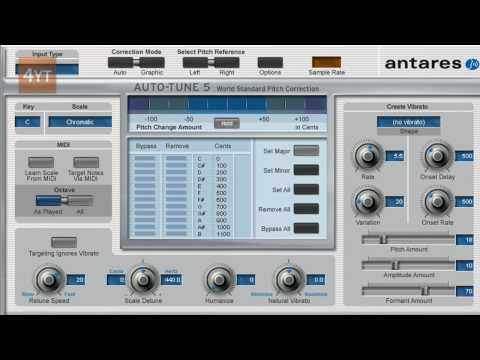
AUTO-TUNE T-PAIN SETTINGS
Input Type: Soprano Voice
Correction Mode: Auto
Select Pitch Reference: Left
Key: C
Scale: Major
Octave: As Played
Retune Speed: 0
Scale Detune: 0 Cents, 440.0 Hertz
Humanize: 0
Natural Vibrato: 0
Shape: (no vibrato)
Rate: 0.1
Variation: 0
Onset Delay: 0
Onset Rate: 0
Pitch Amount: 0
Amplitude Amount: 30
Formant Amount: 100
ANTARESTECH AUTO-TUNE
antarestech.com/download/demoform.php - demo
transactions.antarestech.com/secure/WebStore.as… - $399.00
MIXCRAFT
acoustica.com/mixcraft/download.htm - $64.95
WAVEPAD
secure.nch.com.au/cgi-bin/register.exe?software… - $59.95++
wavepad.en.softonic.com/ - trial
AUTO-TUNE T-PAIN SETTINGS
Input Type: Soprano Voice
Correction Mode: Auto
Select Pitch Reference: Left
Key: C
Scale: Major
Octave: As Played
Retune Speed: 0
Scale Detune: 0 Cents, 440.0 Hertz
Humanize: 0
Natural Vibrato: 0
Shape: (no vibrato)
Rate: 0.1
Variation: 0
Onset Delay: 0
Onset Rate: 0
Pitch Amount: 0
Amplitude Amount: 30
Formant Amount: 100
About this tutorial
Mahir Singh published this 5:12 video tutorial on November 15, 2010. It has been watched 112,465 times on YouTube.
- Channel
- Mahir Singh
- Category
- Howto & Style
- Duration
- 5:12
- Published
- November 15, 2010
- Views
- 112,465
- Likes
- 218
Tags
Share
This tutorial in other languages
- FRTUTORIAL :: Comment utiliser Auto-Tune avec Mixcraft et liens (T-Pain Effect)
- ESTUTORIAL :: Cómo utilizar Auto-Tune con Mixcraft y enlaces (T-Pain Efecto)
- PTTUTORIAL :: Como Use Auto-Tune com Mixcraft e Links (T-Pain Effect)
- ITTUTORIAL :: Come utilizzare Auto-Tune con Mixcraft e collegamenti (T-Pain Effect)
- DETUTORIAL :: Wie zu verwenden Auto-Tune mit Mixcraft und Verbindungen (T-Pain Effect)
- NLTUTORIAL :: Hoe te gebruiken Auto-Tune met Mixcraft en Links (T-Pain Effect)
- RUУчебник :: Как использовать Auto-Tune с Mixcraft и ссылки (T-Pain эффект)
- PLSAMOUCZEK :: Jak używać automatycznego dostrajania z Mixcraft i Odnośniki (T-Pain Effect)
- JAチュートリアル::どのようにMixcraftとリンク(T-ペイン効果)との使用オートチューンへ
- ARTUTORIAL :: كيفية استخدام التلقائي اللحن مع Mixcraft وسريعة (T-ألم تأثير)
- HIट्यूटोरियल :: कैसे Mixcraft और लिंक के साथ ऑटो ट्यून उपयोग करने के लिए (टी-पेन प्रभाव)
- IDTUTORIAL :: Cara Gunakan Auto-Tune dengan Mixcraft dan Links (T-Pain Effect)