Playback starts YouTube’s embedded player (privacy-enhanced mode).
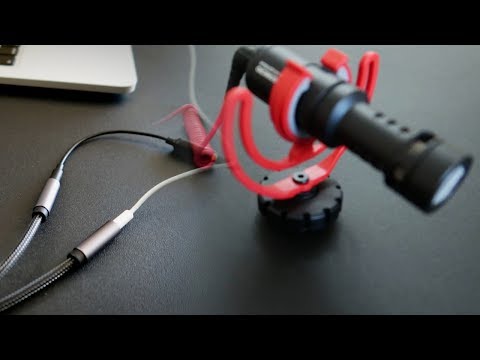
How to use an external mic on a Macbook Pro - IT WORKS (2019)!
ChannelMúsico NerdDescription from the creator
Not having a mic input on your MacBook Pro is a shame... is it? The truth is that there's a trick that allows you to use the headphone jack with an external mic, allowing you to record straight to your MacBook Pro without any audio interface or USB preamp. It can be a lapel mic, a Rode Videomicro, you name it! It's kinda tricky but extremely easy to do once you figure out how!
02:30 Where the solution starts.
Complete post: musiconerd.com/single-post/How-to-use-an-extern…
Headsets Splitter: amzn.to/2TujRHr
Rode Videomicro: amzn.to/2WiIisY
Lavalier Lapel Mic Kit: amzn.to/2uvj1Ae
TRRS to TRS adaptor: amzn.to/2TxAsKl
How to hang acoustic foam without damaging the wall: youtu.be/4kW63OVvZSw
Learn how to build your MIDI controllers!
link.musiconerd.com/f3vDbJ
Equipment I use:
Canon PowerShot G7 X Mark II: amzn.to/2F33z4p
Lavalier Lapel Microphone Kit: amzn.to/2EOHc16
MXL 990 Condenser Microphone: amzn.to/2tZKtWj
Focusrite Scarlett 18i8: amzn.to/2Hu6JQl
Patreon: patreon.com/musiconerd
Facebook: facebook.com/musiconerdmusiconerd
Instagram: instagram.com/musiconerd
02:30 Where the solution starts.
Complete post: musiconerd.com/single-post/How-to-use-an-extern…
Headsets Splitter: amzn.to/2TujRHr
Rode Videomicro: amzn.to/2WiIisY
Lavalier Lapel Mic Kit: amzn.to/2uvj1Ae
TRRS to TRS adaptor: amzn.to/2TxAsKl
How to hang acoustic foam without damaging the wall: youtu.be/4kW63OVvZSw
Learn how to build your MIDI controllers!
link.musiconerd.com/f3vDbJ
Equipment I use:
Canon PowerShot G7 X Mark II: amzn.to/2F33z4p
Lavalier Lapel Microphone Kit: amzn.to/2EOHc16
MXL 990 Condenser Microphone: amzn.to/2tZKtWj
Focusrite Scarlett 18i8: amzn.to/2Hu6JQl
Patreon: patreon.com/musiconerd
Facebook: facebook.com/musiconerdmusiconerd
Instagram: instagram.com/musiconerd
About this tutorial
Músico Nerd published this 7:05 video tutorial on November 9, 2019. It has been watched 440,893 times on YouTube.
- Channel
- Músico Nerd
- Category
- Music
- Duration
- 7:05
- Published
- November 9, 2019
- Views
- 440,893
- Likes
- 4,505
Tags
Share
This tutorial in other languages
- FRComment utiliser un micro externe sur un Macbook Pro - FONCTIONNEMENT (2019)!
- ESCómo usar un micrófono externo en un MacBook Pro - FUNCIONA (2019)!
- PTComo usar um microfone externo em um Macbook Pro - FUNCIONA (2019)!
- ITCome utilizzare un microfono esterno su un MacBook Pro - FUNZIONA (2019)!
- DEWie auf einem Macbook Pro ein externes Mikrofon verwenden - es funktioniert (2019)!
- NLHoe maak je een externe microfoon te gebruiken op een Macbook Pro - HET WERKT (2019)!
- RUКак использовать внешний микрофон на Macbook Pro - это работает (2019)!
- PLJak korzystać z zewnętrznego mikrofonu na Macbook Pro - to działa (2019)!
- JAITワークス(2019年) - のMacBook Proに外部マイクを使用する方法!
- ARكيفية استخدام هيئة التصنيع العسكري الخارجي على ماك بوك برو - يعمل IT (2019)!
- HIएक मैकबुक प्रो पर एक बाहरी माइक का उपयोग करने के लिए कैसे - आईटी काम करता है (2019)!
- IDCara menggunakan mic eksternal pada Macbook Pro - IT WORKS (2019)!