Playback starts YouTube’s embedded player (privacy-enhanced mode).
How to Use Tape Saturation to Enhance a Mix
ChannelPro Audio FilesDescription from the creator
🎧 Train your ears in just minutes a day: quiztones.com
🤖 AI-powered learning for producers & engineers: ai.theproaudiofiles.com/join
📺 Get unlimited premium mix training: theproaudiofiles.com/members
How to use tape saturation (UAD Studer A800 and Ampex ATR-102) to enhance a mix.
—
Transcript:
Greetings! My name is Ian Vargo, and I am with The Pro Audio Files.
Today, I am going to be showing you how to use tape saturation plug-ins – specifically from Universal Audio – in an effort to make your mixes sound more vintage and warm.
The track I'm going to be using is Ocean, from the band, Sunny Love and the Moon Parade, whose album I recorded, produced, mixed, and mastered, which comes out later this week. A lot of this band's songs have a vintage vibe going on. Let's take a listen.
[mix]
Alright. So, for this project, although we recorded in a good room with nice equipment, we did not have the luxury of recording to analog tape, which a lot of projects these days don't.
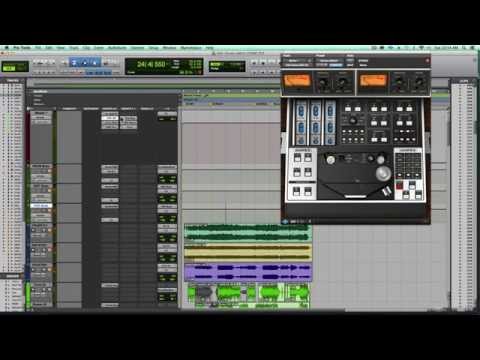
So, fortunately, I had access to the Studer A800, and the Ampex ATR-102 from Universal Audio. So the way that I've been working lately and on this project, is I have all of my drums and percussion being sent – hard sent – through an aux track. I've got all of my keys, guitars, and bass going through an aux track, and all of my vocals going through a separate aux track.
On these aux tracks, I have the Studer A800 on each of them, using varying types and degrees of tape saturation. Let's focus on the drums for a minute.
[drums play]
Let's bypass the effect.
[drums, no tape saturation]
So, we're hearing a little bit of a boost in volume in the drums. We're also hearing slightly more punch, and a little bit of low end drive that really affects the kick drum in a cool way.
Something to keep an eye on with these effects is basically just a balance between the input and the output. I could really drive this if I would like.
[drums, heavy tape saturation]
But I wanted to keep it pretty subtle. We also have control of the inches per second. If I change from 15 to 7.5, we're going to hear a loss in high end.
[drums, adjusting inches per second]
That might be great if you want a really vintage sound, or we could go up to 30 inches per second for a very hi-fi sound.
[drums play at 30 inches per second]
I wanted to split the difference, so I kept it at 15 inches per second, and we also have different tape types.
Let's move over to the instrument buss, which includes the guitars.
[instrument buss plays]
Definitely warms things up a little bit and brings them forward in the mix.
Lastly, let's take a listen to the vocals.
[vocals]
And as you can see, I am driving this particular instance of the plug-in a little bit harder than the others, because I really wanted to saturate the vocal and give it that sound.
Okay, so I have found that this plug-in really does work great on individual instruments, but I've been really loving it on these sub-aux tracks that I have.
Let's move forward to the Master fader now, and I'm going to show you a little bit about how I use the Ampex ATR-102. Let's bypass the effect.
[mix]
When I first demoed this effect, I had never really heard any plug-in like it, so I had to get it because it really helps with spatialization, it helps the bass and drums sit together, a little bit of a boost in volume, and really just makes things sound a little bit more round. Plus, there's so many options in terms of types of tape here, inches per second...
Let's go down to 7.5.
[song at 7.5 inches per second]
Very versatile plug-in indeed.
So, I can't strongly recommend enough that you at least demo the Universal Audio ATR-102 and Studer A800. If you have any questions, e-mail me at [email protected]. Once again, this has been Ian Vargo with The Pro Audio Files. Make sure to check out Sunny Love and the Moon Parade.
🤖 AI-powered learning for producers & engineers: ai.theproaudiofiles.com/join
📺 Get unlimited premium mix training: theproaudiofiles.com/members
How to use tape saturation (UAD Studer A800 and Ampex ATR-102) to enhance a mix.
—
Transcript:
Greetings! My name is Ian Vargo, and I am with The Pro Audio Files.
Today, I am going to be showing you how to use tape saturation plug-ins – specifically from Universal Audio – in an effort to make your mixes sound more vintage and warm.
The track I'm going to be using is Ocean, from the band, Sunny Love and the Moon Parade, whose album I recorded, produced, mixed, and mastered, which comes out later this week. A lot of this band's songs have a vintage vibe going on. Let's take a listen.
[mix]
Alright. So, for this project, although we recorded in a good room with nice equipment, we did not have the luxury of recording to analog tape, which a lot of projects these days don't.
So, fortunately, I had access to the Studer A800, and the Ampex ATR-102 from Universal Audio. So the way that I've been working lately and on this project, is I have all of my drums and percussion being sent – hard sent – through an aux track. I've got all of my keys, guitars, and bass going through an aux track, and all of my vocals going through a separate aux track.
On these aux tracks, I have the Studer A800 on each of them, using varying types and degrees of tape saturation. Let's focus on the drums for a minute.
[drums play]
Let's bypass the effect.
[drums, no tape saturation]
So, we're hearing a little bit of a boost in volume in the drums. We're also hearing slightly more punch, and a little bit of low end drive that really affects the kick drum in a cool way.
Something to keep an eye on with these effects is basically just a balance between the input and the output. I could really drive this if I would like.
[drums, heavy tape saturation]
But I wanted to keep it pretty subtle. We also have control of the inches per second. If I change from 15 to 7.5, we're going to hear a loss in high end.
[drums, adjusting inches per second]
That might be great if you want a really vintage sound, or we could go up to 30 inches per second for a very hi-fi sound.
[drums play at 30 inches per second]
I wanted to split the difference, so I kept it at 15 inches per second, and we also have different tape types.
Let's move over to the instrument buss, which includes the guitars.
[instrument buss plays]
Definitely warms things up a little bit and brings them forward in the mix.
Lastly, let's take a listen to the vocals.
[vocals]
And as you can see, I am driving this particular instance of the plug-in a little bit harder than the others, because I really wanted to saturate the vocal and give it that sound.
Okay, so I have found that this plug-in really does work great on individual instruments, but I've been really loving it on these sub-aux tracks that I have.
Let's move forward to the Master fader now, and I'm going to show you a little bit about how I use the Ampex ATR-102. Let's bypass the effect.
[mix]
When I first demoed this effect, I had never really heard any plug-in like it, so I had to get it because it really helps with spatialization, it helps the bass and drums sit together, a little bit of a boost in volume, and really just makes things sound a little bit more round. Plus, there's so many options in terms of types of tape here, inches per second...
Let's go down to 7.5.
[song at 7.5 inches per second]
Very versatile plug-in indeed.
So, I can't strongly recommend enough that you at least demo the Universal Audio ATR-102 and Studer A800. If you have any questions, e-mail me at [email protected]. Once again, this has been Ian Vargo with The Pro Audio Files. Make sure to check out Sunny Love and the Moon Parade.
About this tutorial
Pro Audio Files published this 5:43 video tutorial on November 7, 2015. It has been watched 37,578 times on YouTube.
- Channel
- Pro Audio Files
- Category
- Music
- Duration
- 5:43
- Published
- November 7, 2015
- Views
- 37,578
- Likes
- 274
Tags
Share
This tutorial in other languages
- FRComment utiliser ce type de saturation pour améliorer un Mix
- ESCómo utilizar saturación de cinta para realzar una mezcla
- PTComo usar Tape Saturation para melhorar a Mix
- ITCome utilizzare Tape Saturation per migliorare un Mix
- DEWie zu verwenden Tape Saturation Enhance einen Mix
- NLHoe te gebruiken Tape Verzadiging naar een Mix verbeteren
- RUКак использовать ленту Насыщенность для повышения Микса
- PLJak używać taśmy nasycenie w celu zwiększenia Mix
- JAミックスを強化するためにテープサチュレーションを使用する方法
- ARكيفية استخدام الشريط التشبع لتعزيز مزيج
- HIकैसे उपयोग टेप संतृप्ति करने के लिए एक मिक्स बेहतर बनाएँ करने के लिए
- IDCara Gunakan Tape Saturation untuk Meningkatkan sebuah Mix