The creator does not allow this video to be played on other websites. You can watch it directly on YouTube.
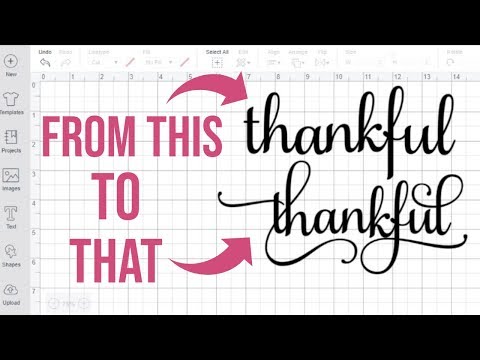
HOW TO ACCESS FLOURISHES & SPECIAL CHARACTERS IN CRICUT DESIGN SPACE USING CHARACTER MAP UWP
ChannelKayla's Cricut CreationsDescription from the creator
Samantha Font: creativefabrica.com/product/samantha-script/ref…
Character Map UWP: microsoft.com/en-us/p/character-map-uwp/9wzdncr…
Windows UWP made an update. Instead of saying copy there is two squares below the letter that is selected. When you hover over it, it'll say "copy to clipboard." Select that. Once you select that you can go into Cricut Design Space. Highlight over the letter you want changed and select Ctrl + V. Design Space won't let you right click on your mouse anymore but you can use your hot keys.
How to access glyphs on a Mac computer: youtube.com/watch?v=Rs85wbS59T8&t=1s
SHOP
Cricut machines: cricut.pxf.io/Ea6ORW
FREE PRINTABLE
Download 5 free Cricut cheat sheets/reference guides HERE: kaylascricutcreations.com/freecricutreferencegu…
LETS CONNECT
instagram.com/kaylascricutcreations/
SHOP BY AMAZON FAVORITES
amazon.com/shop/kaylascricutcreations
DISCLAIMER Some links above are affiliate links. This helps support my channel. Thank you so much for the support!
Character Map UWP: microsoft.com/en-us/p/character-map-uwp/9wzdncr…
Windows UWP made an update. Instead of saying copy there is two squares below the letter that is selected. When you hover over it, it'll say "copy to clipboard." Select that. Once you select that you can go into Cricut Design Space. Highlight over the letter you want changed and select Ctrl + V. Design Space won't let you right click on your mouse anymore but you can use your hot keys.
How to access glyphs on a Mac computer: youtube.com/watch?v=Rs85wbS59T8&t=1s
SHOP
Cricut machines: cricut.pxf.io/Ea6ORW
FREE PRINTABLE
Download 5 free Cricut cheat sheets/reference guides HERE: kaylascricutcreations.com/freecricutreferencegu…
LETS CONNECT
instagram.com/kaylascricutcreations/
SHOP BY AMAZON FAVORITES
amazon.com/shop/kaylascricutcreations
DISCLAIMER Some links above are affiliate links. This helps support my channel. Thank you so much for the support!
About this tutorial
Kayla's Cricut Creations published this 7:49 video tutorial on October 31, 2019. It has been watched 945,712 times on YouTube.
- Channel
- Kayla's Cricut Creations
- Category
- People & Blogs
- Duration
- 7:49
- Published
- October 31, 2019
- Views
- 945,712
- Likes
- 30,960
Tags
Share
This tutorial in other languages
- FRComment accéder à FLOURISHES & SPECIAL EN CRICUT PERSONNAGES DE CONCEPTION EN UTILISANT L'ESPACE CARACTÈRE CARTE UWP
- ES¿Cómo acceder a los Fl Y ESPECIALES personajes de diseño Cricut espacio utilizando el Mapa de caracteres UWP
- PTComo acessar floresce & ESPECIAIS PERSONAGENS DO cricut PROJETO espaço usando Character Map UWP
- ITCOME ACCEDERE fiorisce & SPECIALI PERSONAGGI IN cricut progettazione dello spazio USO Mappa Caratteri UWP
- DEWIE ACCESS FLOURISHES & SONDERZEICHEN IN CRICUT DESIGN SPACE CHARACTER MAP UWP UNTER VERWENDUNG
- NLHoe toegang krijgen BLOEIT & speciale tekens Cricut DESIGN Space via speciale tekens UWP
- RUКак получить доступ к расцветам и специальные символы в Cricut дизайн пространства Использования символьной MAP UWP
- PLJak dostęp do Flourishes ze znaków specjalnych W Cricut przestrzenie użytkowym MAP UWP
- JACHARACTER MAP UWPを使用したのCricutデザインスペースはどれへのアクセス繁栄&特殊文字
- ARHOW TO ACCESS يزدهر وSPECIAL الأحرف في CRICUT DESIGN الفضاء باستخدام CHARACTER MAP UWP
- HIकैसे तक पहुँच फलता-फूलता है और विशेष Cricut डिजाइन अंतरिक्ष में अक्षरों का उपयोग वर्ण मानचित्र UWP
- IDCARA AKSES berkembang & KHUSUS KARAKTER DI CRICUT DESAIN RUANG MENGGUNAKAN KARAKTER MAP UWP