Playback starts YouTube’s embedded player (privacy-enhanced mode).
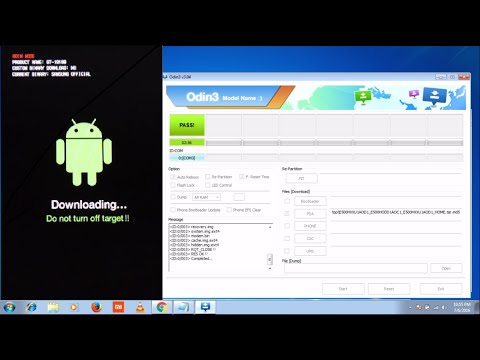
How to Install/Flash Samsung Stock Rom/Official Firmware using Odin | Complete Guide
ChannelDroidTechKnowDescription from the creator
Here is a step by step tutorial on how to flash/install Samsung Android phone using ODIN tool. Odin is software that is used to install the Stock ROM in Samsung devices.
Checkout this video as an article on my latest created website.
► droidtechknow.com/how-to/official-firmware/inst…
Complete Tutorial on ODIN software
►droidtechknow.com/tutorials/odin-tool-firmware-…
In This Tutorial I used samsung galaxy E5 to install
the stock Rom but you can use any Samsung device(Like Samsung Galaxy A7/A5/A3/J7/J5/J3/E7/E5/Grand/S3/S4/Note Series) for upgrading or downgrading software with the help of ODIN tool.
PreRequirement
1. Odin
2. Samsung USB Driver/KIES
3. Stock Rom according to your mobile model number and region
►Links for downloading required files:
Samsung Kies- samsung.com/in/support/usefulsoftware/KIES/
Official Samsung USB Driver- samsungusbdriver.com/download/samsung-driver-v1…
ODIN Flash Tool- cdn.droidviews.com/wp-content/uploads/2015/03/O…
Firmware/StockRom : sammobile.com/firmwares/
►Notes :
- Don't disconnect the cable or turn off your device while flashing FW
- I have no responsibility if you use this tutorial
- Install Samsung Mobile Driver or Samsung Kies if you don't see a sign in Odin
- This process takes maximum 10 minutes
- Flashing official firmware won't void the warranty of your device nor delete your data
- If your device stuck in boot loop after downgrading, factory reset your device from recovery mode
Step 1: Open the Odin
Step 2 :Extract the Stock Rom
Step 3 : Now Connect The phone in downloading mode
Step 4: Now select the extracted stock rom file using PDA Button
Step 5: Click Start Button
Don't Forgot to like my video click subscribe button for subscribe my channel
Thank you For watching.........
-----------------------------------------------------------------------------------------------------------
►Some More Interesting Videos Links:
How to Access your home router from anywhere
youtu.be/9FI-1b2fEoQ
How to Install Ubuntu on Windows 7/8/10 | Dual Boot | Complete Guide: youtube.com/watch?v=k0TQAY4Y3nI&t=
How to Install and Use Wine to Run Windows Applications on Linux: youtube.com/watch?v=f5lrzx6MalQ
How to unlock bootloader, install TWRP and ROOT of motorola phones: youtube.com/watch?v=lFW-dM8T704&t=
How to install/flash stock rom/firmware on moto G2/G3/E/X 3rd/2nd generation: youtube.com/watch?v=GaFozl3UcRw
How to Root any Samsung Galaxy device with CF-Auto-Root using ODIN | Complete Guide: youtube.com/watch?v=RT4ahDXMDZ0&t=
-----------------------------------------------------------------------------------------------------------
► Like us on Facebook: facebook.com/droidtechknow
► Follow us on Twitter: twitter.com/droidtechknow
► Follow us on Instagram: instagram.com/droidtechknow
► Follow us on pinterest: pinterest.com/droidtechknow
► Follow us on tumblr: droidtechknow.tumblr.com/
Checkout this video as an article on my latest created website.
► droidtechknow.com/how-to/official-firmware/inst…
Complete Tutorial on ODIN software
►droidtechknow.com/tutorials/odin-tool-firmware-…
In This Tutorial I used samsung galaxy E5 to install
the stock Rom but you can use any Samsung device(Like Samsung Galaxy A7/A5/A3/J7/J5/J3/E7/E5/Grand/S3/S4/Note Series) for upgrading or downgrading software with the help of ODIN tool.
PreRequirement
1. Odin
2. Samsung USB Driver/KIES
3. Stock Rom according to your mobile model number and region
►Links for downloading required files:
Samsung Kies- samsung.com/in/support/usefulsoftware/KIES/
Official Samsung USB Driver- samsungusbdriver.com/download/samsung-driver-v1…
ODIN Flash Tool- cdn.droidviews.com/wp-content/uploads/2015/03/O…
Firmware/StockRom : sammobile.com/firmwares/
►Notes :
- Don't disconnect the cable or turn off your device while flashing FW
- I have no responsibility if you use this tutorial
- Install Samsung Mobile Driver or Samsung Kies if you don't see a sign in Odin
- This process takes maximum 10 minutes
- Flashing official firmware won't void the warranty of your device nor delete your data
- If your device stuck in boot loop after downgrading, factory reset your device from recovery mode
Step 1: Open the Odin
Step 2 :Extract the Stock Rom
Step 3 : Now Connect The phone in downloading mode
Step 4: Now select the extracted stock rom file using PDA Button
Step 5: Click Start Button
Don't Forgot to like my video click subscribe button for subscribe my channel
Thank you For watching.........
-----------------------------------------------------------------------------------------------------------
►Some More Interesting Videos Links:
How to Access your home router from anywhere
youtu.be/9FI-1b2fEoQ
How to Install Ubuntu on Windows 7/8/10 | Dual Boot | Complete Guide: youtube.com/watch?v=k0TQAY4Y3nI&t=
How to Install and Use Wine to Run Windows Applications on Linux: youtube.com/watch?v=f5lrzx6MalQ
How to unlock bootloader, install TWRP and ROOT of motorola phones: youtube.com/watch?v=lFW-dM8T704&t=
How to install/flash stock rom/firmware on moto G2/G3/E/X 3rd/2nd generation: youtube.com/watch?v=GaFozl3UcRw
How to Root any Samsung Galaxy device with CF-Auto-Root using ODIN | Complete Guide: youtube.com/watch?v=RT4ahDXMDZ0&t=
-----------------------------------------------------------------------------------------------------------
► Like us on Facebook: facebook.com/droidtechknow
► Follow us on Twitter: twitter.com/droidtechknow
► Follow us on Instagram: instagram.com/droidtechknow
► Follow us on pinterest: pinterest.com/droidtechknow
► Follow us on tumblr: droidtechknow.tumblr.com/
About this tutorial
DroidTechKnow published this 10:30 video tutorial on October 29, 2016. It has been watched 1,218,304 times on YouTube.
- Channel
- DroidTechKnow
- Category
- People & Blogs
- Duration
- 10:30
- Published
- October 29, 2016
- Views
- 1,218,304
- Likes
- 4,661
Share
This tutorial in other languages
- FRComment installer / Flash Samsung Stock Rom / Firmware officiel en utilisant Odin | Guide complet
- ESCómo instalar / flash de Samsung de la ROM / Firmware Oficial usando Odin | Guía completa
- PTComo instalar o Flash / Samsung da Rom / Firmware Oficial usando Odin | Guia completo
- ITCome installare / Flash di Samsung della Rom / Gazzetta del firmware utilizzando Odin | Guida completa
- DESo installieren / Flash Samsung Auf Rom / Offizielle Firmware unter Odin | Complete Guide
- NLHoe te installeren / Flash Samsung Stock Rom / officiële firmware met behulp van Odin | complete Guide
- RUКак установить / Вспышка Samsung Stock Rom / официальной прошивки с помощью Odin | Полное руководство
- PLJak zainstalować / Flash Samsung Zdjęcie Rom / Dziennik Firmware za pomocą Odin | kompletny przewodnik
- JAオーディンを使用して/フラッシュサムスン証券ROM /公式ファームウェアをインストールする方法|完全ガイド
- ARكيفية تثبيت / فلاش سامسونج اسهم روم / البرامج الثابتة الرسمية باستخدام أودين | الدليل الكامل
- HIस्थापित करने के लिए कैसे / फ़्लैश सैमसंग स्टॉक रोम / सरकारी फर्मवेयर ओडिन का उपयोग कर | पूरा गाइड
- IDCara Install / Flash Samsung Stock Rom / Official Firmware menggunakan Odin | Panduan lengkap