Playback starts YouTube’s embedded player (privacy-enhanced mode).
How to Make Audiograms in Canva
ChannelSpeakerazziDescription from the creator
Ever wanted to create your own audiogram? 🎧
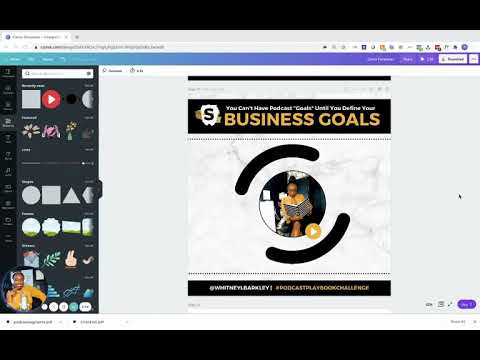
Canva now allows users to upload audio-based media to their images! In this tutorial I show you how to add audio and also user sticker animations to indicate it is an audio.
Will you use Canva to make your podcast audiograms?
SIDE NOTE:
One caveat not mentioned in the video is that you will need to duplicate your video to the size of your audio for all of it to play once it is downloaded. Since we are using stickers element, you will need to increase the animation duration to the max and duplicate. For example, in the audiogram showed in my video, I had to increase the circle animation to 30 seconds, duplicate it once, and choose the documents I wanted to download in order for all 58 seconds of my sound to play. I’ll do a part two on this later, but for my Canva baes, I’m sure you will master it!
Join the #PodcastPlaybookChallenge at bit.ly/podcastplaybookchallenge
Canva now allows users to upload audio-based media to their images! In this tutorial I show you how to add audio and also user sticker animations to indicate it is an audio.
Will you use Canva to make your podcast audiograms?
SIDE NOTE:
One caveat not mentioned in the video is that you will need to duplicate your video to the size of your audio for all of it to play once it is downloaded. Since we are using stickers element, you will need to increase the animation duration to the max and duplicate. For example, in the audiogram showed in my video, I had to increase the circle animation to 30 seconds, duplicate it once, and choose the documents I wanted to download in order for all 58 seconds of my sound to play. I’ll do a part two on this later, but for my Canva baes, I’m sure you will master it!
Join the #PodcastPlaybookChallenge at bit.ly/podcastplaybookchallenge
About this tutorial
Speakerazzi published this 3:06 video tutorial on October 31, 2020. It has been watched 30,408 times on YouTube.
- Channel
- Speakerazzi
- Category
- People & Blogs
- Duration
- 3:06
- Published
- October 31, 2020
- Views
- 30,408
- Likes
- 375
Tags
Share
This tutorial in other languages
- FRComment faire audiogrammes en Canva
- ESCómo hacer Audiogramas en Canva
- PTComo fazer Audiogramas em Canva
- ITCome fare audiogrammi in Canva
- DEWie man in Canva Audiogramme
- NLHoe maak Audiogrammen in Canvas
- RUКак сделать аудиограммы в Canva
- PLJak zrobić audiogramów w Canva
- JACanvaにオージオグラムを作る方法
- ARكيفية جعل Audiograms في Canva
- HIकैसे Canva में Audiograms बनाने के लिए
- IDCara Membuat audiogram di Canva